From Jira ticket to tested pull request with Signadot
A friendlier driver message can break a ride-sharing app if its frontend still expects the old wording. Signadot lets you catch that kind of cross-service bug in an agent's pull request before you merge it, by testing the changed services alongside the rest of your application.
You'll use the Jira Coding Agent to implement this feature in HotROD, a small ride-sharing app. Bitbucket Pipelines builds the change, and Signadot runs only the affected services in a sandbox, sharing the remaining services from the baseline. Playwright checks the ride flow, and the test result and a live preview link appear on the pull request.
You'll configure the repository, test runner and Jira connection once, then follow a work item through the resulting workflow.
Estimated time: about an hour once the prerequisites are in place, much of it spent waiting for the agent and the pipeline.
Pipeline configuration and test files: signadot/examples/jira-coding-agent-tutorial
What you will build
The workflow takes a Jira work item through implementation, testing and review. If a test fails, you paste the failure into the agent's Jira session and ask it to fix the same pull request.
Prerequisites
- A Kubernetes cluster connected to Signadot with HotROD installed. See the quickstart.
- Jira Standard or Premium with the Jira Coding Agent available and Rovo credits for a few sessions.
- A Bitbucket Cloud workspace in the same Atlassian organization, where you can create repositories and run Pipelines.
- A Docker Hub account.
gitwith SSH access to Bitbucket (set up an SSH key),kubectl, and the Signadot CLI.
Check your setup
Check that your CLIs point at the right cluster and organization:
signadot auth status
signadot cluster list
kubectl config current-context
Note your Signadot organization from signadot auth status and your cluster name from
signadot cluster list. You need both below.
Open HotROD using the quickstart's frontend access instructions and request a ride to confirm the baseline works.
Set up the Bitbucket repository
Create the repository
In Bitbucket, select Create > Repository. Pick a project, name the repository hotrod and keep
it private. Set both Include a README? and Include .gitignore? to No.
The commands below clone HotROD and copy in the pipeline configuration and test files from
signadot/examples. Replace YOUR_WORKSPACE with your Bitbucket workspace ID before pushing:
git clone https://github.com/signadot/examples.git signadot-examples
git clone https://github.com/signadot/hotrod.git hotrod
cd hotrod
git checkout -B main 36525ff00bb760fd44df64ec277da94d63522ac1
cp -R ../signadot-examples/jira-coding-agent-tutorial/files/. .
git add -A
git commit -m "Test pull requests in Signadot sandboxes"
git remote set-url origin git@bitbucket.org:YOUR_WORKSPACE/hotrod.git
git push -u origin main
The copied files replace bitbucket-pipelines.yml and add .signadot/jira-agent/ and a Playwright
test for the ride banner. How the pipeline works explains the configuration.
Turn on Pipelines
In Bitbucket's left sidebar, open the three-dot menu next to hotrod and select Settings.
This opens Repository settings. Under Pipelines > Settings, turn on Enable Pipelines.
Check your workspace's available build minutes. Free includes Pipelines; Standard provides more build minutes for repeated runs.
In a brand new workspace, the toggle can stay greyed out until your Bitbucket account has two-step verification. Turn it on under Personal Bitbucket settings > Two-step verification, then reload the page.
Add the pipeline's credentials
The pipeline signs in to Signadot with an API key from a service account. A Signadot admin must create this account and the Job Runner Group used below. In the Signadot Dashboard:
- Open Admin > Service Accounts, then create a service account, such as
hotrod-jira-ci, with thememberrole. - On the account's Keys tab, create an API key and copy it. You only see it once.
In Docker Hub, open Account settings > Personal access tokens and generate a token with Read & Write access.
Then, in Bitbucket, open Repository settings > Pipelines > Repository variables and add these five variables. Secured starts ticked. Keep it for the two keys and untick it for the other three:
| Name | Value | Secured |
|---|---|---|
SIGNADOT_ORG | Your Signadot organization | No |
SIGNADOT_API_KEY | The service account's API key | Yes |
SIGNADOT_CLUSTER | Your cluster name | No |
DOCKERHUB_USERNAME | Your Docker Hub username | No |
DOCKERHUB_TOKEN | The Docker Hub token | Yes |
In Docker Hub, create a repository named hotrod
under the username you set as DOCKERHUB_USERNAME, with Public visibility so your cluster can
pull the image. The pipeline will push to docker.io/<DOCKERHUB_USERNAME>/hotrod.
Public visibility is a convenience for this HotROD demo. For a private application, use a private registry and configure an image pull secret on the baseline workloads before creating sandboxes.
Prepare the cluster
Your kubectl access must allow creating namespaces and Secrets for the test runner.
Let the test runner read the repository
The Playwright Job checks out the pull request's commit from inside your cluster. For that, it needs
read access to your private repository. In Bitbucket, open Repository settings > Security > Access
tokens, select Create access token, name it signadot-test-runner and give it only the
Repositories: Read scope. Choose an expiry that covers your tutorial session, then select
Create and copy the token.
Create the runner's namespace. The command also works if it already exists:
kubectl create namespace signadot-tests --dry-run=client -o yaml | kubectl apply -f -
Paste the token at the prompt below. The prompt hides your input and avoids putting the token in shell history:
bash -c 'printf "Repository access token: "; read -rs T; echo
kubectl -n signadot-tests create secret generic hotrod-repo-read --from-literal=token="$T" \
  --dry-run=client -o yaml | kubectl -n signadot-tests apply -f -'
Any code that runs in a Job on this runner can read the token. Use the runner only for this repository.
Create the Job Runner Group
The Job Runner Group supplies the pod that runs Playwright. It uses an image matching HotROD's
lockfile and mounts the repository Secret. From hotrod, create it with your admin CLI login,
replacing YOUR_CLUSTER:
signadot jrg apply -f .signadot/jira-agent/runner.yaml --set cluster=YOUR_CLUSTER
signadot jrg get hotrod-playwright
Re-run signadot jrg get until it reports 1/1 pods ready. The first pod takes a few minutes to pull
the image.
Connect Jira to Bitbucket
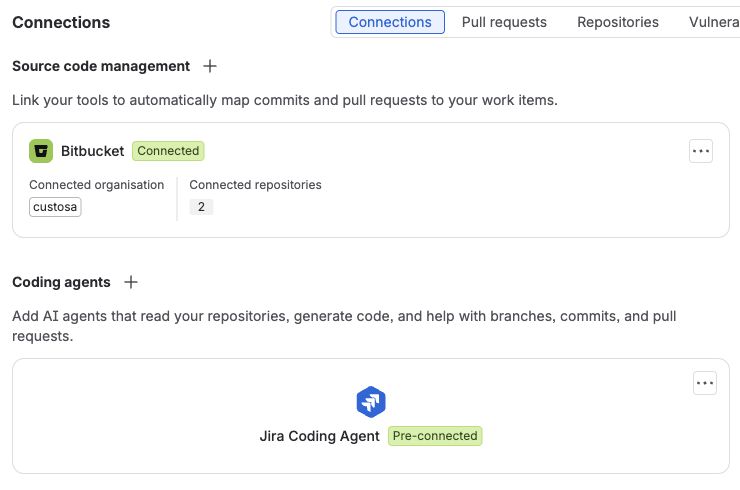
Open your Jira space and select Development > Connections. Under Source code management, connect Bitbucket and approve access for your workspace. Coding agents then lists the Jira Coding Agent as Pre-connected.
Hand a work item to the Jira Coding Agent
Describe the feature
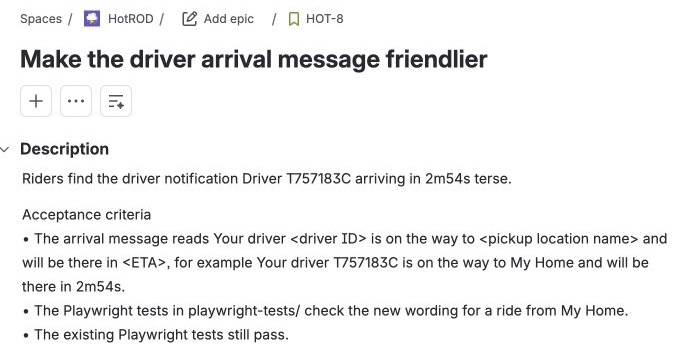
In Jira, select Create, choose your space and set the work type to Story. Fill in the Summary and Description, then select Create.
Summary
Make the driver arrival message friendlier
Description
Riders find the driver notification
"Driver T757183C arriving in 2m54s" terse.

Acceptance criteria
- The arrival message reads "Your driver <driver ID> is on the way
  to <pickup location name> and will be there in <ETA>", for example
  "Your driver T757183C is on the way to My Home and will be there
  in 2m54s".
- The Playwright tests in playwright-tests/ check the new wording
  for a ride from My Home.
- The existing Playwright tests still pass.
Start the agent
On the work item, select Start work under Agent sessions, then Jira Coding Agent. If your
layout shows an Agents menu instead, select Jira Coding Agent there. When the session asks
for a code repository, choose Select repository and pick hotrod.
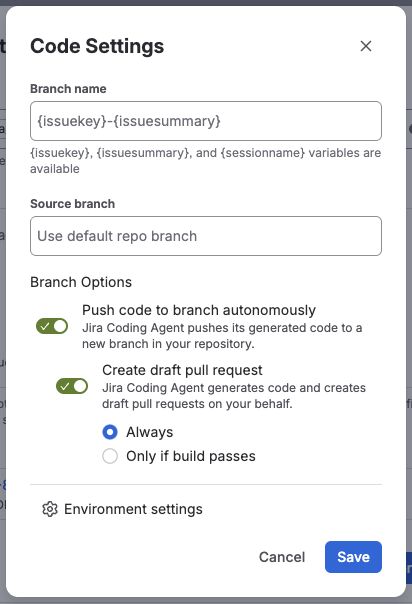
Select the gear next to the repository to open Code Settings:
- Turn on Push code to branch autonomously. Without it, the agent's code stays in its session.
- Turn on Create draft pull request and choose Always.
- Select Save.
Leave the prompt empty (the work item drives the change) and make sure Generate code in draft pull request is ticked. Then select Generate code.
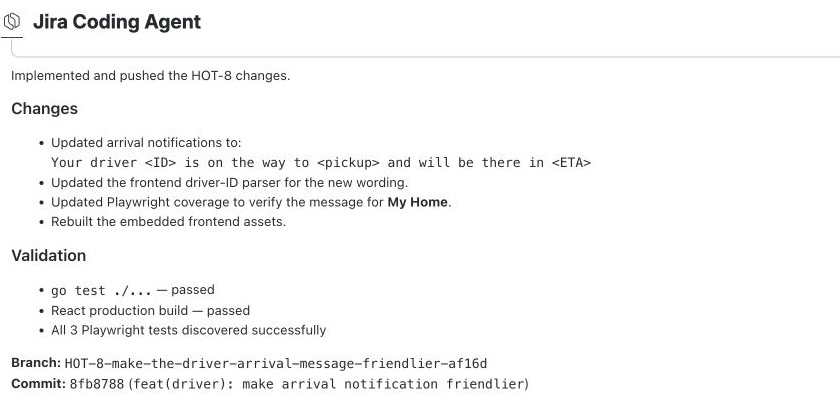
Select Open session under the work item's Agents section to follow its progress. When it finishes, it summarizes its changes and checks, pushes a branch and opens a draft pull request.
Follow the pull request
Open the pull request linked in the agent session to continue in Bitbucket.
The pipeline starts as soon as the draft pull request opens. It has four steps:
- Build the frontend installs dependencies from the lockfile and builds HotROD's React app.
- Compile HotROD builds the Go binary, with the app embedded, for
amd64andarm64. - Build and push the image builds HotROD's Dockerfile for both platforms and pushes it to Docker Hub, tagged with the commit.
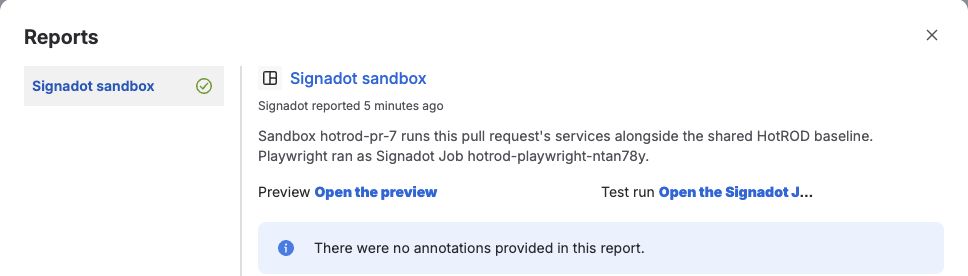
- Test in a Signadot sandbox creates the sandbox, posts a Signadot sandbox report on the pull request, runs the Playwright Job and updates the report with the result.
Allow about six minutes for the pipeline. The first run can take longer while dependencies and
images are downloaded. In the pull request's sidebar, expand Reports and select
Signadot sandbox. The report has two links: Open the preview opens HotROD as the sandbox serves
it, and Open the Signadot Job shows the test run and its logs. Under the Job's Artifacts, you
can download playwright-report.tgz, which contains the HTML report and failure traces and videos.
The agent may update both the driver message and its frontend parser in its first change. If all tests pass, continue to review the running change. If a test fails, use the steps below to get the agent to fix the same pull request.
If the pipeline stops before Playwright runs, open the failed step's log first. For credential, image-pull or runner problems, use the example's troubleshooting guide.
When the tests fail
HotROD's frontend reads the driver ID out of the driver's message to build the ride banner. If the agent changes only the message, that change can compile and pass its own checks while breaking the banner. The following screenshots show an example of this failure. Your sandbox name and work item number will differ.
Open the preview, request a ride from My Home to Rachel's Floral Designs and select Show Logs. The logs show the sandbox driver sending the new message while the frontend, location and route services come from the baseline:
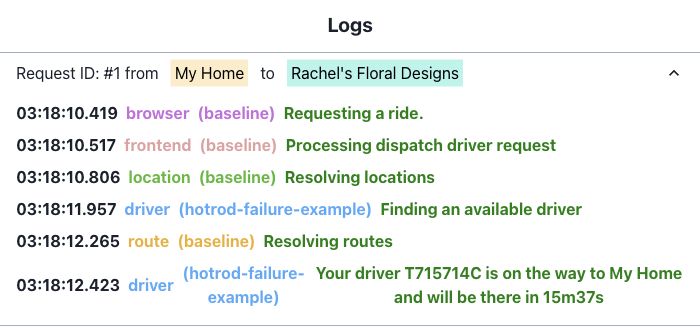
Because the baseline frontend cannot read the driver ID from that message, the ride banner shows
Unknown:

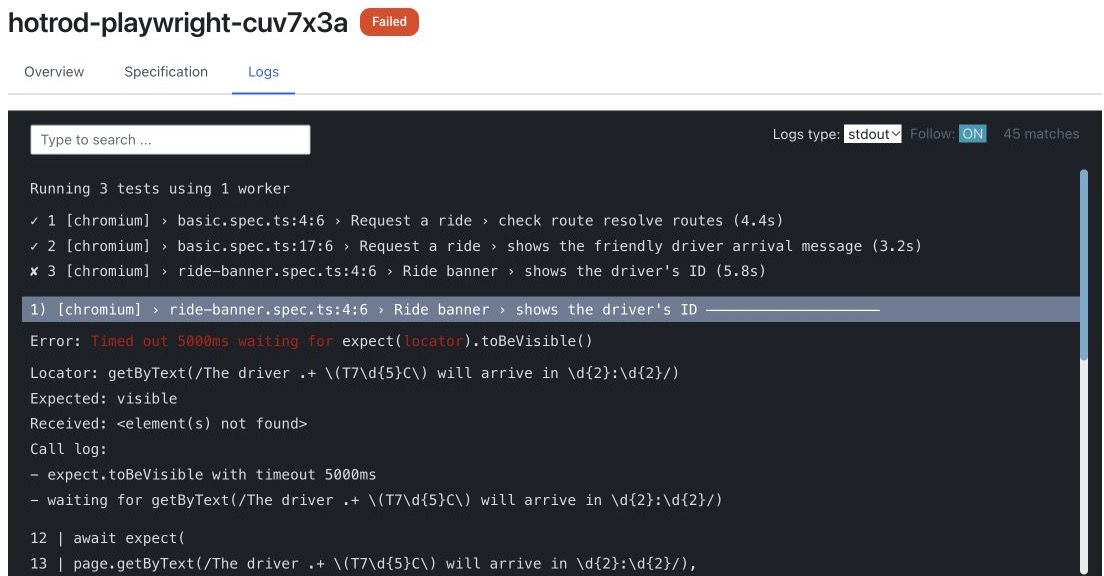
The ride-banner.spec.ts test catches this. Select Open the Signadot Job in the pull request's
report and open Logs to see the failing test and its error:
Give the failure to the agent:
-
In the Job's Logs, copy the failing test's name and error.
-
On the Jira work item, find the agent's card under Agents. Expand the card if it is collapsed, then select Review code to open its session.
-
In the session's chat, paste the failure and ask the agent to fix it and commit the fix to this pull request. For example:
The Signadot sandbox test run on this pull request failed:
<paste the failing test's name and error here>
Please find the cause, fix it so all Playwright tests pass,
and commit the fix to this pull request.
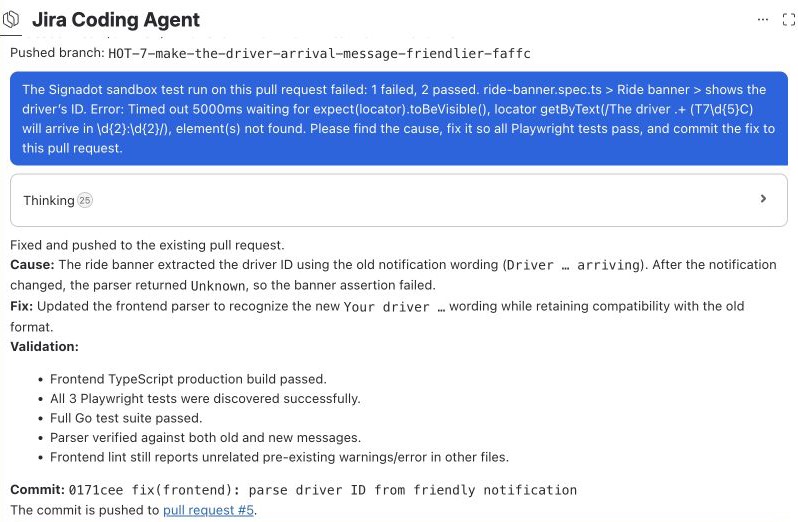
For this failure, the agent needs to update the frontend parser to read the new message and push to
the same branch. The pipeline runs again, rebuilds the frontend and updates the same sandbox. Because
the pull request now changes both services, Signadot forks both frontend and driver.
If a run still fails, send the agent the new result and what the preview shows, and ask it to update the same pull request. Continue when the report is marked passed.
Review the running change
Open the preview from the passed report. Request a ride from My Home to Rachel's Floral
Designs and select Show Logs. In this passing example, frontend and driver run from the
sandbox while location and route use the shared baseline:
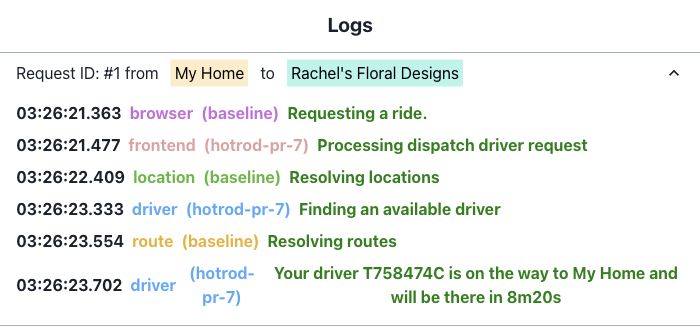
Check that the driver sends the requested wording in the logs and that the banner displays the same driver ID:

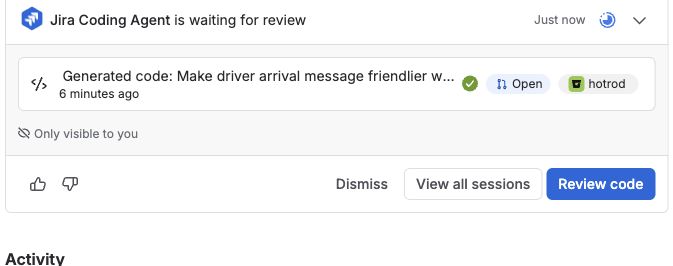
Back on the Jira work item, expand the agent's card under Agents. Its pull request shows a passing build:
Merge and clean up the sandbox
Review the code and test results in Bitbucket. When you are ready to merge, select Mark as ready, then Merge.
Merging into main starts the pipeline's delete-pr-sandbox run, which deletes the pull request's
sandbox. Declining a pull request does the same. Sandboxes also expire three days
after their last update.
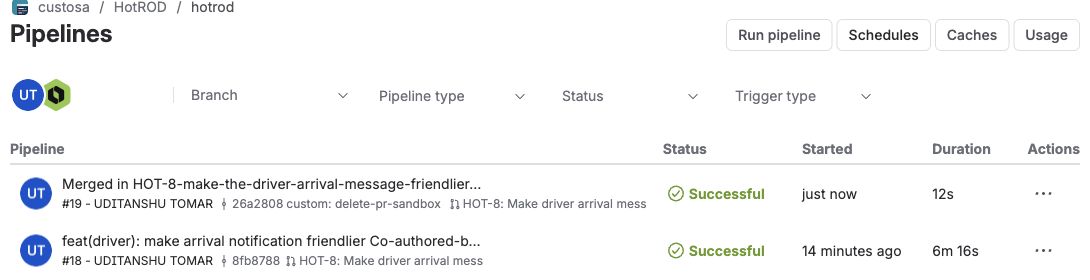
Open the repository's Pipelines page to check that delete-pr-sandbox succeeded. Here it
appears above the passing pull request run:
Cleanup
After the merge or decline cleanup pipeline succeeds, check that no tutorial sandboxes remain:
signadot sandbox list
If one remains, run signadot sandbox delete NAME, replacing NAME with that tutorial sandbox's
name from the list. Then delete the Job Runner Group and its repository credential:
signadot jrg delete hotrod-playwright
kubectl -n signadot-tests delete secret hotrod-repo-read
If you created signadot-tests exclusively for this tutorial, you can also run
kubectl delete namespace signadot-tests. Keep it if other workloads use it.
Revoke the repository access token, the Docker Hub token and the Signadot API key you created for this tutorial. Delete the service account only if nothing else uses it.
How the pipeline works
This section explains the files you already copied into HotROD. No additional setup is needed.
The pull request pipeline
bitbucket-pipelines.yml runs four steps on every pull request. It uses Bitbucket's
runtime v3, which supports
multi-platform builds with Docker Buildx. The image runs on amd64 and arm64 nodes alike.
HotROD's binary embeds its React app, so the frontend must be rebuilt before compiling Go. The
frontend build uses --base=/web_assets/, the path where HotROD serves the assets. The next two steps
compile the binary and push its image. The final step creates the sandbox and runs the tests.
changed-services.sh compares the pull request with its target branch and prints each HotROD service
under services/ that differs. A change to code that every service shares, in cmd/, pkg/,
internal/, go.mod, go.sum or the Dockerfile, forks all four services. A pull request that
changes neither skips the sandbox and test Job. This includes changes only to documentation, tests
or test configuration, including bitbucket-pipelines.yml and .signadot/. Include a service-code
change when testing pipeline changes.
The sandbox name comes from the pull request. Each new commit updates the same sandbox instead of creating another one. That keeps the preview link stable while the agent iterates. A concurrency group serializes the sandbox test and cleanup steps for each pull request. Before updating the sandbox, the test step skips a commit if a newer one is already on the branch.
The sandbox spec
sandbox.sh prints a sandbox spec with one fork per changed service. Each fork uses the image built
for the pull request commit. The frontend endpoint makes the running change available for review:
defaultRouteGroup:
  endpoints:
    - name: frontend
      target: http://frontend.hotrod.svc:8080
The defaultRouteGroup endpoint gives the sandbox its preview URL. It points at frontend even when
only driver is forked, so you can check a backend change through the app. Each sandbox update
resets the three-day expiry.
The pipeline applies the spec and waits for the sandbox to become ready:
- signadot sandbox apply -f sandbox.yaml --wait-timeout 5m
The test run
run-tests.sh submits playwright-job.yaml with the repository, branch, commit and sandbox name.
It waits up to 20 minutes for completion and reads the Job name and result from JSON output. Open
the Job link in the pipeline log or pull request report to see the Playwright logs and artifacts.
The Job runs on the hotrod-playwright runner. It clones the pull request's commit with the token
from the hotrod-repo-read Secret, installs the test dependencies and runs the whole suite. Its
routingContext names the sandbox. Signadot sets SIGNADOT_ROUTING_KEY in the Job, and HotROD's
playwright.config.ts sends that key with every request. That is how the tests reach the pull
request's services:
routingContext:
  sandbox: "@{sandbox}"
uploadArtifact:
  - path: hotrod/playwright-report.tgz
After the Job ends, the script checks the newest attempt and passes only when it is succeeded
and the CLI command completed successfully. A canceled or timed-out Job fails the step as well.
The report on the pull request
report.sh posts the result as a Bitbucket
Code Insights report. It runs
twice: once as Pending with the preview link, before the tests start, and once with the result and
the Job link. Pipelines' local proxy authenticates the call, and the script needs no extra token.
Cleanup on merge
Bitbucket pipeline triggers
run the delete-pr-sandbox custom pipeline when a pull request into main is merged or declined.
delete-sandbox.sh deletes the sandbox if it exists. It also removes the old sandbox if a pull
request no longer changes service code.
Conclusion
You used Signadot to test an agent's service changes with the rest of HotROD before merging. Each sandbox ran only the changed services alongside the shared baseline. The Playwright result and preview link gave you a way to check the running change and send any failures back to the agent.
To adapt this pattern to your application, update the pipeline's build and image commands, list your
services in changed-services.sh, and set the workloads and preview endpoint in sandbox.sh.
Configure your test image in runner.yaml and your test dependencies and command in
playwright-job.yaml. Your tests and services must propagate the
Signadot routing context so requests reach the changed services.