Diagnose Failing Tests with Signadot and CodeRabbit
Some bugs only show up when services talk to each other. Say a pull request renames a field in a message, and the deployed service that sends it still uses the old name. The build passes. A reviewer, or CodeRabbit, may flag the rename, but reading the code can't tell you whether requests will actually fail.
This tutorial answers that question on the pull request itself. Signadot runs your existing tests
against a sandbox with just the changed service, next to the real versions of
everything else. When a test fails, you ask CodeRabbit to explain the failed check in the review, and
its fix-ci command opens a repair that goes through the same tests.
You'll use HotROD, a small ride-sharing demo, and its existing Playwright tests. For your own services, you need tests that cover the behavior you change.
Estimated time: 60 to 90 minutes once the prerequisites are in place, much of it spent waiting for CI runs and CodeRabbit.
Full source: signadot/examples/coderabbit-tutorial
What you will build
Every pull request goes through steps 1 to 4. When a test fails, you continue with steps 5 and 6:
- GitHub Actions builds an image of the changed service.
- Signadot creates a sandbox from a template committed to the repository.
- The existing Playwright tests run in the cluster as a Signadot Job, routed to that sandbox.
- The Job output streams into GitHub Actions, and a failing test turns the check red.
- You ask CodeRabbit to read the failing check and explain it in the review.
- You comment
@coderabbitai fix-ci, and CodeRabbit's repair runs through the same tests.
These terms come up throughout:
- Baseline: the version of HotROD already running in your cluster.
- Sandbox: a copy of selected workloads that runs your pull request's image.
- Routing key: a value on each request that sends it to a sandbox instead of the baseline.
- Job: one run of your test suite inside the cluster, on a pod from a Job Runner Group.
Only the driver runs your pull request's image. The baseline frontend sends it ride requests over
Kafka. HotROD keeps both in one repository, but they deploy separately.
Prerequisites
- A Kubernetes cluster connected to Signadot, with HotROD installed. The
quickstart installs the Signadot Operator and HotROD
in the
hotrodnamespace. Request a ride to confirm it works. Yourkubectlaccess must allow creating namespaces and Secrets and patching Deployments. - Admin access to your Signadot organization, to create a Job Runner Group and a service account.
- A GitHub account that can create repositories and install GitHub Apps.
- A CodeRabbit plan that reviews private repositories, which means a paid plan or a trial. The
fix-cicommand requires Team, Advanced or Enterprise, including an eligible trial. Without it, finish with the reference repair. - Local tools:
gitwith your name and email configured, the GitHub CLI,kubectl, the Signadot CLI, and Go 1.22 or later.
Set up your shell
Check which accounts and clusters your CLIs use:
gh auth status
signadot auth status
signadot cluster list
signadot jrg list
kubectl config get-contexts
If a login is missing or expired, run gh auth login or signadot auth login. Then give gh the
workflow scope, which lets you push the tutorial's workflow file, and let git use your GitHub login.
The first command waits for Enter and a browser sign-in:
gh auth refresh --hostname github.com --scopes workflow
gh auth setup-git
signadot jrg list shows your organization's Job Runner Groups. Pick an unused name for yours, such as
hotrod-coderabbit. It can have up to 30 lowercase letters, digits or hyphens, and must start with a
letter and end with a letter or digit.
Set the values that later commands read, replacing the examples with your own. TEST_CONTEXT comes from
kubectl config get-contexts, SIGNADOT_ORG from signadot auth status and SIGNADOT_CLUSTER from
signadot cluster list. TEST_CONTEXT and SIGNADOT_CLUSTER must point to the same cluster, even if
their names differ. Use the same Bash terminal for every block below, and fix any error before moving
on:
export TUTORIAL_REPO=your-github-user/hotrod-coderabbit
export GHCR_USER=${TUTORIAL_REPO%%/*}
export TEST_CONTEXT=your-test-context
export SIGNADOT_ORG=your-signadot-org
export SIGNADOT_CLUSTER=your-signadot-cluster
export HOTROD_NAMESPACE=hotrod
export HOTROD_ARCH=amd64
export SIGNADOT_RUNNER_GROUP=hotrod-coderabbit
These commands show where driver runs and each node's architecture. If either differs from what you
just exported, export HOTROD_NAMESPACE or HOTROD_ARCH=arm64 again:
kubectl --context "$TEST_CONTEXT" get deployments -A --field-selector metadata.name=driver
kubectl --context "$TEST_CONTEXT" get nodes -L kubernetes.io/arch
Set up a sandbox for every pull request
Create the tutorial repository
The tutorial files are in the
coderabbit-tutorial directory of
the Signadot examples repository. Copy HotROD at the tested revision, add the files, and publish the
result as a new private repository:
git clone https://github.com/signadot/examples.git signadot-examples
git clone https://github.com/signadot/hotrod.git hotrod-coderabbit
cd hotrod-coderabbit
git remote remove origin
git checkout -B main 25b56d7a7494b5afac52f2def76f897bedfa76eb
mkdir -p tutorial/upstream-github
git mv .github/workflows/build.yml .github/dependabot.yml tutorial/upstream-github/
cp -R ../signadot-examples/coderabbit-tutorial/files/. .
git add -A
git commit -m "Add the Signadot and CodeRabbit tutorial setup"
git tag tutorial-setup
gh repo create "$TUTORIAL_REPO" --private --source . --remote origin --push
The last command pushes HotROD's full history, so it takes a few minutes. Moving HotROD's own workflow
and Dependabot config into tutorial/upstream-github/ keeps unrelated CI runs out of your copy. The
tutorial-setup tag marks where every branch starts. The copied files include the sandbox template,
the CI workflow, the runner spec and the Job spec, and How the setup works
covers them once your first check passes.
Give CI its Signadot credentials
Next, add the values the workflow reads. It signs in to Signadot with an API key from a service account. An admin creates the account and its key in the Signadot Dashboard:
- Under Admin > Service Accounts, create a service account, such as
hotrod-coderabbit-ci, with thememberrole. - On the account's Keys tab, create an API key. The default one-month expiration is enough. Copy the key right away. You only see it once.
The last command prompts for the key, which keeps it out of your shell history:
gh variable set SIGNADOT_CLUSTER -R "$TUTORIAL_REPO" --body "$SIGNADOT_CLUSTER"
gh variable set HOTROD_NAMESPACE -R "$TUTORIAL_REPO" --body "$HOTROD_NAMESPACE"
gh variable set HOTROD_ARCH -R "$TUTORIAL_REPO" --body "$HOTROD_ARCH"
gh variable set SIGNADOT_RUNNER_GROUP -R "$TUTORIAL_REPO" --body "$SIGNADOT_RUNNER_GROUP"
gh secret set SIGNADOT_ORG -R "$TUTORIAL_REPO" --body "$SIGNADOT_ORG"
gh secret set SIGNADOT_API_KEY -R "$TUTORIAL_REPO"
Let the cluster pull the image
The workflow pushes the driver image to GitHub Container Registry (GHCR). New GHCR packages are
private, even for public repositories. Your cluster needs a credential to pull the image. Create a
personal access token
(classic)
with only the read:packages scope. The container registry rejects fine-grained tokens.
One command reads the token and stores it as a Secret, so it never reaches your shell history. Nothing appears as you paste:
bash -c 'printf "GHCR token: "; read -rs T; echo
case "$T" in ghp_*) ;; *) echo "Use a classic token with the read:packages scope." >&2; exit 1;; esac
kubectl --context "$TEST_CONTEXT" -n "$HOTROD_NAMESPACE" create secret docker-registry hotrod-ghcr-read \
  --docker-server=ghcr.io --docker-username="$GHCR_USER" --docker-password="$T" \
  --dry-run=client -o yaml | kubectl --context "$TEST_CONTEXT" -n "$HOTROD_NAMESPACE" apply -f -'
Sandboxes copy the driver Deployment, credential included, so add the Secret to it:
kubectl --context "$TEST_CONTEXT" -n "$HOTROD_NAMESPACE" patch deployment driver \
  --type=strategic \
  --patch '{"spec":{"template":{"spec":{"imagePullSecrets":[{"name":"hotrod-ghcr-read"}]}}}}'
kubectl --context "$TEST_CONTEXT" -n "$HOTROD_NAMESPACE" rollout status deployment/driver
The patch keeps existing pull secrets and restarts the baseline driver pods once.
Install the Signadot and CodeRabbit GitHub Apps
Before you open a pull request, install two GitHub Apps on your new tutorial repository:
- Signadot: in the Signadot Dashboard, open Admin > General > GitHub Integration and follow the GitHub flow. The GitHub integration guide describes each step.
- CodeRabbit: sign in at app.coderabbit.ai with GitHub and give CodeRabbit access to the repository. It then posts a walkthrough comment on each pull request it reviews.
If either App is already installed, open GitHub Settings > Applications > Installed GitHub Apps > Configure for each one. If it uses Only select repositories, add your tutorial repository and click Save. The sandbox template links each sandbox to its pull request, so CI can't create sandboxes until the Signadot App can see the repository.
Run the existing test suite as a Job
Create the Job Runner Group
Create the runner's namespace. The command also works if it already exists:
kubectl --context "$TEST_CONTEXT" create namespace signadot-tests \
  --dry-run=client -o yaml | kubectl --context "$TEST_CONTEXT" apply -f -
The Job needs a read-only deploy key to fetch the pull request's commit. These commands store one in a
Secret named hotrod-git-read, which the runner mounts:
KEY_DIR=$(mktemp -d)
ssh-keygen -q -t ed25519 -N '' -C signadot-tutorial-read -f "$KEY_DIR/id_ed25519"
gh repo deploy-key add "$KEY_DIR/id_ed25519.pub" -R "$TUTORIAL_REPO" --title "Signadot tutorial runner"
gh api meta --jq '.ssh_keys[] | "github.com " + .' > "$KEY_DIR/known_hosts"
kubectl --context "$TEST_CONTEXT" -n signadot-tests create secret generic hotrod-git-read \
  --from-file=id_ed25519="$KEY_DIR/id_ed25519" \
  --from-file=known_hosts="$KEY_DIR/known_hosts" \
  --dry-run=client -o yaml | kubectl --context "$TEST_CONTEXT" -n signadot-tests apply -f -
rm -rf "$KEY_DIR"
Any code in a Job can read this key, so use this runner only for the tutorial repository.
Create the Job Runner Group with the name you picked in Set up your shell. This needs a Signadot CLI login with admin access:
signadot jrg apply -f .signadot/testing/runner.yaml \
  --set cluster="$SIGNADOT_CLUSTER" --set runner="$SIGNADOT_RUNNER_GROUP"
signadot jrg get "$SIGNADOT_RUNNER_GROUP"
Re-run signadot jrg get until it reports 1/1 pods ready. The first pod takes a few minutes to
pull the image.
Open a control pull request
First, make sure the setup works. Open a pull request that leaves the application unchanged:
git switch -c demo/control tutorial-setup
echo "Passing control for the Signadot and CodeRabbit tutorial." > tutorial/control.md
git add tutorial/control.md
git commit -m "Add a passing control"
git push -u origin demo/control
gh pr create --base main --head demo/control \
  --title "Tutorial: passing control" \
  --body "Runs the unchanged application through the tutorial workflow."
A run takes about five minutes, and a second pull request waits for it because the Job Runner Group
keeps one pod. On the pull request, open Checks > Playwright against a Signadot sandbox and
expand Run Playwright and stream the Job result. Near the end, look for 2 passed and
PLAYWRIGHT_EXIT_CODE=0, and search the log for JOB_PHASE=succeeded. If it fails, the example
README lists
common problems.
When CI creates a sandbox, Signadot comments with its name and routing key:

The workflow leaves the sandbox running after the tests finish, so reviewers can reproduce a failure while the pull request is open. When the pull request closes, the Signadot App removes its sandbox, and Cleanup shows how to check that none are left.
How the setup works
Your passing check came from four copied files and the two scripts they call.
The sandbox template
The copied .signadot/sandbox.yaml is the template CI uses for each pull request's sandbox. CI fills in
the @{...} values:
name: "@{name}"
spec:
  description: "Driver sandbox for PR @{pr}"
  cluster: "@{cluster}"
  labels:
    signadot/github-repo: "@{repo}"
    signadot/github-pull-request: "@{pr}"
  forks:
    - forkOf:
        kind: Deployment
        name: driver
        namespace: "@{namespace}"
      customizations:
        images:
          - container: hotrod
            image: "@{image}"
        patch:
          type: strategic
          value: |
            spec:
              template:
                spec:
                  containers:
                    - name: hotrod
                      imagePullPolicy: IfNotPresent
The sandbox forks only the driver Deployment and runs the pull request's image. The patch sets
imagePullPolicy: IfNotPresent (some local HotROD installs use Never). The labels link it to its
pull request for the Signadot GitHub App, and can't change once it exists.
The CI workflow
The copied workflow builds the image, creates or updates the sandbox, and runs the tests:
The full workflow file
name: Signadot E2E
on:
  pull_request:
    types: [opened, synchronize, reopened, ready_for_review]

permissions:
  contents: read

# A PR keeps one sandbox; finish its current run before updating it.
concurrency:
  group: signadot-${{ github.repository_id }}-${{ github.event.pull_request.number }}
  cancel-in-progress: false

env:
  PR_SHA: ${{ github.event.pull_request.head.sha }}
  PR_NUMBER: ${{ github.event.pull_request.number }}
  REPO: ${{ github.repository }}
  REPO_ID: ${{ github.repository_id }}
  CLUSTER: ${{ vars.SIGNADOT_CLUSTER }}
  HOTROD_NAMESPACE: ${{ vars.HOTROD_NAMESPACE }}
  TARGET_ARCH: ${{ vars.HOTROD_ARCH || 'amd64' }}
  RUNNER_GROUP: ${{ vars.SIGNADOT_RUNNER_GROUP }}

jobs:
  build:
    if: >-
      github.event.pull_request.draft == false &&
      github.event.pull_request.head.repo.full_name == github.repository
    runs-on: ubuntu-latest
    timeout-minutes: 20
    permissions:
      contents: read
      packages: write
    outputs:
      image: ${{ steps.ref.outputs.image }}
    steps:
      - uses: actions/checkout@11d5960a326750d5838078e36cf38b85af677262 # v4
        with:
          ref: ${{ github.event.pull_request.head.sha }}
          persist-credentials: false
      - name: Validate inputs and derive names
        run: bash .signadot/scripts/ci-inputs.sh >> "$GITHUB_ENV"
      - uses: actions/setup-go@40f1582b2485089dde7abd97c1529aa768e1baff # v5
        with:
          go-version-file: go.mod
      - uses: actions/setup-node@49933ea5288caeca8642d1e84afbd3f7d6820020 # v4
        with:
          node-version: '22'
          cache: yarn
          cache-dependency-path: services/frontend/react_app/yarn.lock
      - name: Test and build HotROD
        run: bash .signadot/scripts/build.sh
      - uses: docker/setup-buildx-action@8d2750c68a42422c14e847fe6c8ac0403b4cbd6f # v3
      - uses: docker/login-action@c94ce9fb468520275223c153574b00df6fe4bcc9 # v3
        with:
          registry: ghcr.io
          username: ${{ github.actor }}
          password: ${{ secrets.GITHUB_TOKEN }}
      - name: Push the PR image
        id: image
        uses: docker/build-push-action@10e90e3645eae34f1e60eeb005ba3a3d33f178e8 # v6
        with:
          context: .
          platforms: linux/${{ env.TARGET_ARCH }}
          provenance: false
          push: true
          tags: ${{ env.IMAGE_TAG }}
      - name: Record the immutable image reference
        id: ref
        env:
          DIGEST: ${{ steps.image.outputs.digest }}
        run: |
          [[ "$DIGEST" =~ ^sha256:[0-9a-f]{64}$ ]] || exit 1
          echo "image=${IMAGE_REPOSITORY}@${DIGEST}" >> "$GITHUB_OUTPUT"

  e2e:
    name: Playwright against a Signadot sandbox
    needs: build
    runs-on: ubuntu-latest
    timeout-minutes: 40
    steps:
      - uses: actions/checkout@11d5960a326750d5838078e36cf38b85af677262 # v4
        with:
          ref: ${{ github.event.pull_request.head.sha }}
          persist-credentials: false
      - name: Validate inputs and derive names
        run: bash .signadot/scripts/ci-inputs.sh >> "$GITHUB_ENV"
      - name: Install the Signadot CLI
        env:
          SIGNADOT_CLI_VERSION: v1.8.0
        run: |
          curl -fsSL https://raw.githubusercontent.com/signadot/cli/f6e4f7a0744dcf7c8b22a92f4d046815fd76e8bc/scripts/install.sh -o /tmp/signadot-install.sh
          sh /tmp/signadot-install.sh
          signadot --version
      - name: Create or update the PR sandbox
        env:
          SIGNADOT_ORG: ${{ secrets.SIGNADOT_ORG }}
          SIGNADOT_API_KEY: ${{ secrets.SIGNADOT_API_KEY }}
          IMAGE: ${{ needs.build.outputs.image }}
        run: |
          signadot sandbox apply -f .signadot/sandbox.yaml \
            --set name="$SANDBOX" --set cluster="$CLUSTER" \
            --set repo="$REPO" --set pr="$PR_NUMBER" \
            --set namespace="$HOTROD_NAMESPACE" --set image="$IMAGE" \
            --wait-timeout 10m
      - name: Run Playwright and stream the Job result
        env:
          SIGNADOT_ORG: ${{ secrets.SIGNADOT_ORG }}
          SIGNADOT_API_KEY: ${{ secrets.SIGNADOT_API_KEY }}
        run: |
          set -euo pipefail
          set +e
          signadot job submit -f .signadot/testing/job.yaml \
            --set runner="$RUNNER_GROUP" --set repo="$REPO" \
            --set sha="$PR_SHA" --set namespace="$HOTROD_NAMESPACE" \
            --set sandbox="$SANDBOX" --attach --timeout 25m 2>&1 | tee signadot-job.log
          cli_exit=${PIPESTATUS[0]}
          set -e
          # A canceled Job still exits 0, so the phase from the API decides.
          job=$(sed -nE 's/^Job (hotrod-cr-e2e-[a-z0-9]+) .*/\1/p' signadot-job.log | head -n 1)
          test -n "$job"
          signadot job get "$job" -o json > signadot-job.json
          phase=$(jq -er '.status.attempts[0].phase' signadot-job.json)
          printf '\nSIGNADOT_JOB=%s\nJOB_PHASE=%s\n' "$job" "$phase"
          tail -c 40000 signadot-job.log | tail -n 100
          test "$cli_exit" -eq 0 && test "$phase" = succeeded
Workflow details:
- The build and the Job use the pull request's head commit, and the sandbox runs the image by digest.
- The sandbox name is a hash of the repository ID and pull request number, within Signadot's 30-byte limit.
- The last step also checks the Job's phase from the API, because a canceled Job still exits 0.
- Pull requests from forks are skipped, and only the build job can write packages.
ci-inputs.shvalidates the repository variables and derives the image tag and sandbox name, andbuild.shruns HotROD'sgo test ./...,go vet ./...andmake build.
The runner spec
The Job Runner Group keeps one pod ready, using the Playwright image matching HotROD's lockfile:
name: "@{runner}"
spec:
  cluster: "@{cluster}"
  namespace: signadot-tests
  jobTimeout: 15m
  image: mcr.microsoft.com/playwright:v1.45.1-jammy
  podTemplate:
    spec:
      automountServiceAccountToken: false
      containers:
        - name: main
          image: mcr.microsoft.com/playwright:v1.45.1-jammy
          volumeMounts:
            - name: git-read
              mountPath: /var/run/hotrod-git
              readOnly: true
      volumes:
        - name: git-read
          secret:
            secretName: hotrod-git-read
            defaultMode: 0400
            optional: true
  scaling:
    manual:
      desiredPods: 1
The Job spec
The copied Job file defines each test run:
spec:
  namePrefix: hotrod-cr-e2e
  runnerGroup: "@{runner}"
  script: |
    #!/bin/bash
    set -euo pipefail
    export GIT_TERMINAL_PROMPT=0
    git init hotrod
    cd hotrod
    if [ -s /var/run/hotrod-git/id_ed25519 ]; then
      # A repository-scoped, read-only deploy key is mounted by the runner.
      export GIT_SSH_COMMAND="ssh -i /var/run/hotrod-git/id_ed25519 -o IdentitiesOnly=yes -o StrictHostKeyChecking=yes -o UserKnownHostsFile=/var/run/hotrod-git/known_hosts"
      git remote add origin "git@github.com:@{repo}.git"
    else
      git remote add origin "https://github.com/@{repo}.git"
    fi
    git fetch --depth=1 origin "@{sha}"
    git checkout --detach FETCH_HEAD
    test "$(git rev-parse HEAD)" = "@{sha}"
    unset GIT_SSH_COMMAND
    export HOTROD_NAMESPACE="@{namespace}" CI=true
    export CYPRESS_INSTALL_BINARY=0 PLAYWRIGHT_HTML_OPEN=never
    : "${SIGNADOT_ROUTING_KEY:?Sandbox routing key missing}"
    printf 'Testing revision %s in sandbox %s\n' "@{sha}" "@{sandbox}"
    npm ci

    set +e
    npx playwright test playwright-tests/basic.spec.ts \
      --reporter=list,github 2>&1 | tee playwright.log
    test_exit=${PIPESTATUS[0]}
    set -e

    # Playwright records traces and videos under test-results; keep them.
    if [ -d test-results ]; then
      tar czf playwright-traces.tgz test-results || true
    fi

    # Keep assertion details at the end, after setup output.
    printf '\n--- Playwright result (last 40 KB, up to 100 lines) ---\n'
    tail -c 40000 playwright.log | tail -n 100
    printf '\nPR_HEAD=%s\nSANDBOX=%s\nNAMESPACE=%s\n' \
      "@{sha}" "@{sandbox}" "$HOTROD_NAMESPACE"
    printf 'PLAYWRIGHT_EXIT_CODE=%s\n' "$test_exit"
    exit "$test_exit"
  routingContext:
    sandbox: "@{sandbox}"
  uploadArtifact:
    - path: hotrod/playwright.log
    - path: hotrod/playwright-traces.tgz
routingContext.sandbox gives the Job the sandbox's routing key in SIGNADOT_ROUTING_KEY. HotROD's
Playwright
configuration
sends it in the baggage header, and HotROD carries it through Kafka to the forked driver. For
your own services, set up context propagation first, or
tests may reach the baseline.
The script exits with Playwright's status, so tee cannot hide a failing test. It prints the summary
last, which puts the assertion details at the end of the step instead of buried under setup output.
Let CodeRabbit read the failure
Now add a cross-service bug. Branch from the setup commit and apply the patch:
git switch -c demo/dispatch-wire-rename tutorial-setup
git apply tutorial/break-dispatch.patch
git add services/driver/interface.go services/driver/best_eta.go
git commit -m "Standardize driver dispatch JSON names"
git push -u origin demo/dispatch-wire-rename
gh pr create --base main --head demo/dispatch-wire-rename \
  --title "Standardize driver dispatch JSON names" \
  --body "Renames the dispatch request fields to snake_case."
The patch renames the JSON fields of DispatchRequest, the Kafka message the frontend sends to the
driver, from pickupLocation and dropoffLocation to pickup_location and dropoff_location. It
also adds a guard that rejects a request without a pickup location, which keeps the driver running so
the failure shows up in the ride flow instead of a crash loop.
The baseline
frontend
still sends the camelCase names. Go's JSON decoder skips fields it doesn't recognize. With empty
locations, the new driver rejects every dispatch, and the ride never gets a route or a driver. The
build stays green because the driver package has no unit tests at this revision. The end-to-end
run catches it, and so does the contract test you add later.
Inspect the failing check
On the regression pull request, open the same check and step as before. This time the build passes and
both ride tests fail. Look for PLAYWRIGHT_EXIT_CODE=1 near the end and search for JOB_PHASE=failed.
The log shows what each test expected and what the page showed instead:
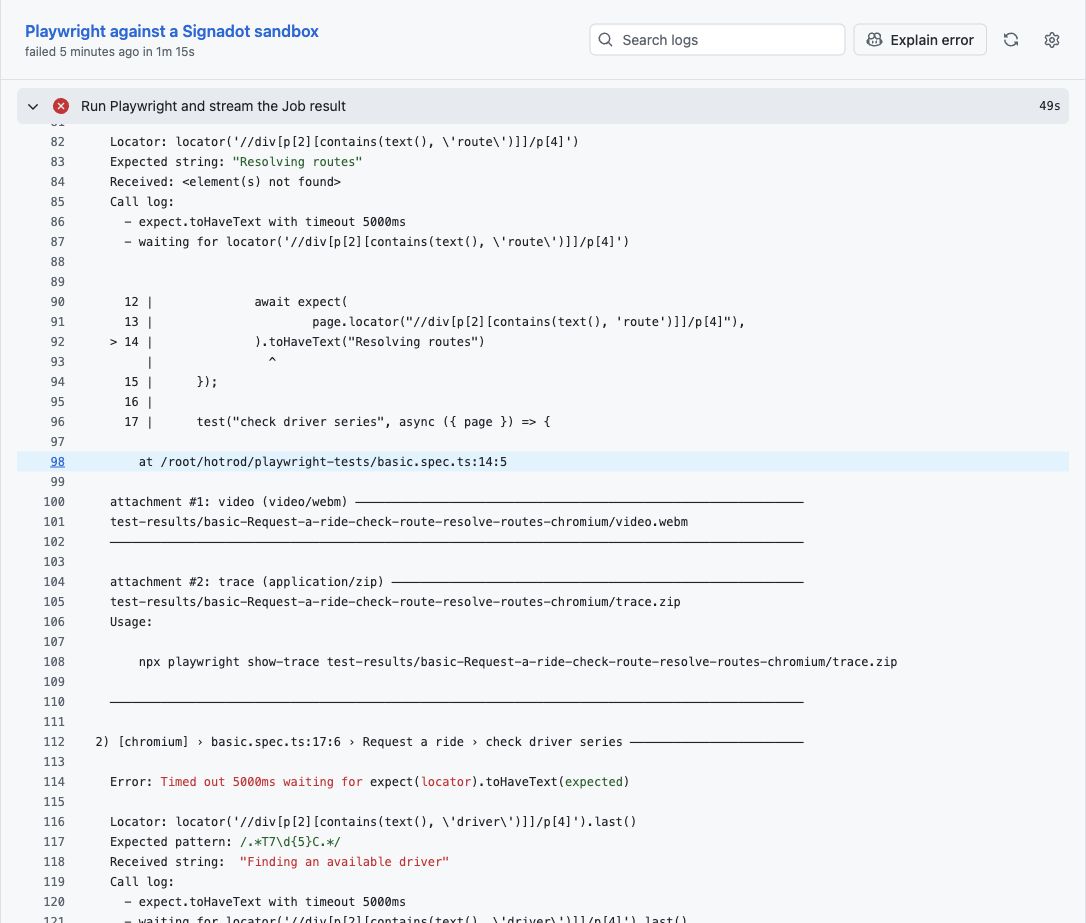
Near the end of the step, PR_HEAD shows the commit the Job tested. A fetch error, or a sandbox that
never becomes ready, points to a setup problem rather than this bug. Playwright's trace and video for
each failed test are on the Job's page in the Signadot Dashboard, not in GitHub's artifact list.
Bring the check into the review
CodeRabbit's GitHub Checks integration reads check results and is on by default. The switch is in the CodeRabbit app under Reviews > Tools > GitHub Checks, and the next section shows the same setting in YAML.
Wait for the check and CodeRabbit's review to finish. If the review finished before the check, comment
@coderabbitai full review to review the pull request again. @coderabbitai review only covers new
commits, and each run uses one review from your allowance.
The review will likely flag the renamed fields from the code. To connect that finding to the failed tests:
- Copy the URL of the failed check's details page.
- Open CodeRabbit's comment on
services/driver/interface.go, or the pull request conversation if it made no comment there. - Reply with this request, replacing
CHECK_URL:
@coderabbitai Please read this completed Playwright check: CHECK_URL. Cite the failed assertions and tested PR head, explain how they connect to this changed code, and recommend a correction here. Distinguish what the run observed from what you infer from source. Do not change code in this reply.
What a useful diagnosis looks like
A useful reply names both failures: basic.spec.ts:14 can't find the route status, and
basic.spec.ts:27 still shows "Finding an available driver". It cites the same commit as PR_HEAD, then
explains the cause from the source. The frontend sends camelCase fields, the new driver expects
snake_case, and the guard rejects the empty pickup location. The fix it recommends should accept both
spellings.
The log shows the broken ride flow, but not the Kafka message or the driver's error. CodeRabbit finds the cause in the source code. Here is how it answered the same request for this regression:
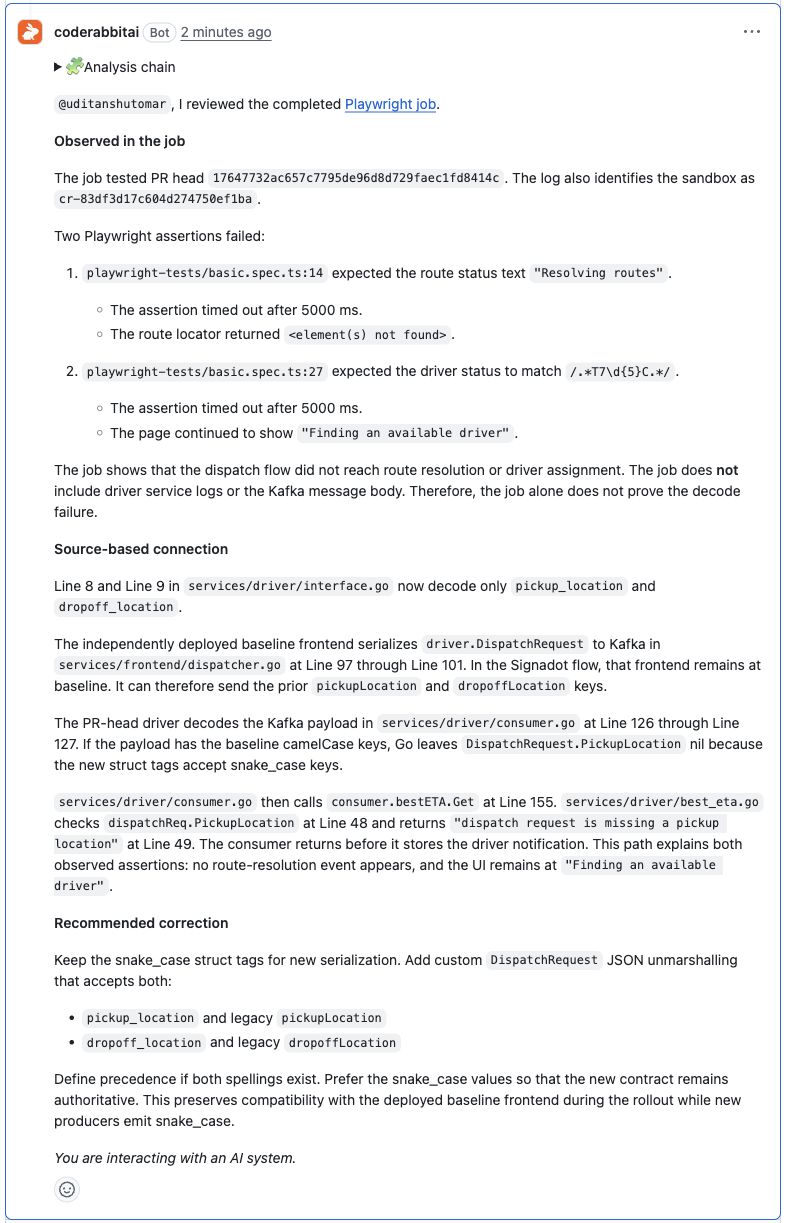
CodeRabbit's wording changes from run to run. A good reply still cites the failed tests and the run. The Fix failing CI checks option in the walkthrough only shows that CodeRabbit saw the failures.
Tune the review with path instructions
The copied .coderabbit.yaml configures the review:
# yaml-language-server: $schema=https://coderabbit.ai/integrations/schema.v2.json
reviews:
  auto_review:
    enabled: true
    base_branches: [".*"]
  tools:
    github-checks:
      enabled: true
  finishing_touches:
    fix_ci:
      enabled: true
  path_instructions:
    - path: "services/driver/**"
      instructions: |
        The frontend and driver deploy independently. Signadot E2E forks
        only the driver at the PR head; the frontend stays at baseline.
        Review Kafka DTO changes for compatibility with existing producers.
        Distinguish source-based risks from observed test failures.
        When CI fails, cite the failing assertion and explain its path
        through dispatch, Kafka decoding, and driver notifications.
        Preserve support for deployed producers when proposing a fix.
    - path: "playwright-tests/**"
      instructions: |
        These are functional ride-dispatch tests, not load tests.
        Check sandbox readiness, routing, and the tested SHA before
        attributing a failure to application code. Do not remove assertions
        or extend timeouts merely to make a failing check pass.
        State which behavior a passing run covers and what remains untested.
github-checks lets CodeRabbit read check results, and fix_ci enables Fix CI.
base_branches: [".*"] turns on automatic review for pull requests into any branch, including a stacked
repair that targets your feature branch. Narrow the pattern when you adapt this setup.
The path instructions describe the deployment, where only the driver runs the pull request's image and
the frontend stays at the baseline. They also ask CodeRabbit to keep risks it sees in the code separate
from failures the tests reported, and to leave test assertions in place. Give CodeRabbit the same kind
of context for your own services.
CodeRabbit often says nothing about a compatible change. When it does raise a concern, a passing run of the tests covering that path settles it. The optional refactor below is a compatible change to try.
A performance concern needs a load test. HotROD's two browser tests would still pass if a change removed a concurrency limit.
Close the loop with Fix CI
Comment @coderabbitai fix-ci on the regression pull request. CodeRabbit investigates the failing check
and opens a stacked pull request, a repair that targets demo/dispatch-wire-rename instead of main.
You can also choose Create stacked PR in CodeRabbit's walkthrough comment. The
Fix CI documentation covers plans and delivery
options.
Fix CI reports progress in a status comment on the regression pull request and can take 15 minutes or more to open the stacked pull request. Here is one with passing build and sandbox checks. Your branch names will differ:
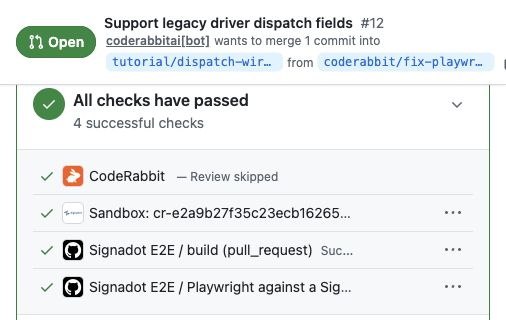
CodeRabbit may show Review skipped on a pull request it opened, as here. Comment
@coderabbitai review there if you want a review of the repair.
If your plan does not include Fix CI, use the reference repair
CodeRabbit generated this repair for the same regression, and it passes the same tests:
git switch -c demo/reference-repair demo/dispatch-wire-rename
git apply tutorial/reference-repair.patch
git add services/driver/interface.go services/driver/interface_test.go
git commit -m "Accept legacy dispatch field names"
git push -u origin demo/reference-repair
gh pr create --base demo/dispatch-wire-rename --head demo/reference-repair \
  --title "Accept legacy dispatch field names" \
  --body "Accepts camelCase and snake_case dispatch fields."
Read through the repair. It should accept the camelCase fields that the deployed frontend sends, keep
the new snake_case format, define which spelling wins when a message has both, and leave both Playwright
assertions in place.
Add a contract test to the repair
Add the tutorial's contract test to whichever repair you use. Replace REPAIR_PR with the number at the
end of that pull request's URL:
gh pr checkout REPAIR_PR
cp tutorial/deployed_payload_test.go.txt services/driver/deployed_payload_test.go
go test ./services/driver -run '^TestDeployedProducerPayload$' -count=1
git add services/driver/deployed_payload_test.go
git commit -m "Test decoding of the deployed frontend payload"
git push
The test decodes a saved copy of the camelCase message the frontend sends. It passes on the repair and
fails on the regression branch. Pushing it runs the workflow again. Wait for the build to pass and the
sandbox check to report 2 passed against the same baseline.
Optional: try a compatible refactor
This change renames Go identifiers but keeps the JSON field names, so the deployed frontend keeps
working:
git switch -c demo/preserve-wire tutorial-setup
git apply tutorial/preserve-wire.patch
cp tutorial/deployed_payload_test.go.txt services/driver/deployed_payload_test.go
go test ./services/driver -run '^TestDeployedProducerPayload$' -count=1
git add services/driver services/frontend/dispatcher.go
git commit -m "Rename driver dispatch fields without changing the wire format"
git push -u origin demo/preserve-wire
gh pr create --base main --head demo/preserve-wire \
  --title "Rename driver dispatch fields" \
  --body "Renames Go identifiers and keeps the JSON field names."
Both browser tests should pass. If CodeRabbit raises a compatibility concern, compare it with these results before you resolve it.
You now have a passing control, a failing regression, a diagnosis that cites the failed run, and a
passing repair. Nothing needs to be merged into main.
Limitations
- It depends on tests that cover the change. The loop starts only when a check fails. You need an existing suite that exercises the behavior you change. A passing run covers the paths those tests take with the dependencies running at the time, and says nothing about untested payloads, load, or other version combinations.
- CodeRabbit's automatic review reads your code, not the check output. It sees that a check failed and offers to fix it, but it diagnoses the failure only when you ask. Its answer is then no better than the log, so keep assertion messages, the tested commit and the sandbox name in it, and keep secrets out. A timeout can be a code problem or a setup problem.
- Neither view of dependencies is complete. CodeRabbit's multi-repository analysis checks changes against repositories you link. On Team, Advanced or Enterprise it can also find related repositories itself from imports, dependency manifests and API use, on a best-effort basis. The sandbox run shows only the runtime breaks your tests catch, so choose tests that cover the contracts a change affects.
Cleanup
If you open a new terminal, return to your hotrod-coderabbit directory and set the values from
Set up your shell again. If Fix CI is still running, open the task link in its status
comment and choose Stop. Otherwise it can open another pull request after you clean up.
Close the pull requests, replacing REPAIR_PR with your repair's number again, then list your sandboxes
to see whether the App removed them:
gh pr close REPAIR_PR --delete-branch
gh pr close demo/dispatch-wire-rename --delete-branch
gh pr close demo/control --delete-branch
signadot sandbox list
If you opened the optional refactor or a second repair, close those pull requests the same way, for
example with gh pr close demo/preserve-wire --delete-branch.
Give the App a few minutes, then run signadot sandbox list again. If a tutorial sandbox is still listed,
find its name in the pull request's Signadot comment and run signadot sandbox delete NAME. Then delete
the Job Runner Group and the pull credential:
signadot jrg delete "$SIGNADOT_RUNNER_GROUP"
kubectl --context "$TEST_CONTEXT" -n "$HOTROD_NAMESPACE" patch deployment driver \
  --type=strategic \
  --patch '{"spec":{"template":{"spec":{"imagePullSecrets":[{"$patch":"delete","name":"hotrod-ghcr-read"}]}}}}'
kubectl --context "$TEST_CONTEXT" -n "$HOTROD_NAMESPACE" rollout status deployment/driver
kubectl --context "$TEST_CONTEXT" -n "$HOTROD_NAMESPACE" delete secret hotrod-ghcr-read
Wait for this Job Runner Group's pods to disappear, then run kubectl --context "$TEST_CONTEXT" -n signadot-tests delete secret hotrod-git-read. Keep the namespace and anything else in it. Remove
the deploy key with gh repo deploy-key list and gh repo deploy-key delete KEY_ID.
Finally, revoke the GHCR token in GitHub and the service account key in the Signadot Dashboard. Deleting the tutorial repository also removes its variables, secrets and branches, but not the image, which you delete separately. Remove the service account under Admin > Service Accounts only if nothing else uses it.
See also
- Running Playwright Tests on Pull Requests: the Job Runner Group pattern this tutorial builds on
- GitHub Actions integration: sandbox labels and pull request comments
- Context propagation: routing keys in your services