End-to-End Hot-Reload‑Style Previews with Vercel and Signadot
Goal: Give full‑stack teams a hot‑reload‑style workflow where every backend change is previewable as quickly as frontend changes on Vercel.
Frontend developers are used to instant feedback: save a file, and the browser updates almost immediately. Vercel previews bring a similar experience to pull requests, where every push spins up a fresh frontend URL. But the backend usually lags behind: changes wait for a staging deploy, reviewers test against stale APIs, and full‑stack PRs become slow to validate.
You'll pair Vercel Preview Deployments with Signadot Sandboxes to get:
- Every PR can build a fresh backend image and launch a PR‑scoped backend sandbox (when configured with a PR‑specific image tag instead of
latest). - The frontend preview is wired to that sandbox via
NEXT_PUBLIC_API_URLand a secure API proxy. - GitHub Actions posts both URLs to the PR so reviewers can exercise the feature end‑to‑end.
- Pushing more commits to the PR updates both sides, giving a fast-feedback, hot‑reload‑like loop for backend and frontend together.
Time required: 45–60 minutes
Repository: https://github.com/signadot/examples/tree/main/vercel-preview-signadot-sandoxes-cicd-connection
Stack note: The sample app uses a Next.js frontend and a Node/Express backend, but the workflow applies to any framework that can read build‑time environment variables and expose a stable Kubernetes deployment for Signadot to clone.
1. Introduction
1.1 Problem: Fast Frontend, Slow Backend
- Vercel previews give instant frontend previews per PR, but they usually point at a static staging/production backend.
- When PRs span both frontend and backend, reviewers test UI changes against outdated APIs.
- If staging is broken, every frontend PR looks broken, even when the frontend code is fine.
1.2 Solution: End‑to‑End Hot Reload with Sandboxes
- Create a Signadot sandbox for each PR that clones the baseline backend deployment and swaps in the PR's image.
- Inject the sandbox URL into the Next.js build via
NEXT_PUBLIC_API_URL, and route calls through a server‑side proxy that keeps the Signadot API key private. - Use GitHub Actions to orchestrate:
- backend image build & push,
- sandbox creation,
- Vercel preview deployment wired to the sandbox URL,
- and a PR comment with both preview links.
Result: a full‑stack, hot‑reload‑style workflow where every push to a PR spins up matching frontend and backend changes, with instant backend previews tied to the Vercel preview you already use.
2. Key Concepts
-
Vercel Preview Deployment (Frontend Hot Reload Experience) Every PR and push gets its own frontend URL. Frontend developers already rely on this for a fast feedback loop during code review.
-
Signadot Sandbox (Instant Backend Preview) A sandbox is a PR‑scoped backend environment that clones your baseline Kubernetes deployment and overrides the parts you're changing—like the backend image tag. This brings a hot‑reload‑like loop to backend changes.
-
Full‑Stack Hot‑Reload‑Style Workflow By wiring the Vercel preview to the PR's sandbox URL:
- Each PR gets a dedicated backend + frontend pair.
- Reviewers see the exact backend behavior that the frontend expects.
- Pushing another commit updates the backend image and redeploys the preview, preserving the fast‑feedback experience across the whole stack.
2.1 Architecture Overview
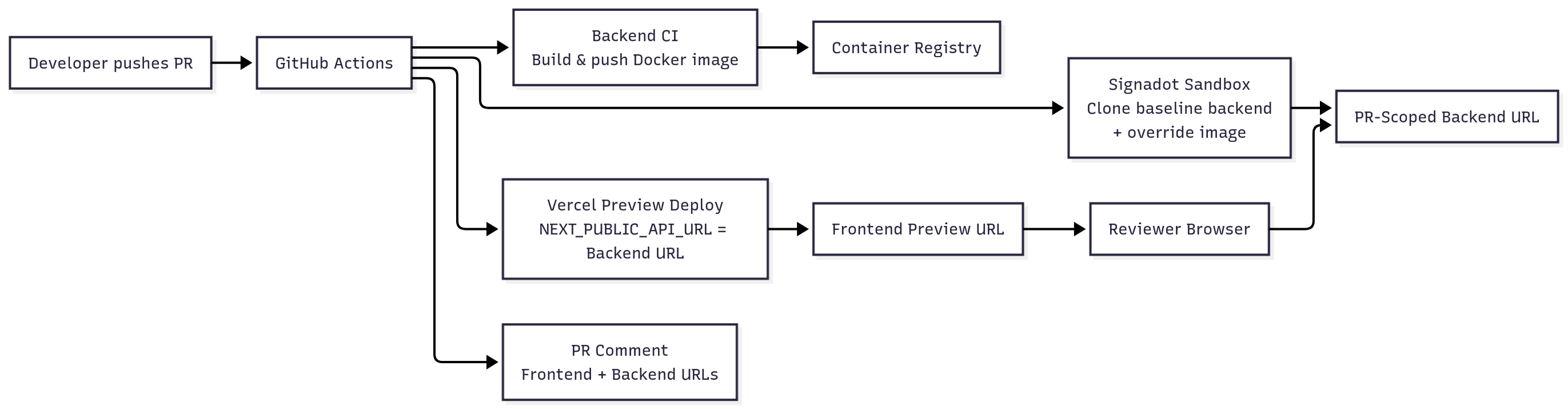
3. Prerequisites
| Requirement | Description |
|---|---|
| GitHub repositories | Separate frontend (next.js) and backend (express) repos, or a monorepo |
| Vercel account | Project wired to the frontend repo, API token for GitHub Actions |
| Signadot account | Organization name, API key, access to a Kubernetes cluster with the Signadot Operator installed |
| Kubernetes cluster | AWS EKS or GKE Standard (GKE Autopilot may have restrictions; verify Operator compatibility) |
| Container registry | Docker Hub / GHCR / GCR for pushing backend images |
Tip: Ensure the Signadot Operator is installed ahead of time. The frontend workflow only verifies the operator; it does not install it.
4. Baseline Environment (One‑Time Setup)
Prepare the baseline backend environment that Signadot will clone for each PR. One‑time setup per cluster.
4.1 Install the Signadot Operator
Install the operator on your target Kubernetes cluster:
kubectl create namespace signadot

helm repo add signadot https://charts.signadot.com
helm repo update signadot

kubectl create secret generic cluster-agent \
  --from-literal=token=$SIGNADOT_CLUSTER_TOKEN \
  -n signadot

helm upgrade --install signadot-operator signadot/operator \
  --namespace signadot \
  --wait
Checkpoint: Operator ready
-
Run:
kubectl get pods -n signadot -
Expected: At least one
signadot-operatorpod is inRunningstate.
4.2 Deploy the Baseline Backend
The backend (backend/) is a minimal Express server with Kubernetes manifests under backend/k8s/.
-
Update the deployment image to point at your registry:
backend/k8s/deployment.yamlcontainers:
- name: vercel-signadot-backend
image: YOUR_REGISTRY/vercel-signadot-backend:latest -
Apply the manifests to your cluster:
kubectl apply -f backend/k8s/deployment.yaml
kubectl apply -f backend/k8s/service.yaml
kubectl get deployment vercel-signadot-backend -n default
Checkpoint: Baseline backend healthy
-
Run:
kubectl get deployment vercel-signadot-backend -n default -
Expected:
AVAILABLEreplicas is at least1.
For a local quick check (optional):
cd backend
npm install
npm run dev
curl http://localhost:8080/health
You should see a JSON response with status: "healthy".
4.3 Sandbox Blueprint (backend/sandbox.yaml)
backend/sandbox.yaml defines how Signadot creates a PR‑scoped backend sandbox by forking the baseline Deployment:
name: backend-pr-PR_NUMBER
spec:
  cluster: CLUSTER_NAME
  description: Sandbox environment for vercel-signadot-backend
  forks:
    - forkOf:
        kind: Deployment
        namespace: default
        name: vercel-signadot-backend
      customizations:
        images:
          - image: docker.io/DOCKERHUB_USERNAME/vercel-signadot-backend:SANDBOX_IMAGE_TAG
        command: ["node", "server.js"]
        env:
          - name: PORT
            value: "3000"
  defaultRouteGroup:
    endpoints:
      - name: backend-api
        target: http://vercel-signadot-backend.default.svc:3000
What this does:
namebecomes PR-specific, likebackend-pr-42.forks/forkOfclones the baseline Deployment and applies minimal overrides (image, command, env).- The
imagescustomization injects the PR-specific image tag built by backend CI. defaultRouteGroupexposes the sandbox endpoint via the service target URL (yielding URLs likehttps://backend-api--backend-pr-42.preview.signadot.com).
This is the URL we will wire into NEXT_PUBLIC_API_URL for a hot‑reload‑style backend experience.
5. Application Configuration (Frontend + Backend)
With the baseline environment ready, configure the sample app to take advantage of it.
5.1 Frontend: Hot‑Reload‑Style Backend URL via NEXT_PUBLIC_API_URL
There are two primary ways to route requests to Signadot sandboxes:
-
Chrome Extension (Recommended for developers): Install the Signadot Chrome Extension to inject routing headers from your browser. With the extension enabled, you open your existing frontend URL, select a sandbox or route group in the extension, and traffic is routed to that sandbox without changing code. Set
NEXT_PUBLIC_USE_SIGNADOT_PROXY=falsein Vercel to use this method. -
API Key / Proxy Route (Alternative for reviewers & automation): Use a server-side proxy route that adds the
signadot-api-keyheader for authenticated preview URLs like*.preview.signadot.com. This works for reviewers who don't have the extension installed and for CI-driven tests, because the proxy keeps the API key server-side. It requires the proxy code below andSIGNADOT_API_KEYin Vercel. This is the default behavior (NEXT_PUBLIC_USE_SIGNADOT_PROXYdefaults totrue).
The frontend (Next.js 13+) reads its backend URL from NEXT_PUBLIC_API_URL. The code automatically detects which method to use based on the NEXT_PUBLIC_USE_SIGNADOT_PROXY environment variable.
frontend/src/lib/config/api.ts (Supports Both Methods)
The code automatically handles both approaches based on NEXT_PUBLIC_USE_SIGNADOT_PROXY:
Build‑time note:
NEXT_PUBLIC_API_URLis evaluated at build time by Next.js and baked into the client bundle. To change which backend a given preview uses, you must trigger a new Vercel build by pushing a commit or redeploying; changing the environment variable alone after the build does not update existing previews.
const API_URL = process.env.NEXT_PUBLIC_API_URL ?? 'http://localhost:8080';

// Defaults to true (proxy) for backward compatibility
// Set to false to use Chrome extension approach
const USE_SIGNADOT_PROXY =
  process.env.NEXT_PUBLIC_USE_SIGNADOT_PROXY !== 'false';

export function isSignadotUrl(url: string = API_URL): boolean {
  return url.includes('.preview.signadot.com');
}

export function getApiUrl(endpoint: string): string {
  const path = endpoint.startsWith('/') ? endpoint.slice(1) : endpoint;

  if (isSignadotUrl()) {
    if (USE_SIGNADOT_PROXY) {
      // Proxy route adds Signadot API key header server-side for authenticated preview URLs
      return `/api/proxy/${path}`;
    } else {
      // Chrome extension: use existing frontend URL; routing headers injected by the extension
      const base = API_URL.endsWith('/') ? API_URL.slice(0, -1) : API_URL;
      return `${base}/${path}`;
    }
  }

  const base = API_URL.endsWith('/') ? API_URL.slice(0, -1) : API_URL;
  return `${base}/${path}`;
}

export function getApiHeaders(): Record<string, string> {
  return { 'content-type': 'application/json' };
}
frontend/src/app/api/proxy/[...path]/route.ts (API Key / Proxy Approach)
This route keeps the Signadot API key server‑side while giving the frontend an instant backend preview. Only needed if using the proxy approach instead of the Chrome extension:
export async function GET(request: NextRequest, { params }: Params) {
  const url = `${process.env.NEXT_PUBLIC_API_URL}/${params.path.join('/')}`;

  const response = await fetch(url, {
    headers: {
      'signadot-api-key': process.env.SIGNADOT_API_KEY ?? '',
      accept: 'application/json'
    },
    cache: 'no-store'
  });

  return new NextResponse(response.body, {
    status: response.status,
    headers: response.headers
  });
}
When using the proxy approach, all sandbox requests go through /api/proxy/*, so SIGNADOT_API_KEY is never exposed in client‑side bundles.
Example component usage
const res = await fetch(getApiUrl('/health'), { headers: getApiHeaders() });
const data = await res.json();
Checkpoint: Local full‑stack dev
- Start the backend locally on port
8080. - Run the frontend with
NEXT_PUBLIC_API_URL=http://localhost:8080. - Expected: the sample page renders the backend health data successfully.
6. Integration with Sandboxes (GitHub Workflows)
Now that the baseline environment and app configuration are in place, wire them together using GitHub Actions. The goal is to automate the fast‑feedback loop for every PR.
6.1 Backend CI: Build and Push Images Only
File: backend/.github/workflows/ci.yml
Purpose: build, tag, and push backend Docker images so Signadot sandboxes can pull PR‑specific artifacts. This workflow does not deploy to the cluster or install the operator; those are one‑time baseline steps from the previous section.
Highlights:
- Logs into
REGISTRYusingDOCKERHUB_USERNAME/DOCKERHUB_TOKEN. - Tags images with a sanitized branch prefix, short SHA, and
lateston the default branch. - Outputs a canonical image reference that matches the registry path used in
sandbox.yaml.
name: Build and Push Backend Image
on:
  pull_request:
    branches: [main, master]
  push:
    branches: [main, master]

jobs:
  build-and-push:
    steps:
      - uses: actions/checkout@v4
      - uses: docker/setup-buildx-action@v3
      - uses: docker/login-action@v3
        with:
          registry: ${{ env.REGISTRY }}
          username: ${{ env.DOCKERHUB_USERNAME }}
          password: ${{ secrets.DOCKERHUB_TOKEN }}
      - uses: docker/build-push-action@v5
        with:
          push: true
          tags: ${{ steps.meta.outputs.tags }}
Secrets required in the backend repo:
| Secret | Purpose |
|---|---|
REGISTRY | Base registry like docker.io |
DOCKERHUB_USERNAME | Registry username |
DOCKERHUB_TOKEN | Registry write token |
Checkpoint: Image available for sandboxes
- After pushing a commit, check your registry.
- Expected: a new image tag exists for
vercel-signadot-backend, matching the branch and SHA for your PR.
6.2 Frontend Preview Workflow: Full‑Stack Hot‑Reload‑Style Preview
File: frontend/.github/workflows/vercel-preview.yml
Triggered on pull_request, this workflow creates a PR‑scoped backend sandbox and deploys a Vercel preview wired to it:
- Check out the frontend repo and backend repo (to read
sandbox.yaml). - Authenticate to AWS and configure
kubectlfor the cluster where the baseline backend and Signadot operator run. - Verify the Signadot operator namespace/pods exist (no install).
- Rewrite
backend/sandbox.yamlwith the cluster name and backend image reference. - Create the Signadot sandbox and extract its
backend-apiURL. - Deploy to Vercel with
NEXT_PUBLIC_API_URLset to the sandbox endpoint. If using the proxy approach, also setSIGNADOT_API_KEYas a server‑side secret andNEXT_PUBLIC_USE_SIGNADOT_PROXY=true(default). If using Chrome extension, setNEXT_PUBLIC_USE_SIGNADOT_PROXY=false. - Comment on the PR with both frontend and backend preview URLs.
Key excerpt:
- name: Prepare Sandbox Configuration
  run: |
    IMAGE_REF=${{ steps.backend-image.outputs.IMAGE_REF }}
    sed -i "s|cluster:.*|cluster: ${{ secrets.AWS_EKS_CLUSTER_NAME }}|g" backend/sandbox.yaml
    sed -i "s|image:.*vercel-signadot-backend.*|image: ${IMAGE_REF}|g" backend/sandbox.yaml

- name: Create Signadot Sandbox
  id: sandbox
  run: |
    SANDBOX_NAME="backend-pr-${{ github.event.pull_request.number }}"
    sed -i "s|backend-pr-PR_NUMBER|${SANDBOX_NAME}|g" backend/sandbox.yaml
    signadot sandbox apply -f backend/sandbox.yaml
    SANDBOX_URL=$(signadot sandbox get "${SANDBOX_NAME}" -o json | jq -r '.endpoints[] | select(.name=="backend-api").url')
    echo "sandbox-url=${SANDBOX_URL}" >> "$GITHUB_OUTPUT"

- name: Deploy to Vercel
  uses: amondnet/vercel-action@v25
  with:
    # Proxy approach (default): Include SIGNADOT_API_KEY and NEXT_PUBLIC_USE_SIGNADOT_PROXY=true
    # Chrome extension: Set NEXT_PUBLIC_USE_SIGNADOT_PROXY=false, omit SIGNADOT_API_KEY
    vercel-args: '--build-env NEXT_PUBLIC_API_URL=${{ steps.sandbox.outputs.sandbox-url }} --build-env NEXT_PUBLIC_USE_SIGNADOT_PROXY=true --env SIGNADOT_API_KEY=${{ secrets.SIGNADOT_API_KEY }} --force'
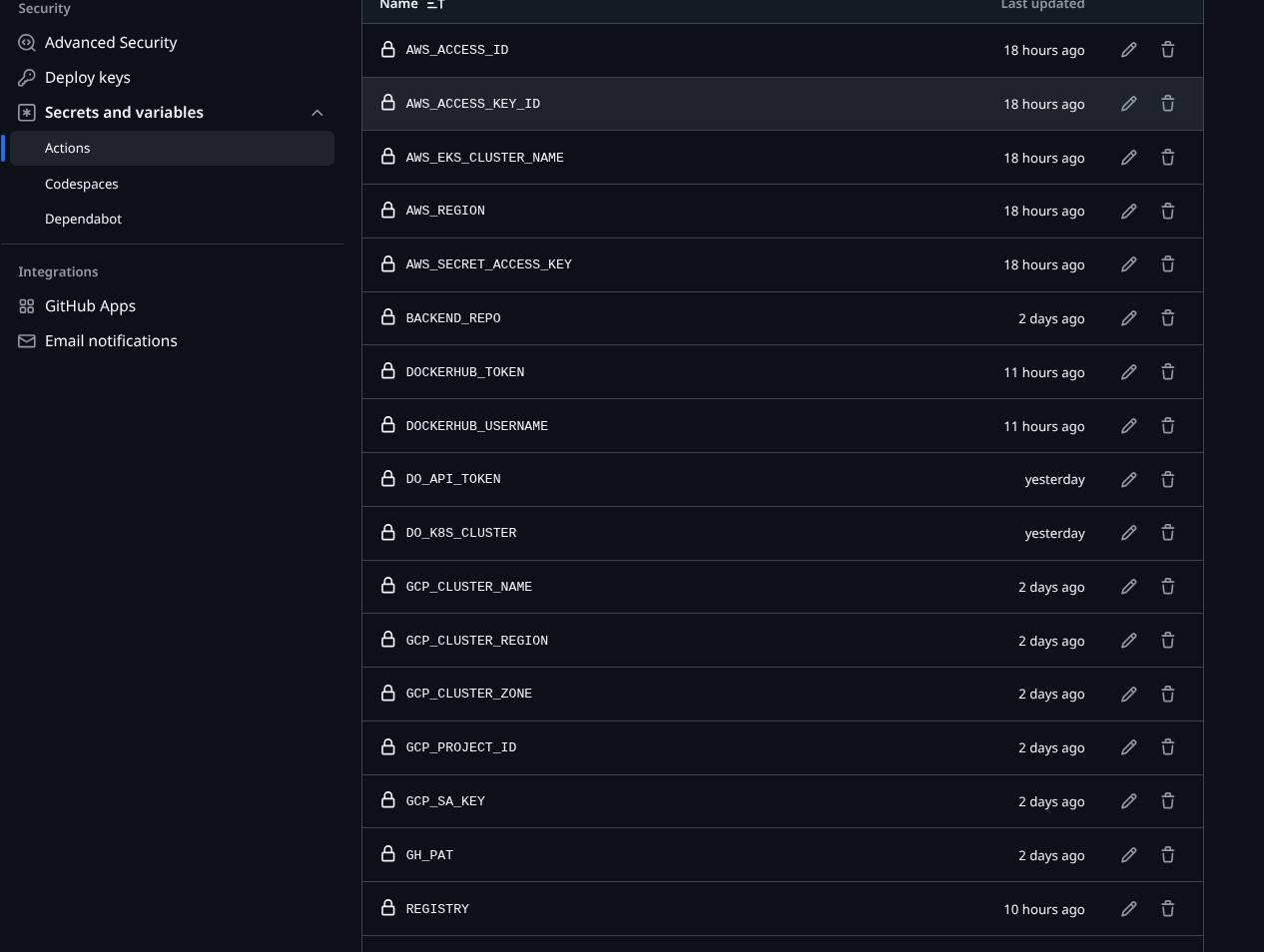
Secrets required in the frontend repo:
| Category | Secrets |
|---|---|
| Vercel | VERCEL_TOKEN, VERCEL_ORG_ID, VERCEL_PROJECT_ID |
| Signadot | SIGNADOT_API_KEY (only if using proxy approach), SIGNADOT_ORG |
| GitHub | BACKEND_REPO, GH_PAT (to check out the backend repo) |
| AWS | AWS_ACCESS_KEY_ID, AWS_SECRET_ACCESS_KEY, AWS_REGION, AWS_EKS_CLUSTER_NAME |
| Registry | DOCKERHUB_USERNAME (used for image rewrites) |
Note: This workflow uses the Signadot CLI (
signadot sandbox apply/get). You can substitutesignadot/sandbox-actionif desired; the logic is equivalent.
Checkpoint: Full‑stack preview workflow
- Open a PR against the frontend repo.
- In GitHub Actions, you should see:
- Backend CI building and pushing an image.
- Frontend preview workflow creating a sandbox and deploying to Vercel.
- Expected: the PR gets a comment with a Frontend Preview URL and a Backend Sandbox URL.
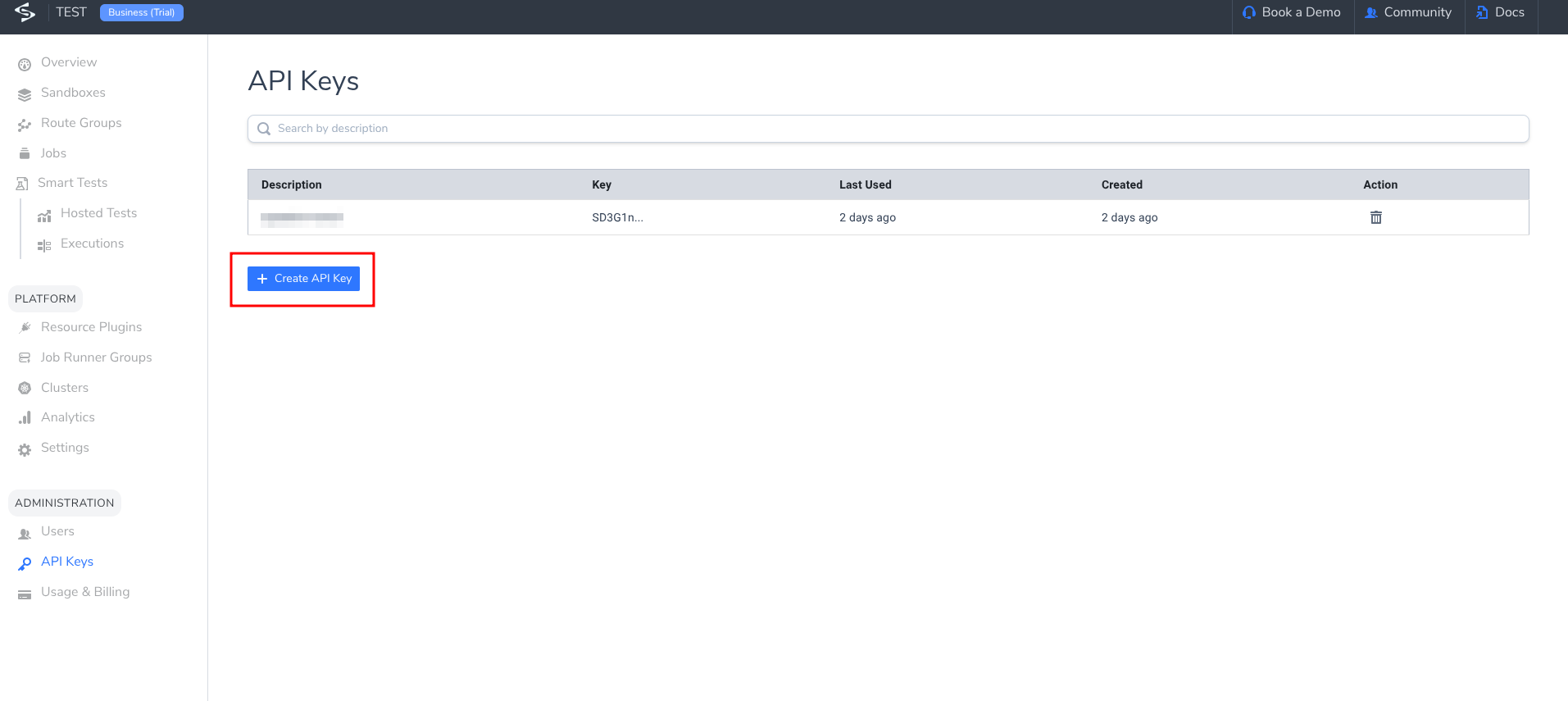
If you need a visual reference for secrets and API keys, see:
7. See It Work: Experiencing the Hot‑Reload‑Style Loop
Now let's see the workflow in action.
7.1 Create a Test PR
- Make a small change in the frontend—update the text rendered by the
BackendStatuscomponent. - Optionally, make a small change in the backend—add a field to the
/healthresponse. - Push your branch and open a PR against
mainormaster.
Checkpoint: Workflows running
- In the frontend repo, you should see the Deploy Full‑Stack Preview workflow running.
- In the backend repo, you should see the Build and Push Backend Image workflow running.
7.2 Inspect the PR Comment and URLs
Once the workflows complete:
- Scroll to the bottom of the PR to find the comment created by the frontend workflow.
- It should list:
- Frontend Preview: a
vercel.appURL. - Backend Sandbox: a
*.preview.signadot.comURL.
- Frontend Preview: a
These two URLs represent your end‑to‑end instant preview for that PR.
7.3 Validate the End‑to‑End Flow
- Open the Frontend Preview URL in your browser.
- Open DevTools → Network tab.
- Trigger the UI behavior that hits the backend—load the page that reads
/health. - Inspect the network requests:
- If using Chrome extension: Requests go directly to the sandbox URL (e.g.,
https://backend-api--backend-pr-<PR_NUMBER>.preview.signadot.com/health) with routing headers injected by the extension. - If using proxy approach: Requests go to
/api/proxy/…on the Vercel domain, which forwards to the sandbox URL.
- If using Chrome extension: Requests go directly to the sandbox URL (e.g.,
Checkpoint: Instant backend preview
- Expected: the response body reflects the backend version built for this PR, not the shared staging backend. You are now effectively experiencing a hot‑reload‑style backend workflow tied to your PR.
7.4 Push Another Change and Feel the Loop
To feel the fast‑feedback loop:
- Change something in the backend—modify the
statusmessage or add a new field to/health. - Commit and push to the same PR branch.
- Wait for:
- Backend CI to build and push a new image.
- The frontend preview workflow to recreate or update the sandbox with that new image and redeploy the preview.
- Refresh the same Vercel preview (or the new preview URL if it changed).
Checkpoint: Hot‑reload‑style full‑stack update
- Expected: the frontend now shows the updated backend behavior, without manually promoting anything to staging. Every push gives you an instant backend preview wired to your frontend preview.
8. Troubleshooting
| Issue | Checks |
|---|---|
| Sandbox creation fails | kubectl get deployment vercel-signadot-backend -n default, kubectl get pods -n signadot, confirm image exists in registry |
| API calls from Vercel fail | Ensure NEXT_PUBLIC_API_URL appears in build logs. If using proxy approach: SIGNADOT_API_KEY is set (no NEXT_PUBLIC_), /api/proxy/[...path] exists. If using Chrome extension: extension is installed and sandbox is selected |
| 401/403 from sandbox | If using proxy approach: requests must go through the proxy so the signadot-api-key header is added server-side. If using Chrome extension: ensure extension is enabled and correct sandbox is selected |
| AWS auth errors | Verify AWS_EKS_CLUSTER_NAME and AWS_REGION secrets; IAM needs eks:DescribeCluster |
To debug locally:
curl https://<vercel-preview>.vercel.app/api/proxy/health \
  -H "signadot-api-key: $SIGNADOT_API_KEY"
9. Next Steps
By pairing Vercel previews with Signadot sandboxes, you:
- Bring the hot‑reload experience to your backend with instant backend previews per PR.
- Give reviewers a fast-feedback, end‑to‑end preview they can trust for every full‑stack change.
- Automate the whole flow with GitHub Actions, so the loop stays fast without extra manual steps.
From here you can:
- Add more services to the same sandbox to preview multi‑service changes.
- Apply the same pattern to other frontend frameworks that support build‑time env vars.
- Extend the workflows with integration tests that run against the sandbox.