
What Are Ephemeral Environments? The Complete Kubernetes Guide
What are ephemeral environments? Learn the four ways to build ephemeral environments in Kubernetes, the tradeoffs of each, and how to test microservices against real dependencies without duplicating infrastructure.
Ephemeral environments are short-lived, on-demand environments created to test a specific code change, then torn down once it ships. In Kubernetes, they let teams validate microservices against real dependencies without standing up a full staging copy for every change or pull request. They go by several names, ephemeral test environments, ephemeral development environments, sandboxes, or preview environments, and they are how high-velocity teams replace the shared-staging bottleneck with isolated, production-like testing for every change.
This guide compares the four main ways to build Kubernetes ephemeral environments, the tradeoffs of each, and how to choose the right model for your team’s scale, branching strategy, and budget. If you are weighing them against long-lived staging setups, the ephemeral vs static comparison later in this guide breaks down where shared environments fall short.
Ephemeral environments are gaining popularity among development teams who want to accelerate testing and streamline their continuous integration/continuous deployment (CI/CD) pipelines. That pressure has intensified now that a large share of code is written by AI coding agents like Claude Code, Codex, and Cursor. The volume of changes has jumped, and the hard part has moved from writing code to validating it. For cloud-native applications the constraint is the environment itself: local setups are resource-constrained and low-fidelity, while shared staging is slow and contended. If you are using Kubernetes then there are many ways to create ephemeral environments for fast releases and testing new features or changes. By creating isolated, ephemeral environments, you can test code changes, experiment with new features, and reproduce issues without affecting your production systems. Check out Scaling Quality: The Industry’s Shift Towards Ephemeral Environments in 2024 to discover how teams are using these environments to improve code quality and streamline microservices testing.
Today we will go through various methods for creating ephemeral Kubernetes environments, including microservices in-a-box, namespaces, separate clusters, and shared clusters. We will discuss the pros and cons of each approach, along with different factors that will influence the right selection for your needs. Let’s start by understanding the first option, which is deploying all services in an ephemeral environment on a single powerful machine or a virtual machine.
Option 1. Microservices In-a-Box (All-in-One Machine)
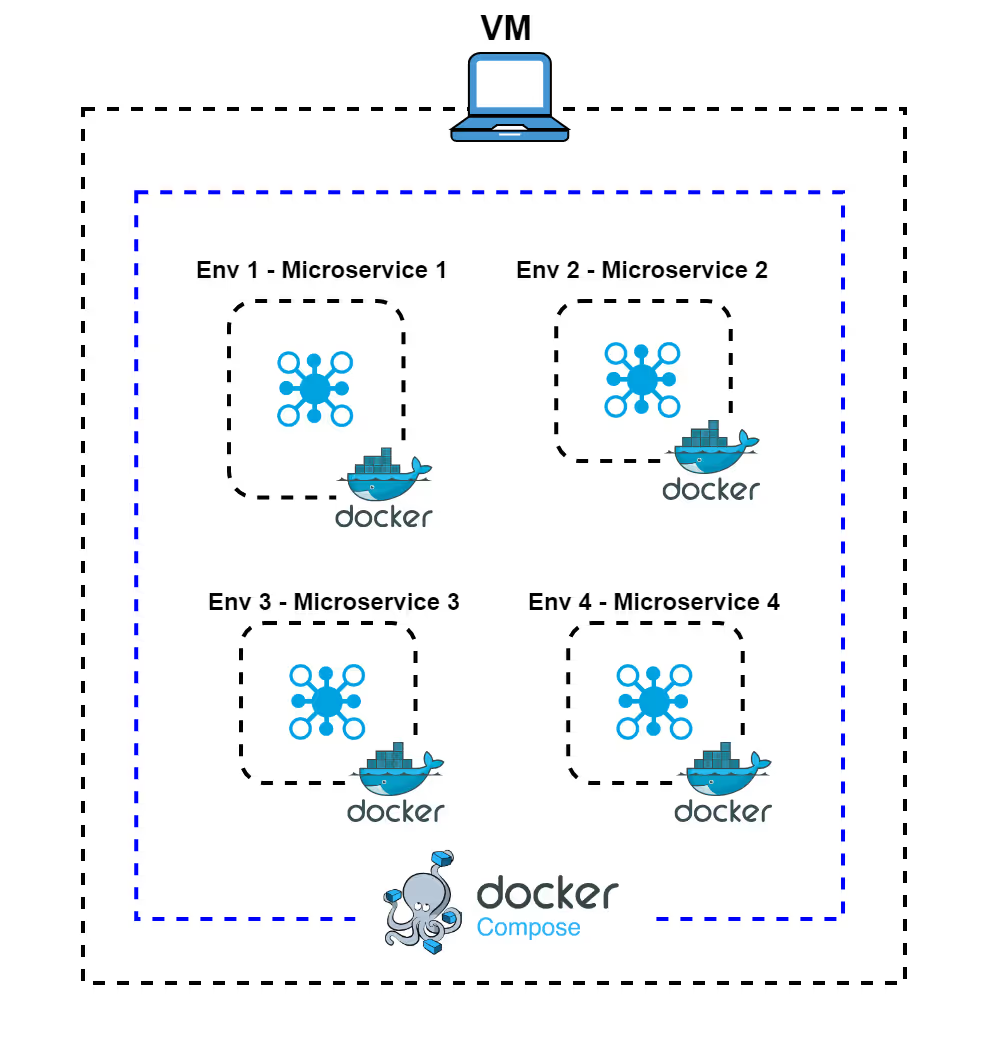
In this approach to creating ephemeral environments, all microservices are deployed together on a single, powerful machine or virtual machine (VM). Services are containerized and orchestrated using tools like Docker Compose or a single-node Kubernetes cluster. All the containers run side by side on one large EC2 instance with large CPU and memory resources. It is a relatively simple solution but has its disadvantages. Let’s go through the pros and cons of this approach:
-
Advantages:
- Quick Setup: It is best for small teams or simpler applications where you can get all ephemeral environments up and running quickly without the complexity of managing multiple clusters.
- Simplified Development Environment: With all ephemeral environments running on the same machine, debugging and testing interactions between services is straightforward.
-
Considerations:
- Limited Scalability: As all microservices are deployed on a single instance, it can be challenging to scale the environment horizontally. This makes it less suitable for larger applications with high traffic or resource demands.
- Resource Contention: If one microservice consumes too much CPU or memory, it might impact the performance of other services running on the same instance.
Cannot be a Production Replica: Running all services on a single node does not accurately mimic a distributed production setup, which can lead to unexpected issues when deploying to a multi-node production cluster.
Option 2. Deploy in Namespace
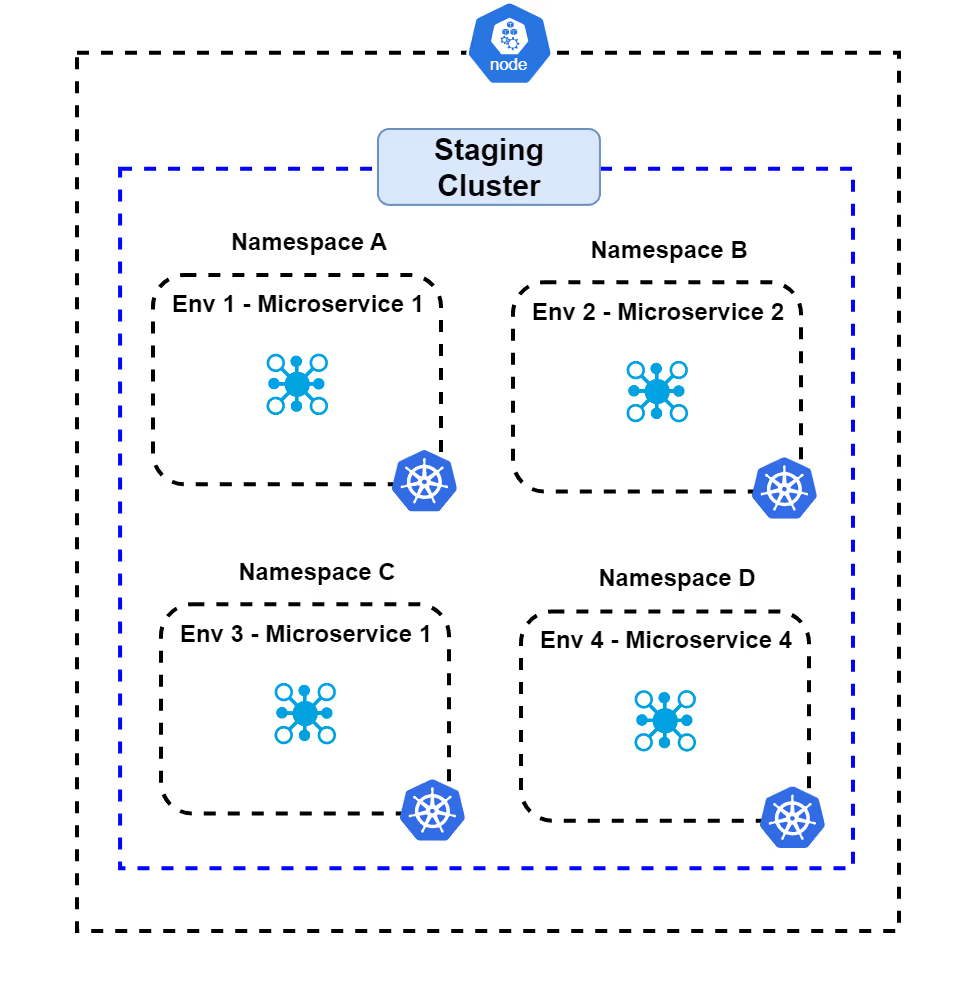
With this approach, each ephemeral environment is isolated using Kubernetes namespaces within a shared cluster. This is a form of logical isolation where all ephemeral environments are in separate namespaces with each namespace having its own resource quota and limits.
- Advantages:
- Decent Isolation: Although part of the same cluster, namespaces still provide a decent layer of isolation between environments. You can manage resource quota and limits separately for each ephemeral environment in its own namespace.
- Centralized Management: As all the ephemeral environments are part of the same cluster, so management of the ephemeral environments is centralized.
- Considerations:
- Management Complexity: With a large number of namespaces, managing and maintaining them can become complex, especially if all you want to do is to test a small change in just one of the microservices. Note that you have to manage not just the setup and policies, quotas, but access controls for each ephemeral environment too.
- Resource Overhead: Each namespace can introduce additional resource overhead, especially if they have their own resource quotas and limits. This can lead to inefficient resource utilization.
- Performance Impact: A high number of namespaces can impact the performance of the Kubernetes control plane, as it has to manage and keep track of all the namespaces and their associated resources.
- Security Risks: The more the namespaces, the larger the attack surface, which increases the security risk.
- Synchronization Complexity: Keeping all the separate microservices copies up to date with the master can be challenging, especially as release velocity increases.
For a deeper look at where this model works and where it breaks down, see Kubernetes namespace vs cluster: pros and cons for test environments.
Option 3. Deploy in Separate Clusters
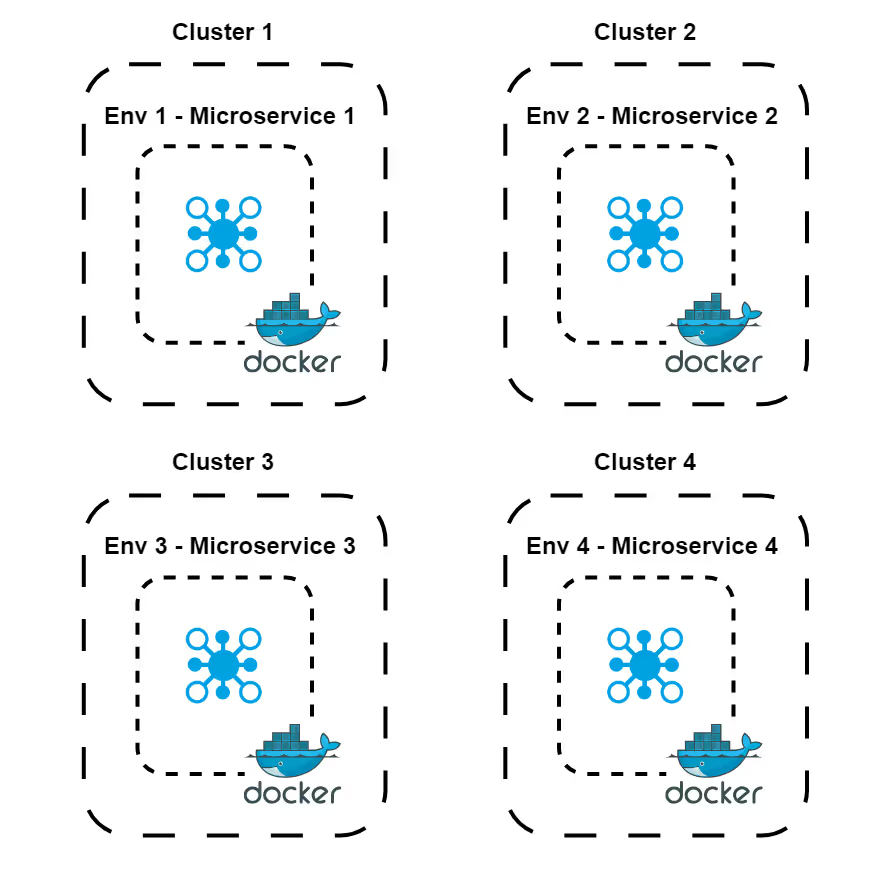
This approach involves deploying each ephemeral environment within its own Kubernetes cluster. As a result, you get ephemeral environments that are highly isolated and completely independent from each other. Here are some of the pros and cons of this strategy:
-
Advantages:
- Total Isolation: Each cluster operates independently, so any issue in one environment, like crashes, will not affect others.
- Customizable Configurations: You can customize each cluster for specific testing needs, such as network policies or Kubernetes versions. With the individual customization for each cluster, teams can experiment and replicate production environments without affecting others.
-
Considerations:
- High Resource Costs: Deploying each ephemeral environment in its own cluster requires substantial resources, driving up cloud costs. This is because each feature branch needs its own cluster requiring more CPU, memory, and storage.
- Added Complexity: Managing multiple clusters adds operational overhead. For each cluster, you will need to manage its own configuration, security policies, and maintenance. This might be an overkill for small or simple applications, e.g. a monolith MVP application.
- Longer Setup Times: The greater the number of clusters, the longer it will take to set up each one. This will potentially slow down the overall development time.
Synchronization Complexity: Each microservice in separate clusters needs to be kept synchronized with the master branch, which can be difficult as the number of services and release velocity increases. This becomes especially challenging as each microservice is deployed independently.
Option 4. Deploy in a Shared Cluster with Tunable Isolation
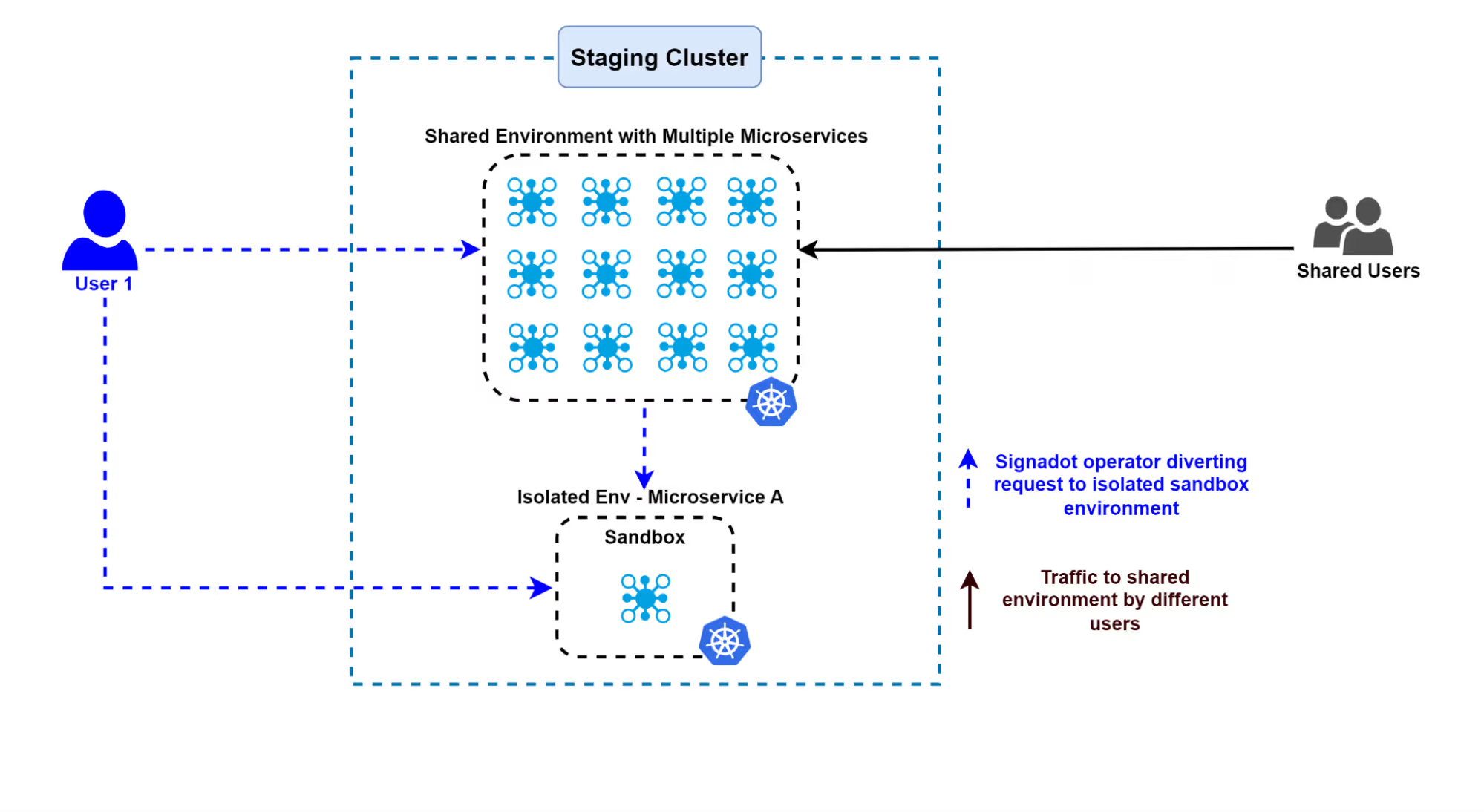
In this model, all ephemeral environments exist within a single shared cluster, where isolation levels can be adjusted to fit different needs, such as controlling how requests are routed to specific environments. This approach typically involves using a baseline environment, which acts as the core shared environment, and sandboxes that isolate changes from each code change. A sandbox is an ephemeral environment created on top of the baseline. It allows developers to test changes independently without disrupting the core environment. Below, we explore how this method ensures efficient resource usage and testing without interference:
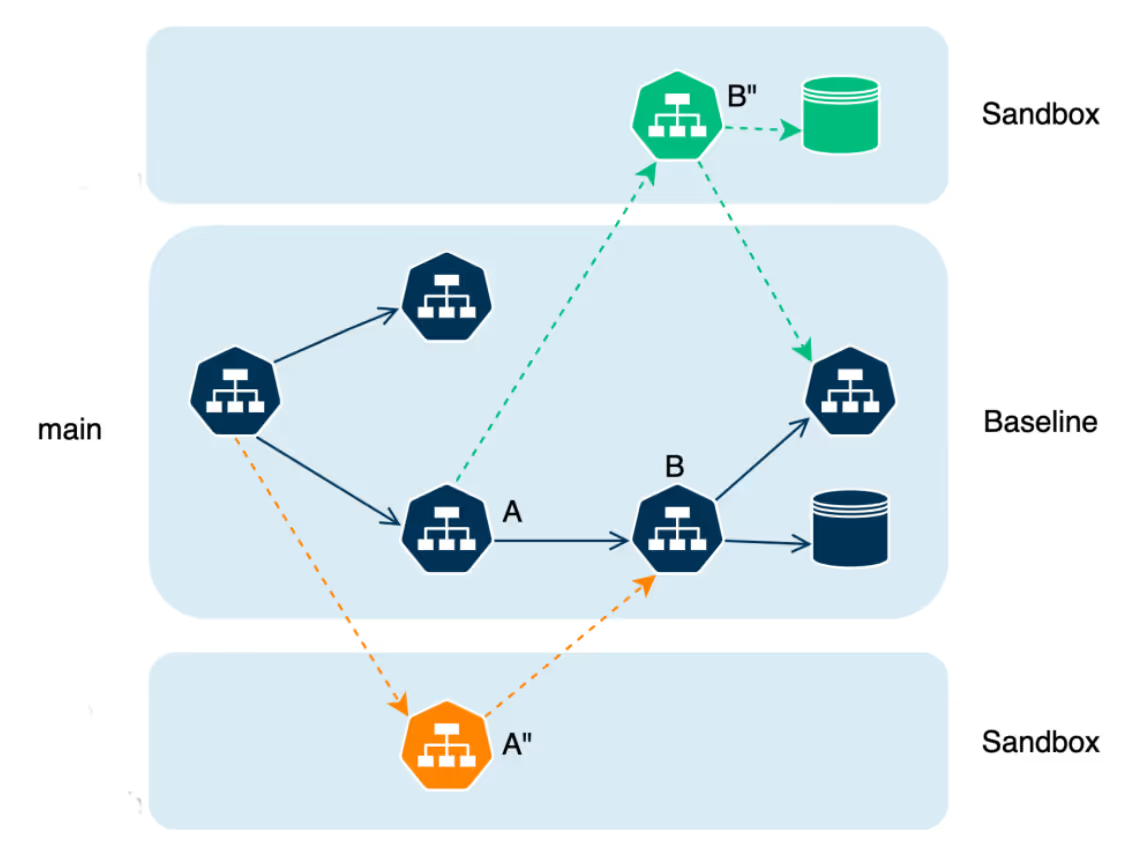
This shared cluster can be used collaboratively by multiple developers and QA teams. It uses minimal resources and is ideal for situations where cost efficiency is a high priority.
- Advantages:
- Efficient Use of Resources: Optimizes existing resources, lowering the overall infrastructure cost.
- Encourages Team Collaboration: Teams can work in parallel within the same cluster instead of spinning up new ones.
- Centralized Operations: Easier to maintain and manage as all environments are within a single cluster.
- Considerations:
- Keeping the baseline environment stable: It is important to ensure that the baseline is well tested and stable, as instability can interfere with testing of other microservices. A strong CI/CD process with sufficient checks can help maintain stability.
- Need for a strong data isolation strategy: If deploying in a production environment, a robust data isolation strategy is necessary to avoid conflicts. However, in staging environments, the data isolation bar may not be as high.
Signadot: Best of Both Worlds
Signadot implements tunable isolation in a shared environment strategy and provides all the cost benefits of a shared staging cluster while still providing the required isolation by uniquely routing to isolated sandboxes. This allows you to deploy your bug-fixed microservice in its own ephemeral environment. As a result, you avoid the common issues associated with shared clusters, such as one service breaking the application being tested by another team. This approach ensures scalable microservices testing without compromising cost efficiency.
This combination of quick, cheap, and high-fidelity is also what makes the shared-cluster model the right fit for AI-driven development. An agent does its best work when it can close the loop on its own: make a change, run it against real dependencies, read the result, fix, and repeat, without waiting on a human or queuing for a shared environment. Sandboxes give the agent that isolated environment layer. On top of it, Signadot adds a validation layer with SmartTests, Jobs, and Plans for functional and non-functional checks, so the agent can validate AI-generated code against real Kubernetes dependencies and open verified pull requests rather than unverified ones.
Spin up your first Kubernetes sandbox on your existing cluster in minutes. No duplicated infrastructure, no staging queue. The free tier is open to every developer.
Factors Influencing Your Ephemeral Environment Strategy
Let’s go through some of the factors that will impact your decision on which option to adopt.
Branching Strategies
Trunk-Based Development
For teams practicing trunk-based development, where small and frequent commits get integrated straight into the main branch, the Microservices In-a-Box and Deploy in Shared Cluster models tend to be the most practical options:
- Microservices In-a-Box lets developers do quick and straightforward testing of incremental changes right on their local machines. As there is minimal effort required for the setup, you can achieve rapid feedback cycles.
- Deploy in a Shared Cluster is well-suited for scenarios that demand rapid deployments. This model supports quick provisioning and de-provisioning of environments within a shared cluster. That way, you can commit code frequently, and your builds will align with trunk-based workflows.
Feature Branches
When it comes to teams using feature branch workflows, where every feature gets its own branch, we have following choices:
- Deploy in Namespace strikes a balance by offering isolated environments for each feature branch, all within a single cluster. This approach helps maintain separation while keeping resources efficiently shared.
- Deploy in Separate Clusters is the go-to model if you prefer isolation over cost. It’s especially helpful for teams working on features that require strict separation due to compliance or security requirements.
- Deploy in Shared Cluster with Routegroups: While traditionally the shared cluster approach may not be ideal for feature branches due to isolation concerns, tools like routegroups (see Signadot Routegroups) enable routing between feature branches more efficiently. This makes it a viable third option that offers tunable isolation without requiring completely separate clusters.
Deployment Velocity
High Deployment Frequency
For teams with high deployment frequency, the Deploy in Shared Cluster model is often the best match:
- This option makes it easy to provision and remove environments quickly, which is vital for continuous integration and deployment pipelines.
- Shared resources and smart routing help minimize setup time, which is ideal for teams that need to deploy fast and frequently.
Moderate to Low Deployment Frequency
Teams with a more moderate deployment cadence might consider the Deploy in Namespace model:
- This approach provides a good balance between resource use and environment isolation, making it well-suited for regular (but not necessarily rapid) deployments.
- For lower deployment frequencies, Microservices In-a-Box may be sufficient for smaller applications, whereas Deploy in Separate Clusters works better if complete isolation is worth the cost.
Resource Efficiency
When optimizing resource usage is a key goal, Microservices In-a-Box and Deploy in a Shared Cluster offer the most efficient solutions depending on the number of microservices:
- Microservices In-a-Box minimizes resource consumption by running all services on a single machine, best for small-scale projects. For more ways to slim down dev and test setups, see our guide to lightweight Kubernetes environments.
- Deploying in a Shared Cluster lets you run multiple environments within a single cluster. This maximizes resource efficiency as the number of environments grows. However, as the number of microservices increases, resource contention may occur and requires careful management to prevent performance bottlenecks.
Scalability and Growth
When more ephemeral environments are added, scalability becomes a key factor in determining which approach is best. Depending on how easily you can manage multiple copies of services and ensure efficient resource use, some methods will scale better than others. Let’s take a look at which strategies perform best in terms of scalability.
- Deploy in Separate Clusters: This option provides the best scalability since you can add more clusters without affecting existing ones. Each cluster operates independently, offering complete isolation. This allows teams to develop and test in parallel without resource contention. It also enables customized configurations per cluster to suit specific needs. However, this approach significantly increases complexity and cost due to the need for multiple copies of services across clusters.
- Deploy in a Shared Cluster with Tunable Isolation: This option is cost-efficient and can scale well with the addition of more microservices. It allows multiple ephemeral environments to coexist within a single cluster by adjusting isolation levels as needed. This maximizes resource utilization and simplifies management since all environments are centralized. Managing the baseline environment becomes crucial as more ephemeral environments are added and requires strong coordination to keep services synchronized.
Ephemeral vs Static Environments
A static environment such as shared staging runs continuously and serves every team at once. That model, reasonable for simpler monoliths, breaks down for microservices in three ways:
- Resource contention: multiple teams competing for one shared environment creates queues that stretch development cycles by days or weeks.
- Test interference: overlapping deployments collide, and test failures become nearly impossible to attribute to a root cause.
- Configuration drift: long-lived environments diverge from production, producing the familiar “it works in staging” failures at release time.
Audits regularly find shared staging idle 60 to 80 percent of the time while still consuming resources around the clock, so teams pay continuously for an environment that also blocks them. As one engineering leader at a Fortune 500 fintech put it: “When developers spend more time waiting for environments than writing code, you’re not just paying for infrastructure inefficiency; you’re paying for lost opportunities.”
The measurable gains from switching are consistent across teams that publish numbers: infrastructure cost reductions of 85 to 90 percent when duplicated environments are replaced with request-level isolation, roughly 80 percent fewer production incidents from testing against real dependencies before merge, and order-of-magnitude faster feedback. Brex saves about $2 million annually after replacing per-developer environment copies with sandboxes, and DoorDash cut feedback loops from over 30 minutes to under two.
Coding agents raise the stakes further. Agents open pull requests in parallel and around the clock, so the number of changes in flight jumps well past what a single shared environment can absorb. Even the conventional fix, duplicating the stack per change, fails at that volume on both cost and spin-up speed. Request-level isolation is the model that holds up: one shared baseline, only the changed services deployed per sandbox, and a marginal cost per environment close to zero, so hundreds of agent and pull-request environments fit on one cluster.
Rolling Out Ephemeral Environments Without the Common Pitfalls
Teams that make the transition smoothly tend to follow the same sequence. Start with an audit of current environments: how often teams queue, where configuration drift bites, and what the always-on footprint costs. Pick a pilot team with frequent pull requests, real service dependencies, and an existing CI pipeline rather than attempting a big-bang migration. And decide deliberately between building and buying: homegrown ephemeral-environment systems typically absorb 6 to 12 months of platform engineering effort before they are dependable, which is time most teams would rather spend on product.
Four pitfalls account for most failed rollouts:
- Stateful and asynchronous dependencies. Databases, Kafka, SQS, and third-party APIs need a plan. Share the baseline’s stateful resources where tests tolerate it, use per-sandbox ephemeral resources where they do not, and use message-level isolation with per-sandbox consumer groups for queues.
- Observability. Environments that disappear take their evidence with them. Persist logs and traces centrally beyond teardown, and rely on distributed tracing to follow requests across sandboxed and baseline services.
- Culture and process. Teams used to long-lived environments, QA especially, need training, documentation, and early wins rather than a mandate.
- Security and compliance. Regulated teams should design RBAC, secrets management, and audit trails into the environment model from the start rather than retrofitting them.
Conclusion
Choosing the right ephemeral environment strategy in Kubernetes depends on factors such as scalability, isolation, cost efficiency, branching strategy, deployment frequency, and budget constraints. For teams prioritizing rapid deployment and cost-effectiveness, models like Microservices In-a-Box or Deploy in Shared Cluster are ideal. If your focus is on isolation due to security or compliance needs, Deploy in Namespace or Separate Clusters offers stronger separation at the cost of added complexity and resource usage. At the end of the day, it is your technical and business needs that will drive the selection of the most suitable model.
That choice matters more now than it used to. As agents write a growing share of the code, the environment is where validation either happens or stalls. Environments that are fast and cheap to create but still high fidelity are no longer just a developer-velocity nicety, they are what lets agents verify their own changes against real dependencies and keep continuous delivery moving. The shared-cluster model with tunable isolation is the one that holds up under that load.
Signadot brings tunable isolation to your shared Kubernetes cluster, so teams test in parallel against real dependencies at a fraction of the cost of duplicating environments.
Frequently asked questions
What are ephemeral environments?
Ephemeral environments are short-lived, on-demand environments created to test a specific code change, then torn down once it ships. In Kubernetes they give each change an isolated, production-like place to run against real dependencies without standing up a full staging copy.
What is an ephemeral test environment?
An ephemeral test environment is a temporary environment spun up for a single test run or pull request and destroyed afterward. It can take the form of a namespace, a virtual cluster, a separate cluster, or a sandbox on a shared cluster with request-level isolation.
How do ephemeral environments work in Kubernetes?
There are four common models: running all services on a single machine, isolating each environment in its own namespace, provisioning a separate cluster per environment, or sharing one cluster and isolating each change at the request level. Each model trades off cost, fidelity, spin-up speed, and maintenance differently.
What is the difference between ephemeral and static environments?
A static environment such as shared staging is long-lived and shared by every team, so it drifts from production and becomes a bottleneck. An ephemeral environment exists only for the change it validates, which keeps it clean, current, and free of contention.
How much do ephemeral environments cost?
It depends entirely on the isolation model. Duplicating the full stack per change scales cost with services times concurrent changes, which is why homegrown preview systems get expensive. Request-level isolation on a shared cluster deploys only the changed services, so the marginal cost of another environment is close to zero. Teams replacing duplication with this model report 85 to 90 percent lower infrastructure cost, and Brex saves about $2 million annually.
How do ephemeral environments handle databases, Kafka, and other stateful dependencies?
Three patterns cover nearly every case: share the baseline environment's databases and queues when tests tolerate shared state, attach per-sandbox ephemeral resources such as a temporary database when they do not, and isolate message queues at the message level, where producers tag messages with a routing key and each sandbox's consumers process only their own messages through dedicated consumer groups.
Do ephemeral environments work with Istio and other service meshes?
Yes. Request-level isolation composes naturally with a mesh: the platform propagates a routing key in request headers and the mesh routes each request to the sandboxed or baseline version of a service. Signadot integrates with Istio, including ambient mode, and also works without a mesh by handling routing through its own lightweight sidecars.