
Kubernetes Namespace vs Cluster: Pros and Cons for Test Environments
Namespaces, separate clusters and vCluster compared as Kubernetes test environments: where namespaces work, where they break as teams grow, and why teams move to routing on a shared baseline.
Namespace-based environments give each team or developer a logical slice of a shared Kubernetes cluster to test in. They are cheap, they are built into Kubernetes itself, and a small team can be up and running with them in an afternoon. They are one of four ways to replace a single shared environment, compared in the complete guide to staging environments, and the complete guide to Kubernetes testing sets them beside local clusters, virtual clusters and full copies. The trouble arrives later, when the number of services and teams grows and keeping every namespace in sync quietly becomes a full-time job. This is an honest look at what namespaces do well as test environments, where they break down, and what teams adopt when they outgrow them.
| Pros | Cons |
|---|---|
| Simple to set up, core to Kubernetes | Each namespace needs its own datastores and seed data |
| Cheap logical isolation within one cluster | No built-in way to keep namespaces in sync |
| Per-namespace RBAC and resource quotas | Spin-up time grows with app complexity |
| Familiar kubectl workflow | Often unmaintained and unreliable at scale |
What a namespace actually gives you
A namespace is a logical partition inside a single Kubernetes cluster. It groups a set of resources, pods, services, volumes, and so on, so they can be managed and access-controlled as a unit while still sharing the cluster with everything else.
Creating one is about as easy as anything gets in Kubernetes: define the namespace in a YAML file, run kubectl apply -f namespace.yaml, and deploy your application into it with the --namespace flag. Every kubectl command can be pointed at your namespace, or default to it, so you can experiment freely without worrying about wrecking another team’s services. You get per-namespace RBAC and resource quotas, and because namespaces are core to the Kubernetes spec, you are not depending on obscure add-ons. Namespaces are not fully sealed off from each other either, which is handy for testing: every service gets a DNS entry of the form <service-name>.<namespace-name>.svc.cluster.local, so if you know a service’s name and namespace, you can reach it from anywhere in the cluster.
Namespaces have plenty of uses, but this piece is about one in particular: functional testing, where each engineer gets a production-like environment to try their code in before it merges.
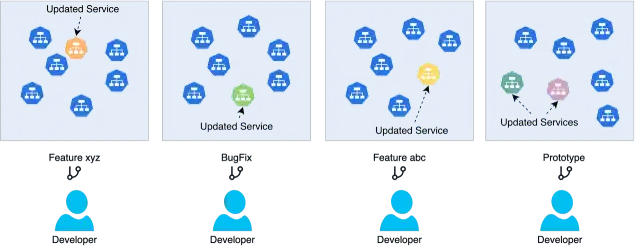
Four developers, four namespaces, four copies of the environment to keep up to date.
Namespace vs cluster vs vCluster
Namespaces are one of three isolation boundaries teams reach for, so it is worth placing them side by side. A namespace is a logical partition inside one cluster: cheap, simple, and isolated at the application level. A separate cluster is the opposite extreme, a fully independent control plane and data plane, with the strongest isolation and the highest cost. A virtual cluster (vCluster) sits in between: a virtual control plane running inside a host cluster, which gives each tenant cluster-level isolation without another physical cluster to pay for.
| Namespace | vCluster | Separate cluster | |
|---|---|---|---|
| Isolation level | Application / resource | Control plane (virtual) | Full (physical) |
| Relative cost | Lowest | Low to medium | Highest |
| Blast radius | Shared control plane | Isolated control plane | Fully isolated |
| Setup and management | Simplest | Moderate | Most complex |
| Best for | Lightweight separation in one cluster | Strong isolation without new clusters | Hard multi-tenancy or compliance |
In practice, namespaces and vClusters solve similar problems. Both partition a shared cluster, both support quotas and role-based access control, and both let teams make changes independently. The difference is depth: a namespace shares one control plane with every other tenant, while a vCluster gives each tenant its own API server, operators, and CRDs, at the price of more moving parts. For PR environments, the vCluster alternatives page compares a virtual cluster per pull request with environments that copy only what changed. A separate physical cluster remains the strongest boundary, and the right one for hard multi-tenancy or compliance, but it is the most expensive and the slowest to provision.
Here is the thing, though: for testing, the choice of boundary matters less than you would hope. Whichever unit you pick, namespace, vCluster, or cluster, a test environment still needs its own copies of services, datastores, and seed data, and something has to keep all of it in sync. That problem is the real subject of this post, and it is why many teams eventually skip stronger partitioning altogether in favor of sandboxes on a shared cluster that duplicate only what changed. More on that at the end.
Where namespaces start to break down
First, remember what the namespace is for. The point of handing a team its own namespace is more accurate testing: spin up the services and resources you need, run your changes against them, and trust the result. Some teams deploy everything into the namespace; others deploy a subset and mock the rest to save money.
That accuracy is exactly what erodes first. Say you create namespaces for two large teams, team-jacob and team-edward. There is no built-in way to keep those namespaces in sync. Changes to datastores, changes to third-party APIs, even routine updates to services neither team is touching, all of it has to be propagated by hand. And while running many namespaces is certainly simpler than running many clusters, it is not much cheaper: the storage and compute for all those duplicated services cost nearly the same wherever the boundary sits.
I got a vivid picture of how this plays out from an enterprise operations team that had used namespaces heavily for several years. Early on they were delighted: every team had free rein in its own namespace, and testing accuracy went up. Then the app grew. Spinning up all the services in a namespace took longer and longer, and the needs of different teams caused their namespaces to diverge. There was no simple way for a developer to tell whether their namespace was up to date, so a passing test stopped meaning much about what would happen on staging.
Ownership made it worse. Product teams are clearly delineated; operations teams usually are not. Individual namespaces had no owner on the platform side, so when one went stale, nobody was answerable for it. The end state was a collection of half-maintained namespaces that nobody trusted. One by one, developers stopped using them and went back to feature flags and testing on staging, which is exactly the situation the namespaces were supposed to fix.
The mocking trap
Faced with that upkeep, any sensible team starts looking for things to stop maintaining. Instead of updating the namespace every time a third-party API changes, why not mock its responses? The response format changes far more slowly than the service itself. Instead of running a pile of unrelated services, why not emulate them with a localstack-style tool?
Each of these swaps buys stability and costs fidelity. The stack gets easier to maintain and less like production at the same time, and the risk of surprises between development, staging, and production goes right back up. Test fidelity was the whole reason we handed out namespaces in the first place. Follow the mocking logic far enough and you end up with an environment so hollowed out that you might as well mock everything and run it on a laptop. Which layers of testing can safely use a mock, and which need the real dependency, is the subject of our complete guide to microservices testing.
Deploy-time bugs live in data and dependencies
There is a reason fidelity keeps coming up. The bugs that surface at deploy time overwhelmingly come from two places: data and dependencies.
Namespaces make the compute side easy, since your services run in the real cluster alongside everyone else’s. Data is the hard part. To be isolated, each namespace needs its own datastore instance, whether that is a managed cloud database or a containerized one inside the cluster, and something has to create those temporary databases and load the right seed data every time an environment spins up. That is a real system you have to build and operate. Third-party dependencies are no better off; a namespace does nothing special to help you test against them.
Who hasn’t had code fail in production because only the production database contained little Bobby Tables?
What teams move to
To be fair to namespaces: they work well for simple apps with a handful of services, they work for teams with dozens of engineers, and they can keep working at large scale if someone actively maintains them. But the failure mode is a vicious cycle. The moment maintenance slips, sync problems multiply, developers hit bugs that are really environment drift, and they quietly route around the whole thing.
The teams that scale past this tend to land on the same insight: deploy only what changed, and share everything else. In a discussion on a private Slack (quoted with permission), Mason Jones described how his previous company got there:
At my previous company as we scaled up we used a shared dev/test cluster and built our own tooling to provide on-demand namespaces. A namespace isn’t a “dedicated instance of infra”, it’s just a logical space in which devs can deploy their own version of something. We often used it with one namespace per team. They only deployed the containers they were changing, and used the shared instances of everything else, so it was actually quite economical. […] there are “hidden” complications to making this work, no question. We customized our service mesh so that requests to another service would first try to target a version of the service in the same namespace, and if there wasn’t one then the request would go to the shared namespace. That allowed devs to run a custom version of a service privately, while others could use the shared one.
Notice what did the heavy lifting there. It was not the namespace; it was the request routing layered on top of a shared baseline. Lyft, Razorpay, and DoorDash all arrived at versions of the same approach, letting individual developers run just the service under test against a high-fidelity shared environment. That approach, duplicating only what changed on a shared baseline, is what our guide to ephemeral environments in Kubernetes covers in depth.
If you want to talk about high-fidelity testing on Kubernetes at scale, or you hated this article and want to tell Nica about it, join the Signadot Slack and talk directly with the team.
Frequently asked questions
What is a namespace-based test environment?
It is a testing setup where each team or developer gets a dedicated Kubernetes namespace within a shared cluster to deploy and test their services, isolated at the application level from other namespaces.
What are the drawbacks of using namespaces for testing?
Each namespace needs its own datastores and seed data, there is no built-in way to keep namespaces in sync with each other or with production, spin-up time grows with application complexity, and namespaces often go unmaintained and unreliable as teams scale.
Do namespaces scale for large teams?
They work well for simple apps or smaller teams, and can work for large teams if actively maintained. At scale, sync and maintenance problems usually push teams toward a shared baseline instead, where each change duplicates only the services it touched and request routing sends its traffic to them.
What is the difference between a Kubernetes namespace and a cluster?
A namespace is a logical partition inside a single Kubernetes cluster, isolating resources at the application level. A cluster is a complete, independent Kubernetes environment with its own control plane and nodes. Namespaces are cheaper and simpler, while separate clusters give stronger isolation at higher cost.
What is a vCluster?
A virtual cluster (vCluster) is a virtual Kubernetes control plane that runs inside a namespace of a host cluster. It gives each tenant cluster-level isolation, including their own API server and CRDs, without the cost of provisioning a separate physical cluster.
Is a namespace the same as a virtual cluster?
No. A namespace isolates resources at the application level within one shared control plane, while a virtual cluster provides a separate virtual control plane, which is a much stronger isolation boundary.