Test Redis Streams Producers and Consumers with Signadot Sandboxes
Sandboxes route a request to the right version of a service by its routing key, which travels in request headers. A Redis stream breaks that chain: nobody calls a consumer, it reads entries on its own. So the routing key has to travel inside each stream entry, and every consumer, baseline and sandboxed alike, has to decide whether an entry is meant for it.
This tutorial deploys a small Python app to your Kubernetes cluster. A producer appends messages to
the Redis stream demo:messages, and a consumer reads the stream and calls a notifier. You fork each
of the three services into a sandbox, bundle them in a route group, and watch each message reach
exactly the right version of each service, on one shared Redis and one shared stream.
Full source: signadot/examples/selective-consumption-with-redis-streams/python
How Redis Streams changes the isolation problem
Deploy a changed consumer next to the baseline and leave everything else alone, and the two end up
in the same consumer group. Within a group, Redis hands each entry to whichever consumer calls
XREADGROUP next, without looking at the routing key, so the sandbox silently takes a share of
everyone's work and acknowledges it. The example avoids that in four steps:
- A consumer group per sandbox. The baseline reads through
demo-consumers; a sandbox reads throughdemo-consumers-<routing key>, created at$so it sees new entries only. Every group receives every entry. - The routing key inside the entry. Stream entries have no headers, so the producer adds the
OpenTelemetry context (
traceparentandbaggage) to each entry as extra fields, and the consumer reads it back out. - A check per entry, on both sides. Each consumer asks the
Signadot Routes API which routing keys belong to
sandboxes of the
consumerDeployment. The baseline skips those keys; a sandbox processes only its own key and the keys of route groups it is in. - An acknowledgement for every entry. Processed or skipped, every entry gets an
XACK, so nothing stays pending.
The Redis Streams integration guide covers the reasoning in depth, along with the alternative of a stream per sandbox and the operational details.
What you will deploy
Everything runs in the redis-streams-demo namespace:
- producer (port 4000):
POST /api/publishappends a message to the streamdemo:messages. It also serves the demo UI and an event log,GET /api/events, that shows which workload handled each step of a message. - consumer: reads
demo:messagesthrough a consumer group and calls the notifier for each message it processes. It has no Service, because nothing calls it. - notifier (port 4001):
POST /api/notifyrecords a notification. - redis: Redis 7.4, holding the stream and the demo's event log.
The three services run from one image, and the first argument picks which one starts
(python main.py producer, consumer or notifier). The producer and notifier Deployments carry
the sidecar.signadot.com/inject: "true" annotation, so DevMesh
can route the requests they receive to a sandbox. The consumer does not need it: no request ever
reaches the consumer, and which copy handles an entry is decided by consumer groups and the
per-entry check instead.
The files that matter:
selective-consumption-with-redis-streams/python/
├── app/                  # the three services: plain redis-py, Flask and requests
├── platform_redis/       # everything Signadot-specific
│   ├── client.py         # Redis: XADD with the OpenTelemetry context
│   ├── consumer.py       # StreamConsumer: groups, per-entry check, XACK, recovery
│   └── routes.py         # Routes API client
├── k8s/                  # Redis and the three Deployments
├── signadot/
│   ├── sandboxes/        # consumer.yaml, notifier.yaml, producer.yaml
│   └── routegroups/      # redis-streams-demo.yaml
├── Dockerfile
└── main.py
Before you begin
- A Kubernetes cluster with the Signadot Operator installed.
- The Signadot CLI, logged in with
signadot auth login. kubectlpointed at that cluster, andjq.- Docker, and a container registry your cluster can pull from.
This tutorial was tested with Signadot CLI v1.9.0, Operator v1.4.0 and Redis 7.4 on a Docker Desktop cluster.
1. Build the image
The three services run from one image. Build it and push it to your registry:
git clone https://github.com/signadot/examples.git
cd examples/selective-consumption-with-redis-streams/python

export IMAGE=docker.io/your-user/redis-streams-demo-python:latest  # your registry
docker build -t $IMAGE .
docker push $IMAGE
docker.io/your-user/... is a placeholder. When you build images of your own services this way,
push them to a private repository and give the cluster pull access to it, for example with an
image pull secret.
If your cluster's nodes have a different CPU architecture than your machine (for example an Apple
silicon Mac and an x86 cluster), add --platform linux/amd64 to docker build. On a local cluster
that runs images straight from your Docker daemon, you can skip the push.
2. Deploy the demo
Point the manifests at your image, then deploy Redis and the three services:
sed -i.orig "s|image: redis-streams-demo-python:latest|image: $IMAGE|" k8s/*.yaml

kubectl create namespace redis-streams-demo
kubectl apply -f k8s/
kubectl -n redis-streams-demo wait --for=condition=available deploy --all --timeout=180s
The sed command keeps the original manifests as k8s/*.yaml.orig, which kubectl apply ignores.
The consumer's Deployment tells the Routes API which baseline workload it is, and only reports ready
once it can actually route
(k8s/consumer.yaml):
          env:
            # Which baseline workload this is, for the Signadot Routes API.
            - name: SIGNADOT_BASELINE_KIND
              value: Deployment
            - name: SIGNADOT_BASELINE_NAME
              value: consumer
            - name: SIGNADOT_BASELINE_NAMESPACE
              valueFrom:
                fieldRef:
                  fieldPath: metadata.namespace
          # Ready once the consumer group exists and routing rules are loaded.
          readinessProbe:
            exec:
              command: ["cat", "/tmp/ready"]
            periodSeconds: 2
So when kubectl wait returns, the consumer group demo-consumers exists and the consumer has its
first answer from the Routes API. A sandbox forked from this Deployment inherits the same variables,
and the Signadot Operator adds SIGNADOT_SANDBOX_NAME and SIGNADOT_SANDBOX_ROUTING_KEY through
the sandbox downward API.
3. How the code carries the routing key
The app code is plain redis-py, Flask and requests. Everything Signadot-specific lives in
platform_redis/,
a thin wrapper over redis-py of the kind a platform team would ship, so app developers don't have to
think about sandboxes.
The application code
The producer uses platform_redis.Redis, a drop-in redis.Redis
(app/producer.py):
redis_client = platform_redis.Redis.from_url(REDIS_URL, decode_responses=True)
...
entry_id = redis_client.xadd(STREAM, message, maxlen=10_000, approximate=True)
The consumer hands a handler to platform_redis.StreamConsumer
(app/consumer.py).
The handler receives the entry's application fields and calls the notifier with plain requests:
def handle(entry_id, fields):
    message = {"id": fields.get("id", ""), "body": fields.get("body", "")}
    if PROCESSOR_VERSION == "v2":
        message["body"] = message["body"].upper()
    events.record(f"Consumed message from {STREAM} with processor {PROCESSOR_VERSION}: "
                  f"\"{message['body']}\"", message)
    # The requests instrumentation adds the entry's baggage (and routing key)
    # to this call.
    requests.post(f"{NOTIFIER_URL}/api/notify", json=message, timeout=10).raise_for_status()


def main():
    redis_client = platform_redis.Redis.from_url(REDIS_URL, decode_responses=True)
    consumer = platform_redis.StreamConsumer(
        redis_client, stream=STREAM, group=CONSUMER_GROUP, name=socket.gethostname(),
        on_ready=lambda: pathlib.Path("/tmp/ready").touch())
    consumer.run(handle)
PROCESSOR_VERSION is the "change" this tutorial tests: v1 keeps the message body as is, and v2
uppercases it.
Carrying the key on every hop
Underneath, OpenTelemetry carries the routing key on every hop. No tracing backend is involved: the instrumentation alone propagates the W3C trace context and baggage.
- HTTP: the Flask and
requestsinstrumentation read and forward thebaggageheader, which holdssd-routing-key. - Into Redis: stream entries have no headers, so
platform_redis.Redis.xaddadds the OpenTelemetry context (traceparentandbaggage) to the entry as extra fields. - Out of Redis:
StreamConsumerreads the context back from those fields and makes it current while the handler runs, so the handler's call to the notifier carries the key too.
Selective consumption
StreamConsumer also decides which consumer processes each entry:
- The baseline reads through the group
demo-consumers. A sandbox reads through its own group,demo-consumers-<routing key>, created at$so it sees new entries only. Every group gets every entry. - It asks the Signadot Routes API which routing keys
belong to sandboxes of the
consumerDeployment. The baseline skips those keys; a sandbox processes only its own key and the keys of route groups it is in. - It acknowledges (
XACK) every entry, processed or skipped, so nothing stays pending.
How platform_redis works, after the walkthrough, goes through the code that does this.
4. Send a message without a routing key
Connect your machine to the cluster, so that cluster service names resolve locally (this asks for your password):
export CLUSTER=my-cluster  # your cluster's name, from: signadot cluster list
signadot local connect --cluster=$CLUSTER
Port-forwarding sends traffic straight to a pod and bypasses DevMesh, so a request carrying the
producer sandbox's routing key would stay on the baseline producer.
signadot local connect sends your requests through the cluster's
services, where DevMesh routes them.
Publish a message:
PRODUCER=http://producer.redis-streams-demo.svc:4000
curl -X POST $PRODUCER/api/publish -H 'Content-Type: application/json' \
  -d '{"messageID": "m1", "messageBody": "hello m1"}'
Every service writes what it did to an event log that the producer serves. Define a helper that shows which workload handled each step of a message:
trail() {
  curl -s $PRODUCER/api/events | jq -r --arg id "$1" '.events[]
    | select(.context.message.id == $id)
    | "\(.context.baselineWorkload.name) (\(.context.sandboxName | if . == "" then "baseline" else . end)): \(.logEntry)"'
}
trail m1
producer (baseline): Publishing message to Redis stream demo:messages
consumer (baseline): Consumed message from demo:messages with processor v1: "hello m1"
notifier (baseline): Sent notification: "hello m1"
The event log is a second stream, demo:event-log, that exists only for this helper and the demo
UI. Each event records the workload's baseline name and, in a sandbox, the sandbox name.
5. Create the sandboxes
Each sandbox forks one service. The consumer sandbox also sets PROCESSOR_VERSION=v2, the "change"
under test, which uppercases message bodies
(signadot/sandboxes/consumer.yaml):
name: redis-streams-consumer
spec:
  description: "consumer sandbox for the Redis Streams demo (processor v2)"
  cluster: "@{cluster}"
  labels:
    demo: redis-streams
  forks:
    - forkOf:
        kind: Deployment
        namespace: redis-streams-demo
        name: consumer
      customizations:
        env:
          # The change under test: v2 uppercases message bodies.
          - name: PROCESSOR_VERSION
            value: v2
  defaultRouteGroup:
    endpoints:
      - name: producer
        target: http://producer.redis-streams-demo.svc:4000
The fork runs the same image as the baseline. In a real change it would run your branch's image
instead. Every sandbox exposes the producer as an endpoint, so each one gets a preview URL for the
demo UI. The route group bundles all three sandboxes under one routing key, by matching their
demo: redis-streams label.
signadot sandbox apply -f signadot/sandboxes/consumer.yaml --set cluster=$CLUSTER
signadot sandbox apply -f signadot/sandboxes/notifier.yaml --set cluster=$CLUSTER
signadot sandbox apply -f signadot/sandboxes/producer.yaml --set cluster=$CLUSTER
signadot routegroup apply -f signadot/routegroups/redis-streams-demo.yaml --set cluster=$CLUSTER
Save the routing keys:
CONSUMER_KEY=$(signadot sandbox get redis-streams-consumer -o json | jq -r .routingKey)
NOTIFIER_KEY=$(signadot sandbox get redis-streams-notifier -o json | jq -r .routingKey)
PRODUCER_KEY=$(signadot sandbox get redis-streams-producer -o json | jq -r .routingKey)
GROUP_KEY=$(signadot routegroup get redis-streams-demo -o json | jq -r .routingKey)
6. Send messages with routing keys
Define a helper that publishes with a routing key in the baggage header, as a preview URL or the
Signadot browser extension would:
publish() {
  curl -s -o /dev/null -X POST $PRODUCER/api/publish -H 'Content-Type: application/json' \
    -H "baggage: sd-routing-key=$2" -d "{\"messageID\": \"$1\", \"messageBody\": \"hello $1\"}"
}
The consumer sandbox
The sandboxed consumer takes the message and runs v2. The baseline consumer skips it, and the notifier call goes back to the baseline notifier:
publish m2 $CONSUMER_KEY; sleep 1; trail m2
producer (baseline): Publishing message to Redis stream demo:messages
consumer (redis-streams-consumer): Consumed message from demo:messages with processor v2: "HELLO M2"
notifier (baseline): Sent notification: "HELLO M2"
The notifier sandbox
The baseline consumer processes the message, and its call to the notifier lands on the sandbox: the routing key made it through Redis.
publish m3 $NOTIFIER_KEY; sleep 1; trail m3
producer (baseline): Publishing message to Redis stream demo:messages
consumer (baseline): Consumed message from demo:messages with processor v1: "hello m3"
notifier (redis-streams-notifier): Sent notification: "hello m3"
The producer sandbox
The request goes to the sandboxed producer, which publishes to the same stream as the baseline, and the baseline consumer handles the entry:
publish m4 $PRODUCER_KEY; sleep 1; trail m4
producer (redis-streams-producer): Publishing message to Redis stream demo:messages
consumer (baseline): Consumed message from demo:messages with processor v1: "hello m4"
notifier (baseline): Sent notification: "hello m4"
The route group
All three sandboxes handle the message:
publish m5 $GROUP_KEY; sleep 1; trail m5
producer (redis-streams-producer): Publishing message to Redis stream demo:messages
consumer (redis-streams-consumer): Consumed message from demo:messages with processor v2: "HELLO M5"
notifier (redis-streams-notifier): Sent notification: "HELLO M5"
What each message did
Together, the five messages cover every combination:
| Routing key | producer | consumer | notifier |
|---|---|---|---|
| none (m1) | baseline | baseline (v1) | baseline |
| consumer sandbox (m2) | baseline | sandbox (v2) | baseline |
| notifier sandbox (m3) | baseline | baseline (v1) | sandbox |
| producer sandbox (m4) | sandbox | baseline (v1) | baseline |
| route group (m5) | sandbox | sandbox (v2) | sandbox |
The consumer groups and logs
Look at the stream's consumer groups:
kubectl -n redis-streams-demo exec deploy/redis -- redis-cli XINFO GROUPS demo:messages
There are two groups, demo-consumers and demo-consumers-<consumer key>, and both show pending
0: each group received every entry and acknowledged the ones it skipped. The baseline consumer's
log shows each decision:
kubectl -n redis-streams-demo logs deploy/consumer | grep -E "processing|skipped"
... processing 1792725846853-0 (routing key None)
... skipped 1792725891917-0 (routing key fv51lmqum5pts)
... processing 1792725892981-0 (routing key x8nxnyx7xcndj)
... processing 1792725894049-0 (routing key cv8sn8btqsjmw)
... skipped 1792725895106-0 (routing key srud7xvwuckny)
Your entry IDs and routing keys will differ. In order, these are m1 through m5: the baseline processes the message with no key, skips the consumer sandbox's key, processes the notifier and producer sandboxes' keys (neither of those sandboxes forks the consumer), and skips the route group's key, because the route group includes the consumer sandbox.
The sandboxed consumer's log is the mirror image:
kubectl -n redis-streams-demo logs -l signadot.com/sandbox-routing-key=$CONSUMER_KEY --tail=-1 | grep -E "processing|skipped"
7. Try it in the UI
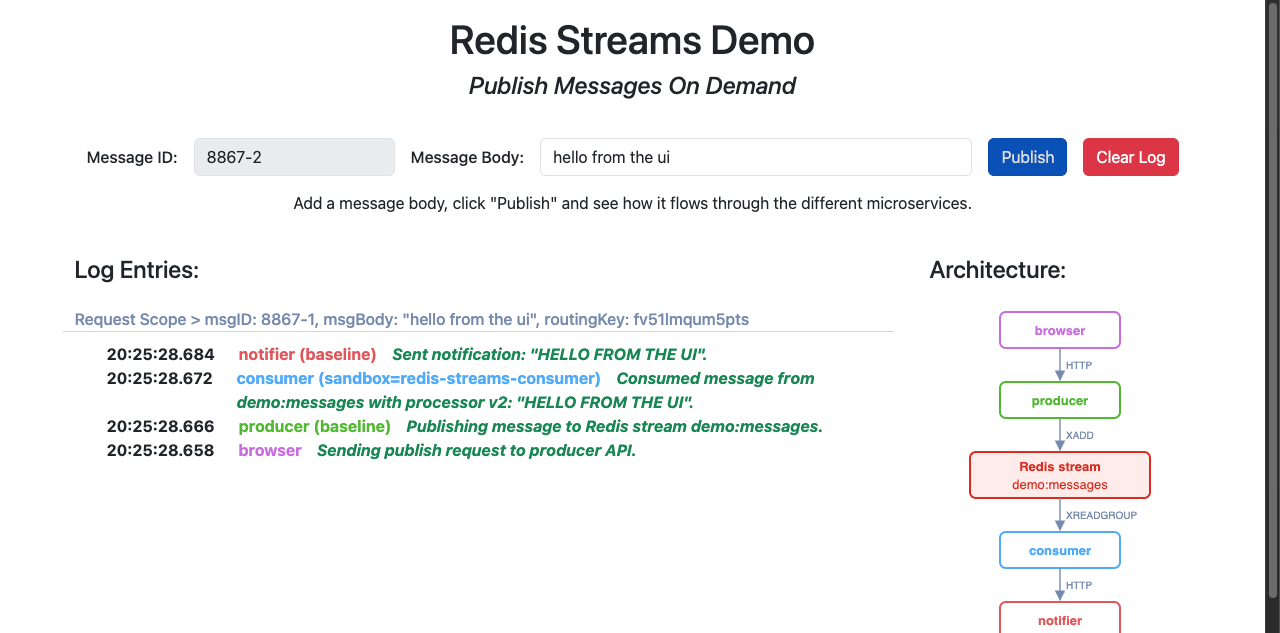
The producer serves a UI that shows each message's trail as it happens. Open
http://producer.redis-streams-demo.svc:4000 (it resolves while signadot local connect is running)
and use the
Signadot browser extension
to pick a sandbox or the route group. You can also open the preview URL that
signadot sandbox apply printed for each sandbox.
8. Clean up
Delete the route group and the sandboxes:
signadot routegroup delete redis-streams-demo
signadot sandbox delete redis-streams-consumer
signadot sandbox delete redis-streams-notifier
signadot sandbox delete redis-streams-producer
Redis doesn't remove a consumer group when its consumer goes away, so the consumer sandbox's group is still on the stream. With a Redis you keep, delete it yourself:
kubectl -n redis-streams-demo exec deploy/redis -- \
  redis-cli XGROUP DESTROY demo:messages demo-consumers-$CONSUMER_KEY
Then remove the demo and disconnect:
kubectl delete namespace redis-streams-demo
signadot local disconnect
How platform_redis works
Everything Signadot-specific is in three small files in
platform_redis/.
Context in and out of entries
platform_redis.Redis overrides a single method. This is the whole of
platform_redis/client.py:
class Redis(redis.Redis):
    def xadd(self, name, fields, *args, **kwargs):
        # Stream entries have no headers, so the W3C trace context and baggage
        # (which holds the Signadot routing key) travel as extra fields.
        carrier = {}
        propagate.inject(carrier)
        return super().xadd(name, {**fields, **carrier}, *args, **kwargs)
The OpenTelemetry Redis instrumentation does neither half of this: it only creates spans for Redis
commands. That is why the wrapper exists. StreamConsumer reads the context back out, as shown
below.
The consumer group
platform_redis/consumer.py picks the consumer group. A
sandbox never joins the baseline's group:
        # Never join the baseline's group from a sandbox: within a group each
        # entry goes to only one consumer, regardless of routing key.
        if self.in_sandbox:
            self.group = f"{group}-{self.rules.sandbox_routing_key}"
        else:
            self.group = group
and creates it at the right place in the stream:
        # A sandbox starts at "$" (new entries only) instead of replaying the
        # stream; the baseline starts at "0" so nothing published before its
        # first start is missed.
        start = "$" if self.in_sandbox else "0"
Each entry
For each entry it reads, it extracts the context, decides whether the entry is meant for this workload, runs the handler with the entry's context current, and acknowledges the entry either way:
            ctx = propagate.extract(fields)
            routing_key = baggage.get_baggage(ROUTING_KEY, ctx)
            app_fields = {k: v for k, v in fields.items()
                          if k not in propagate.get_global_textmap().fields}
            if not self._should_process(routing_key):
                log.info("skipped %s (routing key %s)", entry_id, routing_key)
                return
            log.info("processing %s (routing key %s)", entry_id, routing_key)
            # Make the entry's context current, so the handler's outbound
            # calls carry the routing key.
            token = context.attach(ctx)
            ...
        finally:
            # Acknowledge processed and skipped entries alike, or they stay in
            # this group's pending entries list forever.
            self.client.xack(self.stream, self.group, entry_id)
The routing decision
The decision itself is in
platform_redis/routes.py.
A background thread polls the Routes API every 5 seconds for the routing rules of the consumer
Deployment, and keeps two sets: the keys that route to any sandbox of it, and the keys that route
to this sandbox (its own key and the keys of route groups it belongs to). The same check runs in
the baseline and in a sandbox:
    def should_process(self, routing_key):
        if self.in_sandbox:
            # Process only what is routed to this sandbox.
            return routing_key is not None and (
                routing_key == self.sandbox_routing_key or routing_key in self._own_keys)
        # Baseline: process everything except what a sandbox has claimed.
        return routing_key not in self._sandbox_keys
An entry with no routing key, or with a key that belongs to a sandbox of some other service, stays with the baseline consumer.
Pending entries
StreamConsumer also recovers entries left pending. At startup it reads its own pending entries
(XREADGROUP with ID 0), and once a minute it uses XAUTOCLAIM to take over entries that
another consumer, such as a pod that was replaced, read but never acknowledged.
Behavior and tradeoffs
- Every group reads every entry. The data is stored once, but each sandboxed consumer reads the whole stream and skips most of it, so read load on Redis grows with the number of sandboxed consumers.
- A failed handler drops its entry.
StreamConsumeracknowledges every entry, including one whose handler raised an exception, so the failure is logged and the entry is not retried. - Routing changes reach the baseline within one poll. A sandbox knows its own routing key from the moment it starts, but the baseline learns about it on its next Routes API poll, up to 5 seconds later. In that window an entry with the new key can be processed by both.
- A consumer needs the Routes API to start. It reads nothing, and stays not ready, until its first Routes API answer. After that it keeps the last rules it fetched if a refresh fails.
- Sandbox consumer groups outlive their sandboxes. Destroy them with
XGROUP DESTROY, as in Clean up. decode_responses=Trueis required.StreamConsumerrefuses a redis-py client created without it.- Pipelined
XADDcarries no context. Onlyplatform_redis.Redis.xaddadds the context fields, so entries appended withpipeline().xadd(...)have no routing key and go to the baseline.
The integration guide covers these in more detail, along with leftover consumers, trimming, and how Redis Pub/Sub differs.
Adapt this to your stack
- Ship the wrapper in your shared code. Copy
platform_redis/into your platform library, or port its three pieces to your language: anXADDthat adds the OpenTelemetry context, a Routes API client with a polling cache, and a stream consumer that picks the group, checks and acknowledges every entry, and recovers pending ones. - Use it in your services. Producers create their client with
platform_redis.Redisinstead ofredis.Redis. Consumers replace theirXREADGROUPloop withStreamConsumer(...).run(handler); the handler receives the entry ID and the application fields. - Instrument HTTP. Use the OpenTelemetry instrumentation for your HTTP server and client
libraries, as
app/otel.pydoes for Flask andrequests, so the routing key reaches the producer and leaves the consumer. - Set the baseline identity (
SIGNADOT_BASELINE_KIND,SIGNADOT_BASELINE_NAME,SIGNADOT_BASELINE_NAMESPACE) on every consumer Deployment. Without it,StreamConsumerprocesses every entry, which is what you want in a cluster without Signadot. - Enable DevMesh on the services that receive requests, as the producer and notifier Deployments do.
- Destroy a consumer sandbox's group in whatever deletes the sandbox.
Frequently asked questions
How do you test a Redis Streams consumer without a separate Redis?
Fork the consumer into a sandbox that reads the shared stream through a consumer group of its own. Every group receives every entry, the routing key travels inside each entry as OpenTelemetry baggage, and both the baseline and the sandboxed consumer check each entry against the Signadot Routes API, so exactly one of them processes it. Nothing about Redis or the stream is duplicated.
Which services does this tutorial run in sandboxes?
All three, one sandbox each: the producer, the consumer, and the notifier the consumer calls. The consumer sandbox sets PROCESSOR_VERSION=v2, which uppercases message bodies, as the change under test, and a route group bundles the three sandboxes under one routing key. Redis and the stream demo:messages stay shared with the baseline throughout.
How can I tell which version of a service handled a message?
Every service records each step in the demo's event log, and the tutorial's trail helper prints, per message, which workload handled each step: baseline or the sandbox's name. Each consumer also logs a processing or skipped line for every entry, with its routing key, and XINFO GROUPS shows one consumer group for the baseline and one for the consumer sandbox, each with nothing pending.
Do I need a container registry to follow this tutorial?
You need an image your cluster can pull. The tutorial builds one image for all three services and pushes it to your registry; the Docker Hub name in the commands is a placeholder. If the registry is private, the cluster needs pull access to it, for example through an image pull secret. On a local cluster that runs images straight from your Docker daemon, you can skip the push. If you build on an Apple silicon Mac for an x86 cluster, add --platform linux/amd64 to docker build.
How do I apply this to my own Redis Streams services?
Ship the platform_redis wrapper, or a port of it, in your shared code. Producers create their client with platform_redis.Redis instead of redis.Redis, consumers replace their XREADGROUP loop with StreamConsumer(...).run(handler), and consumer Deployments set SIGNADOT_BASELINE_KIND, SIGNADOT_BASELINE_NAME and SIGNADOT_BASELINE_NAMESPACE. Add OpenTelemetry instrumentation for your HTTP server and client so the routing key reaches the producer and leaves the consumer.
Can I use kubectl port-forward instead of signadot local connect?
Not for this tutorial. kubectl port-forward sends traffic straight to a pod and bypasses DevMesh, so a request carrying the producer sandbox's routing key would stay on the baseline producer. signadot local connect sends requests through the cluster's normal service routing, where DevMesh can route them.
See also
- Redis Streams integration guide: the problem and both isolation patterns, in depth
- Message Queue Isolation: the other brokers
- Kafka: the same patterns on Kafka
- Testing Microservices with RabbitMQ: selective consumption on a different broker
- Header-Based Routing
- Sandbox specification