How to Test Asynchronous Google Pub/Sub Flows End to End with Sandboxes
Imagine a team building microservices that communicate asynchronously through Google Cloud Pub/Sub. Setting up every service locally against managed Pub/Sub is hard, so integration and end-to-end tests run in a shared staging environment, where one developer's test messages get processed by another developer's subscribers. Testing asynchronous workloads in isolation needs a way to keep each developer's messages with that developer's services, without a copy of the whole environment per developer.
This tutorial walks through that with Signadot sandboxes on a shared cluster. A publisher copies the routing key from each request into the message it publishes, each sandboxed subscriber reads from its own subscription, and every subscriber decides from the routing key whether a message is its to process. The approach is the same as for Kafka; this page covers what is specific to Pub/Sub.
Estimated time: 20 minutes.
How the demo app works
The demo is a small Node.js app on Google Cloud Pub/Sub:
- Frontend: a UI to send messages and view logs of how each one was processed.
- Publisher: publishes each message it receives to the
pubsub-demotopic. It copies the request'sbaggageheader, which carries the sandbox routing key, into the message. - Subscriber: receives messages from Pub/Sub and uses the routing key to decide whether to process or ignore each one.
- Redis: stores the log entries the frontend displays.
The publisher and the frontend run with the Signadot sidecar, which routes requests that carry a sandbox's routing key to that sandbox. The Signadot Operator's Routes API tells each subscriber which routing keys belong to which sandbox.
Two request flows follow from that:
- No matching routing key. The publisher sends a message with no routing key, or with a key no sandbox claims for the subscriber. Only the baseline subscriber, reading from its own subscription, processes it. Sandboxed subscribers ignore it.
- Matching routing key. The publisher sends a message whose routing key a subscriber sandbox claims. The sandboxed subscriber processes it and the baseline subscriber ignores it.
Before you begin
You need:
- A GKE cluster with Workload Identity enabled, and a Google Cloud project with the Pub/Sub API enabled.
- The Signadot Operator v0.15.0 or later installed in the cluster. The subscriber uses the Operator's Routes API.
- The Signadot CLI, logged in with
signadot auth login. kubectlpointed at that cluster,gcloudlogged in to the project, andgit.- The Signadot Chrome extension, to choose which sandbox your browser's requests are routed to.
Step 1: Deploy the demo app
Clone the demo and deploy Redis, the frontend, the publisher and the subscriber into a
pubsub-demo namespace:
git clone https://github.com/signadot/examples.git
cd examples/selective-consumption-with-google-pub-sub
kubectl create ns pubsub-demo
kubectl -n pubsub-demo apply -f k8s/pieces
The publisher and subscriber call Pub/Sub with Google's default credentials, and the subscriber
creates the pubsub-demo topic and its subscription on startup. Give them a Google service account
that can do that, through Workload Identity on their Kubernetes service accounts, publisher and
subscriber:
export PROJECT_ID=my-project
export GSA=pubsub-demo@$PROJECT_ID.iam.gserviceaccount.com

gcloud iam service-accounts create pubsub-demo --project=$PROJECT_ID
gcloud projects add-iam-policy-binding $PROJECT_ID \
  --member="serviceAccount:$GSA" --role=roles/pubsub.editor

for ksa in publisher subscriber; do
  gcloud iam service-accounts add-iam-policy-binding $GSA \
    --project=$PROJECT_ID \
    --role=roles/iam.workloadIdentityUser \
    --member="serviceAccount:$PROJECT_ID.svc.id.goog[pubsub-demo/$ksa]"
  kubectl -n pubsub-demo annotate serviceaccount $ksa iam.gke.io/gcp-service-account=$GSA
done

kubectl -n pubsub-demo rollout restart deployment publisher subscriber
kubectl -n pubsub-demo wait --for=condition=available deployment --all --timeout=5m
Sandboxes fork these Deployments with the same service accounts, so forked publishers and subscribers get the same access.
Forward the frontend to your machine:
kubectl port-forward service/frontend -n pubsub-demo 4000:4000
Step 2: Check the baseline behavior
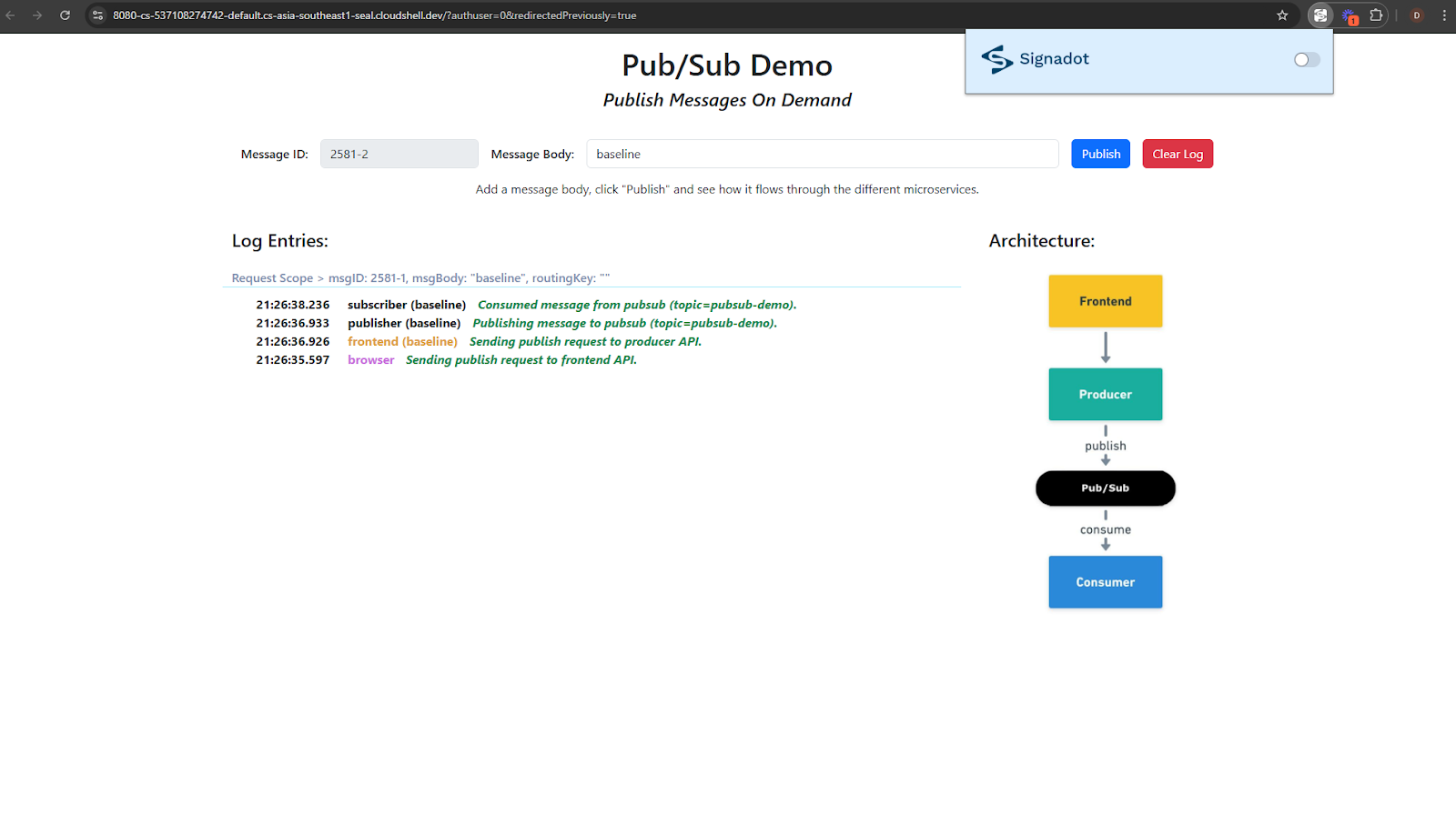
Open http://localhost:4000 and send a message. With no sandboxes created yet, the baseline subscriber processes it, and the log shows an empty routing key:
Step 3: How the publisher propagates the routing key
The publisher reads the routing key from the incoming request's baggage header and includes the
header in the message it publishes. In src/apps/publisher/app.js:
let routingKey = extractRoutingKey(req.get('baggage'));
// ...
publishMessages(pubsubTopic, msg, { baggage: req.get('baggage') })
publishMessages in src/modules/pubsub/pubsub.js wraps the message and its headers into the
Pub/Sub message data:
const dataBuffer = Buffer.from(JSON.stringify({
    value: JSON.stringify(message),
    headers: headers || {}, // Include headers if provided, or an empty object
}));

await pubSubClient.topic(topicName).publishMessage({
    data: dataBuffer
});
The demo keeps the headers in the data so its code matches the Kafka demo. In your own client
library, put the baggage in the message's attributes instead, so subscribers can read the routing
key without parsing the payload.
The publisher only carries the routing key. Deciding what to do with it is the subscriber's job.
Step 4: How the subscriber consumes selectively
The subscriber does three things.
It reads from its own subscription when it runs in a sandbox. The Signadot Operator injects a
SIGNADOT_SANDBOX_NAME environment variable into sandboxed pods. The subscriber appends it to the
subscription name, so the baseline reads from pubsub-grp and a sandbox named subscriber-sbx
reads from pubsub-grp-subscriber-sbx:
const groupId = 'pubsub-grp';

// This sets the consumer group with suffix '-' + <sandbox-name> if running in
// sandboxed workload, otherwise, it just returns the argument.
function signadotConsumerGroup(sGroupId) {
    if (sandboxName !== "") {
        sGroupId += '-' + sandboxName
    }
    return sGroupId
}
Pub/Sub delivers every message to each subscription, so the baseline and every sandboxed subscriber
each get a copy. On startup, initializePubSubResources creates the topic and the subscription if
they don't exist yet.
It learns which routing keys are its own from the Routes API. Every five seconds,
src/modules/routesapi-mq-client/pullrouter.js asks the Operator's route server
(routeserver.signadot.svc:7778) for the routing keys that apply to this workload, and caches them.
A sandboxed subscriber asks for the keys routed to its own sandbox; the baseline asks for every key
claimed by any sandbox that forks it.
It checks every message with shouldProcess. The subscriber reads the routing key from the
message's headers and skips messages that aren't its own:
function shouldProcess(routingKey) {
    const routingKeys = cache.get('routingKeys');
    if (sandboxName !== "") {
        // we are a sandboxed workload, only accept the received routing keys
        return routingKeys.has(routingKey)
    }
    // we are a baseline workload, ignore received routing keys (they belong
    // to sandboxed workloads)
    return !routingKeys?.has(routingKey)
}
The message handler in src/apps/subscriber/app.js, simplified here, parses the data, applies the
check, and acknowledges the message either way, since this copy was delivered to this
subscription only:
function callbackListener(message) {
    try {
        let data = JSON.parse(Buffer.from(message.data));
        consumerListener(JSON.parse(data.value), data.headers); // runs shouldProcess
        message.ack();
    } catch (error) {
        message.nack();
    }
}
If the subscriber calls other services, synchronously or through Pub/Sub, it should pass the
baggage header on as well, so the routing key reaches the next hop. Platform teams usually put
the subscription naming, the Routes API lookup, the check and the propagation in a shared Pub/Sub
client library, so product teams get selective consumption without writing it themselves.
Step 5: Create the sandboxes
Create one sandbox that forks the publisher, one that forks the subscriber, and a route group that
combines them. No change to either service's configuration is needed. Here is
signadot/sandboxes/subscriber.yaml:
name: subscriber-sbx
spec:
  labels:
    demo: "pubsub"
  cluster: "@{cluster}"
  forks:
  - forkOf:
      kind: Deployment
      name: subscriber
      namespace: pubsub-demo
  defaultRouteGroup:
    endpoints:
    - name: frontend
      target: http://frontend.pubsub-demo.svc:4000
The publisher sandbox, publisher-sbx, is the same with publisher in place of subscriber. Both
carry the label demo: pubsub, which the pubsub-demo route group matches. Set CLUSTER to your
cluster's name from signadot cluster list, then create all three:
export CLUSTER=my-cluster
signadot sandbox apply -f signadot/sandboxes/publisher.yaml --set cluster=$CLUSTER
signadot sandbox apply -f signadot/sandboxes/subscriber.yaml --set cluster=$CLUSTER
signadot routegroup apply -f signadot/routegroups/demo.yaml --set cluster=$CLUSTER
Step 6: Send messages and watch the routing
Use the Signadot Chrome extension to choose which sandbox, if any, your browser's requests to http://localhost:4000 are routed to, then send a message from the frontend for each scenario. You can also open the preview URLs printed by the commands above, which add the routing key for you.
Scenario 1: baseline publisher and baseline subscriber
With no sandbox selected, the message carries no routing key. The baseline subscriber processes it, and the sandboxed subscriber skips its copy.
In these diagrams, the labels on the arrows out of the topic are the two subscriptions, and a dashed box is a subscriber that skips its copy.
Scenario 2: baseline publisher and sandboxed subscriber
Select the subscriber-sbx sandbox in the extension and send a message.
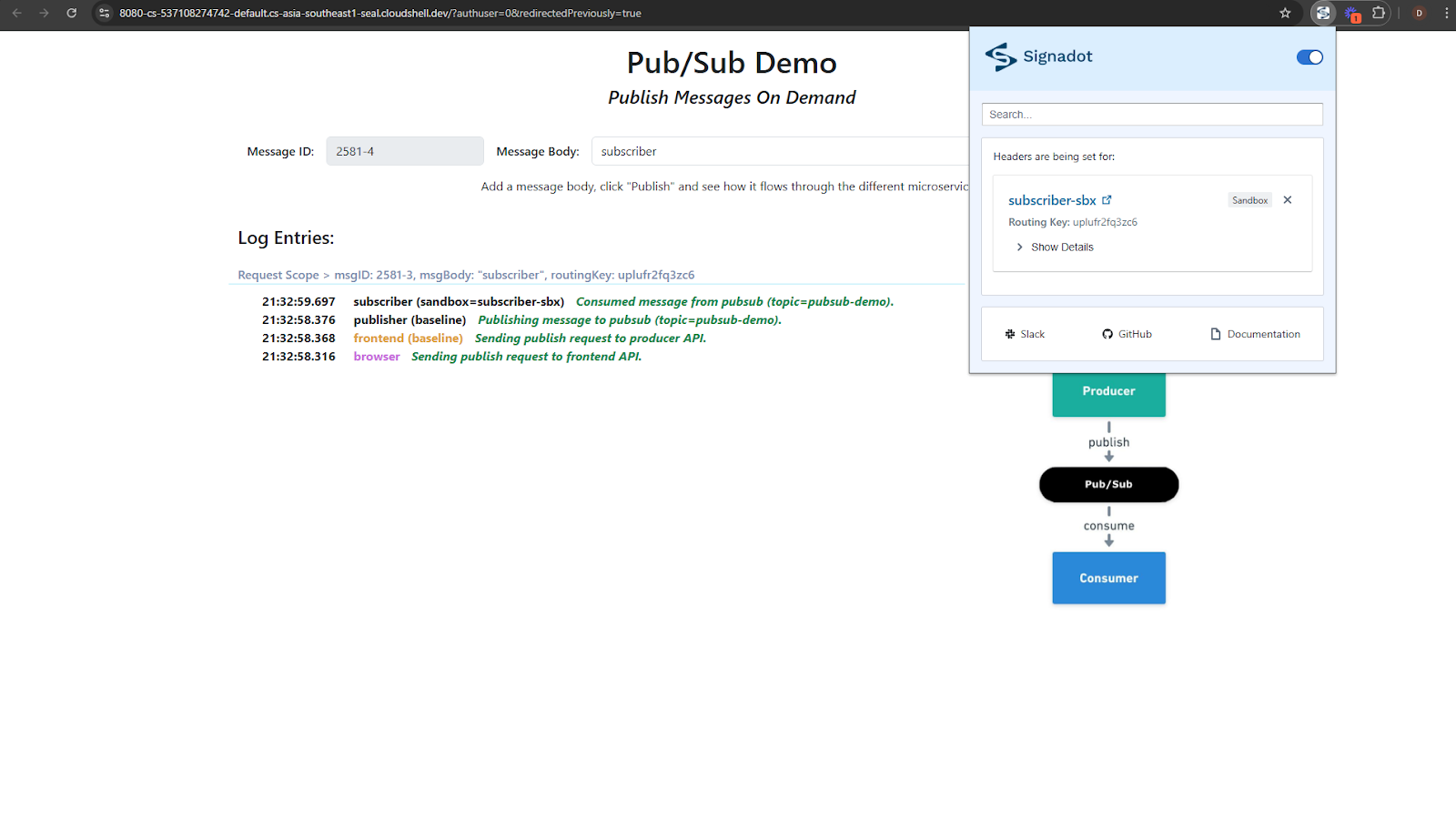
The baseline publisher sends the message with the subscriber sandbox's routing key. Both subscriptions receive a copy. The sandboxed subscriber processes it because its sandbox claims the key, and the baseline subscriber drops its copy for the same reason.
Scenario 3: sandboxed publisher and baseline subscriber
Select the publisher-sbx sandbox instead and send a message.
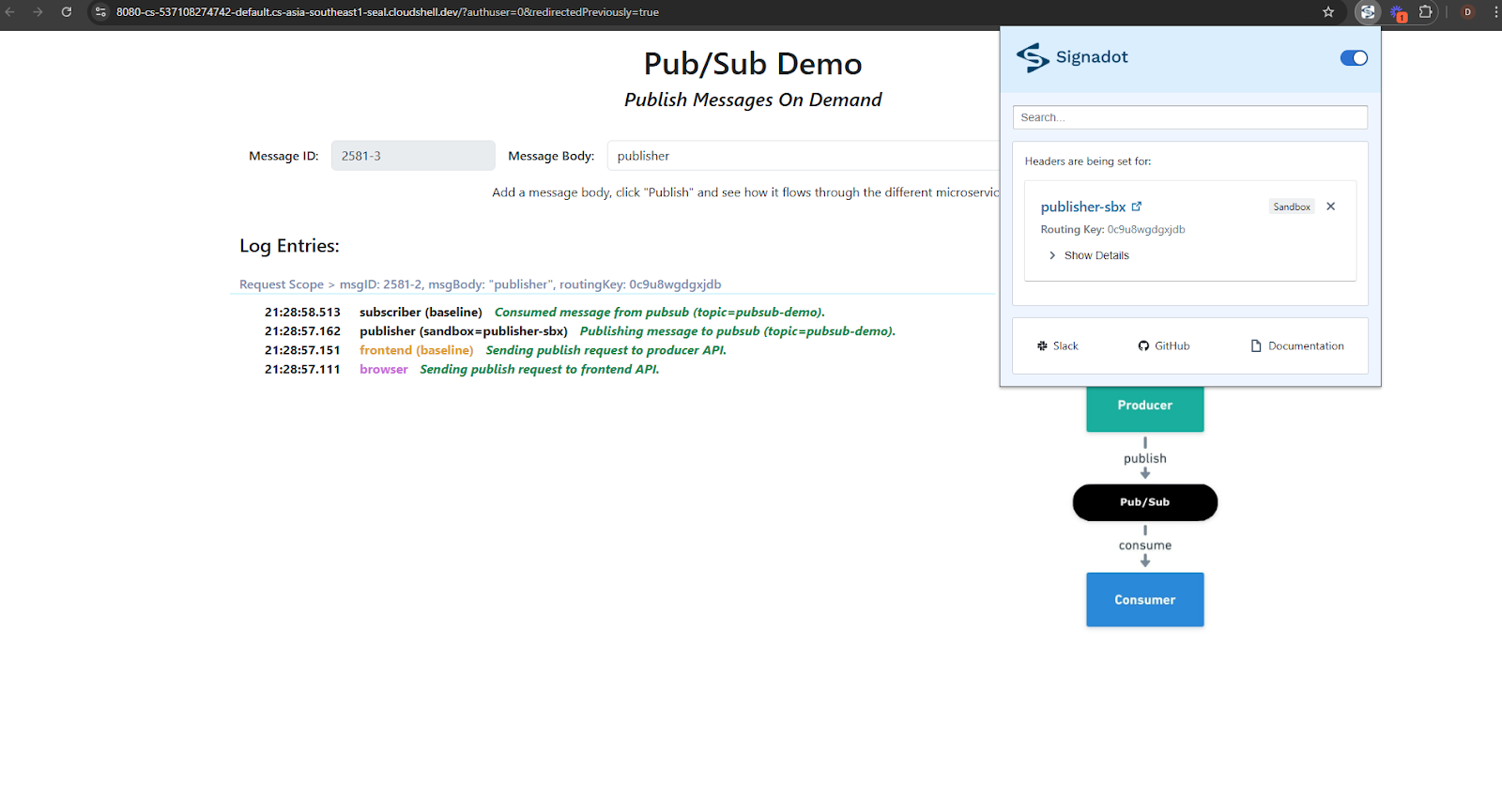
The forked publisher sends the message with its own sandbox's routing key, but no subscriber sandbox claims that key, so the baseline subscriber treats it as general traffic and processes it. Unmatched keys falling through to the baseline is the contract working as designed.
Scenario 4: publisher and subscriber together in a route group
Select the pubsub-demo route group and send a message. The request reaches the forked publisher,
and the message it publishes carries the route group's routing key, which the subscriber sandbox
claims as a member of the group. The forked subscriber processes it, end to end, while the baseline
and every other sandbox stay untouched.
Clean up
Delete the sandboxes and route group, then the demo, then the Pub/Sub resources and the Google service account the demo used:
signadot routegroup delete pubsub-demo
signadot sandbox delete publisher-sbx
signadot sandbox delete subscriber-sbx
kubectl delete ns pubsub-demo

gcloud pubsub subscriptions delete pubsub-grp pubsub-grp-subscriber-sbx --project=$PROJECT_ID
gcloud pubsub topics delete pubsub-demo --project=$PROJECT_ID
gcloud iam service-accounts delete $GSA --project=$PROJECT_ID
In your own library, delete a sandbox's subscription when the sandbox is deleted, or set an expiration policy on it, so subscriptions don't pile up.
Frequently asked questions
How do you test Google Pub/Sub flows end to end without a separate environment per developer?
Share one topic and one baseline of every service, and isolate at the message level. A publisher copies the routing key from the incoming request into each message. Each sandboxed subscriber reads from its own subscription and processes only messages whose routing key its sandbox claims, according to Signadot's Routes API. The baseline subscriber processes everything else.
Why does each sandboxed subscriber need its own Pub/Sub subscription?
Pub/Sub delivers each message once per subscription, spreading messages across the subscribers that share it. If a sandboxed subscriber shared the baseline subscription, it would receive only some of the messages and take others away from the baseline. A subscription per sandbox gives every subscriber version a copy of every message, and the routing key decides which version processes it.
Where should the routing key go in a Pub/Sub message?
In your own client library, put the OpenTelemetry baggage header, which carries the routing key, in the message attributes, so subscribers can read it without parsing the payload. The demo in this tutorial wraps the headers inside the message data to keep its code identical to the Kafka demo.
What happens to a message whose routing key no sandbox claims?
The baseline subscriber processes it. Sandboxed subscribers process only keys their sandbox claims, and the baseline processes messages with no routing key or a key that no sandbox claims, so every message is processed exactly once.
Can I test a publisher change and a subscriber change together?
Yes. Put both sandboxes in a route group. Requests sent with the route group routing key reach the forked publisher, and the messages it publishes are processed by the forked subscriber, while the baseline and other sandboxes are unaffected.
See also
- Google Cloud Pub/Sub isolation: the pattern in brief, and the topic-per-sandbox alternative
- Testing Kafka-based microservices: isolation strategies compared, and the same demo on Kafka
- Message queue isolation: the same pattern for RabbitMQ, SQS and NATS
- Amazon SQS tutorial: the same routing-key gate on a shared SQS queue, with SNS fan-out as an option
- Route groups: test changes that span several sandboxes together
- Routes API: the gRPC and REST APIs subscribers use to look up routing keys