Testing Kafka-Based Microservices in Kubernetes
Asynchronous, event-driven communication is the backbone of most microservice architectures, and Apache Kafka is the most common way teams build it. It is also where testing strategies go to die. Setting up all your microservices plus Kafka locally is painful, and testing in a shared staging environment means one developer's test messages get consumed by another developer's consumers.
This page covers how to test Kafka-based applications properly: the three isolation strategies and their tradeoffs, how message-level isolation works, the hard patterns (CDC, batch jobs, offsets), and a hands-on tutorial you can run on your own cluster.
While Kafka is the concrete example, the same patterns apply to RabbitMQ, Google Pub/Sub, AWS SQS, and other message queues. The same routing-key gate also works for durable-execution task queues, as the Temporal worker tutorial shows. For setup details by broker, see the Kafka isolation guide.
Why testing Kafka-based microservices is hard
Message queues implement several patterns in a microservices architecture: many-to-one (multiple producers, one aggregating consumer), many-to-many (event-driven architectures), and one-to-many (a producer broadcasting to many consumers, common in notification systems). Every one of those patterns complicates testing, because the thing you are testing is not a request and a response. It is a message that fans out through the system.
Consider an e-commerce platform where an order processing service publishes events that trigger payment processing, inventory updates, and shipping notifications. When developers need to test changes to any service in this workflow, they face the same problems:
- Interference in shared environments. A developer modifying the order processor affects another developer testing the payment service. When tests fail, it is hard to tell whether the failure came from your change or from someone else's test running at the same time.
- Coordination overhead. Developers spend real time booking testing windows, waiting for other teams to finish, and debugging failures that turn out to be someone else's. Schema changes are the worst case, requiring careful cross-team coordination to avoid breaking existing consumers.
- Kafka is heavy to replicate. A test environment with Kafka means brokers, cluster management, security, replication, and partitioning configuration, plus every producer and consumer service across different languages and frameworks. Duplicating that per developer or per pull request is slow to set up, expensive to run, and immediately starts drifting out of date.
Slow feedback cycles and low-confidence integration tests are the predictable result. The fix starts with choosing the right isolation boundary.
The three isolation strategies for Kafka test environments
There are three places you can draw the isolation line for a Kafka test environment. Throughout, a "tenant" means a developer, team, or CI job that needs to run a test scenario in isolation.
Strategy 1: Isolate the Kafka cluster
Give each tenant a complete Kafka cluster of their own, along with copies of all producers and consumers.
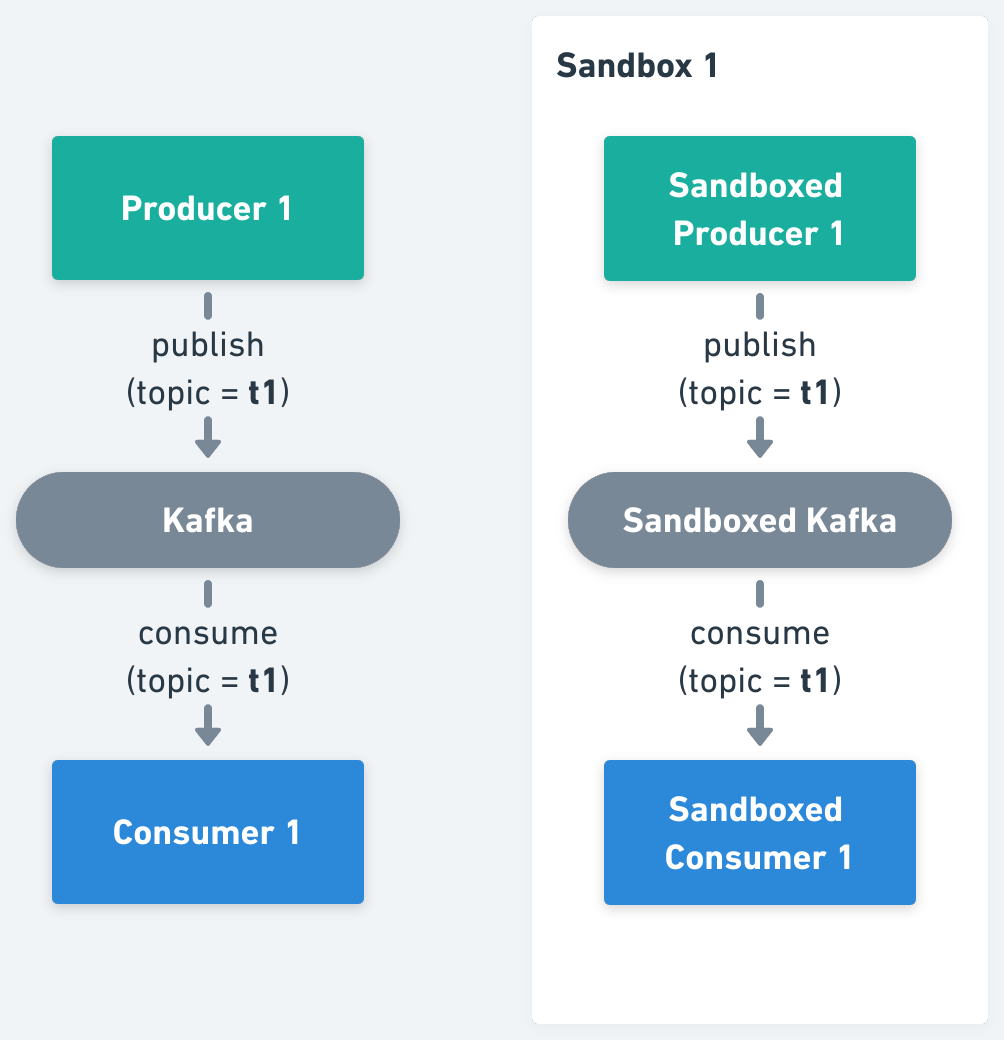
Advantages: the highest isolation between environments.
Considerations: the highest cost, since the entire infrastructure is duplicated per tenant; complex management of many independent environments; and the need for automation that continuously keeps every copy in sync with the main branch, without which environments go stale fast.
Strategy 2: Isolate Kafka topics
Share one Kafka cluster and create ephemeral, per-tenant topics. Producers and consumers still need to be duplicated and reconfigured to point at the tenant's topics.
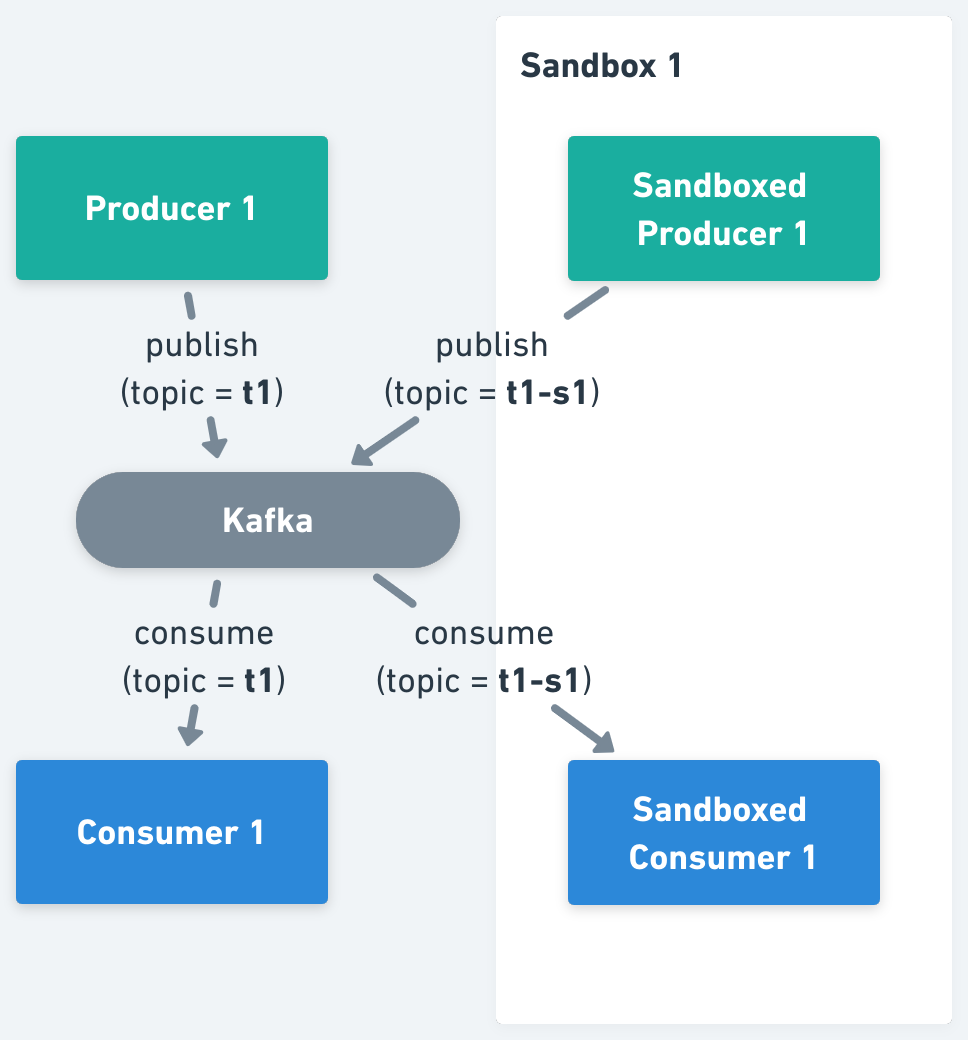
Advantages: meaningful cost savings from sharing the brokers.
Considerations: automation to create and tear down topics per environment; every producer and consumer still gets duplicated per tenant; and reconfiguring services to point at the right topics is error-prone.
Strategy 3: Isolate Kafka messages
Run one shared, continuously updated baseline environment containing Kafka and every service, and isolate at the level of individual messages. Each tenant deploys only the service versions under test. Requests and messages are tagged with a routing key and dynamically routed, so the tenant's messages reach the tenant's consumers while everything else flows through the baseline.
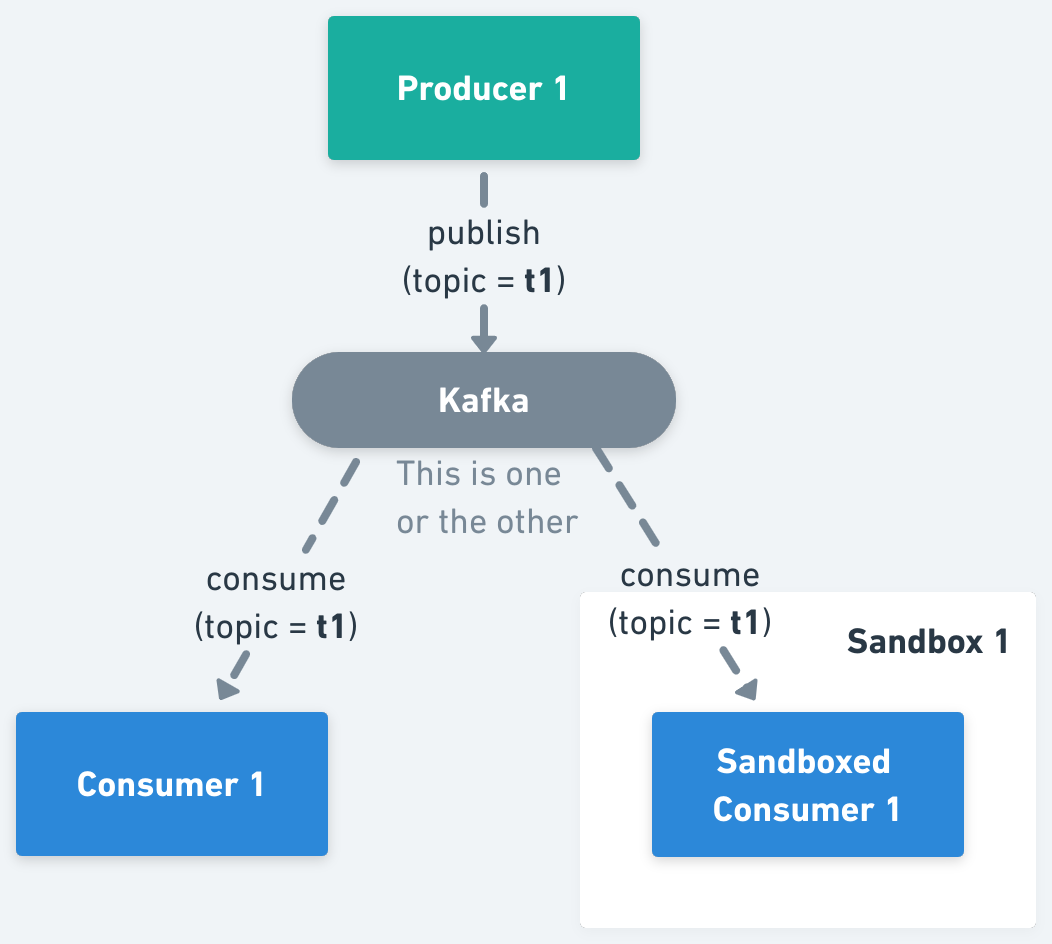
Advantages: no infrastructure to create or tear down per environment; the most cost-efficient model, especially with a complex Kafka setup and many services; minimal operational overhead, since each test environment runs only the changed services; and no stale environments, because the shared baseline is updated by your existing CI/CD pipeline.
Considerations: services need OpenTelemetry (or equivalent) instrumentation for context propagation, and Kafka consumers need a small amount of logic for selective consumption. If you need infrastructure-level isolation for compliance reasons, this is not the right boundary.
For most teams, message-level isolation wins as the system grows: it is the only strategy whose cost does not scale with the number of concurrent tests. The rest of this page is about making it work.
| Isolated cluster | Isolated topics | Isolated messages | |
|---|---|---|---|
| Isolation | Highest | High | Per message, by routing key |
| Infrastructure per tenant | Brokers, producers and consumers | Topics, producers and consumers | Only the changed services |
| Cost as tests grow | Grows with every tenant | Grows with every tenant | Stays flat |
| Freshness | Copies drift without automation | Copies drift without automation | Baseline updated by CI/CD |
| Code changes | None | Topic configuration | Context propagation and selective consumption |
How message-level isolation works
Message isolation rests on two primitives: context propagation (getting a routing key from the incoming request all the way through Kafka) and selective consumption (each consumer version deciding which messages to process). For synchronous calls, context propagation is standardized by OpenTelemetry, and Signadot routes requests at the infrastructure layer with a service mesh or its own sidecar. You only need OpenTelemetry's context propagation, not distributed tracing: the baggage mechanism carries the routing key across service boundaries, and auto-instrumentation can add it to Kafka clients without application code changes.
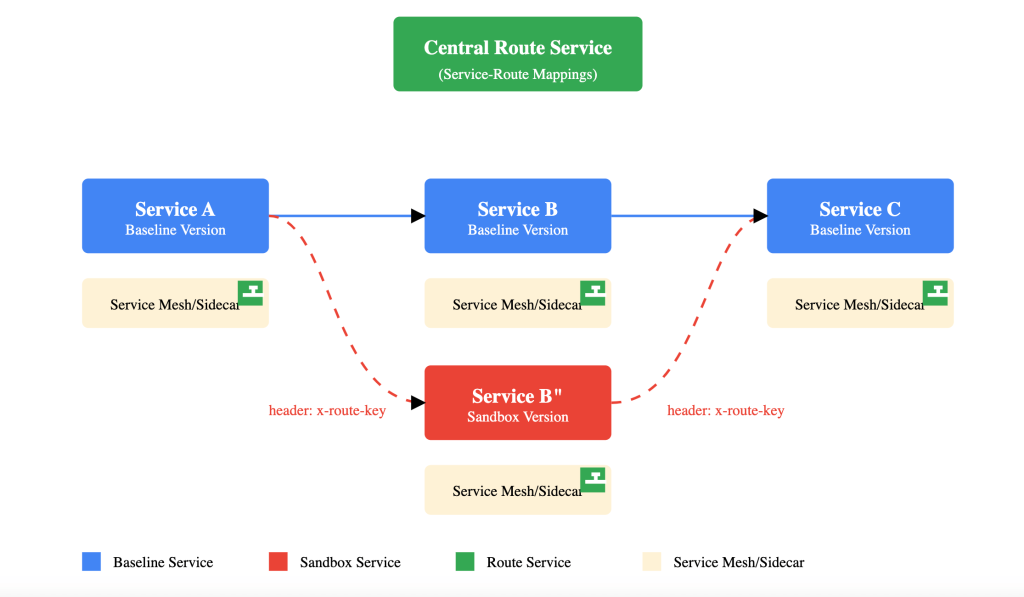
Asynchronous flows need three more pieces, because routing at the request level cannot see individual messages:
- Producers propagate the routing key into message headers. When a request with a routing key triggers message production, the key is copied from the request context into the Kafka message headers.
- Each sandboxed consumer joins its own consumer group. This guarantees that every consumer version (baseline and every sandbox) receives every message on the topic. A simple naming convention is the original consumer group name with the sandbox name appended, which is unique per sandbox.
- Every consumer runs selective consumption logic. All versions see all messages; the routing key decides who processes each one.

The routing key contract
In Signadot, the routing key is an opaque value assigned to each sandbox and route group. The selective consumption rules differ slightly for sandboxed and baseline workloads.
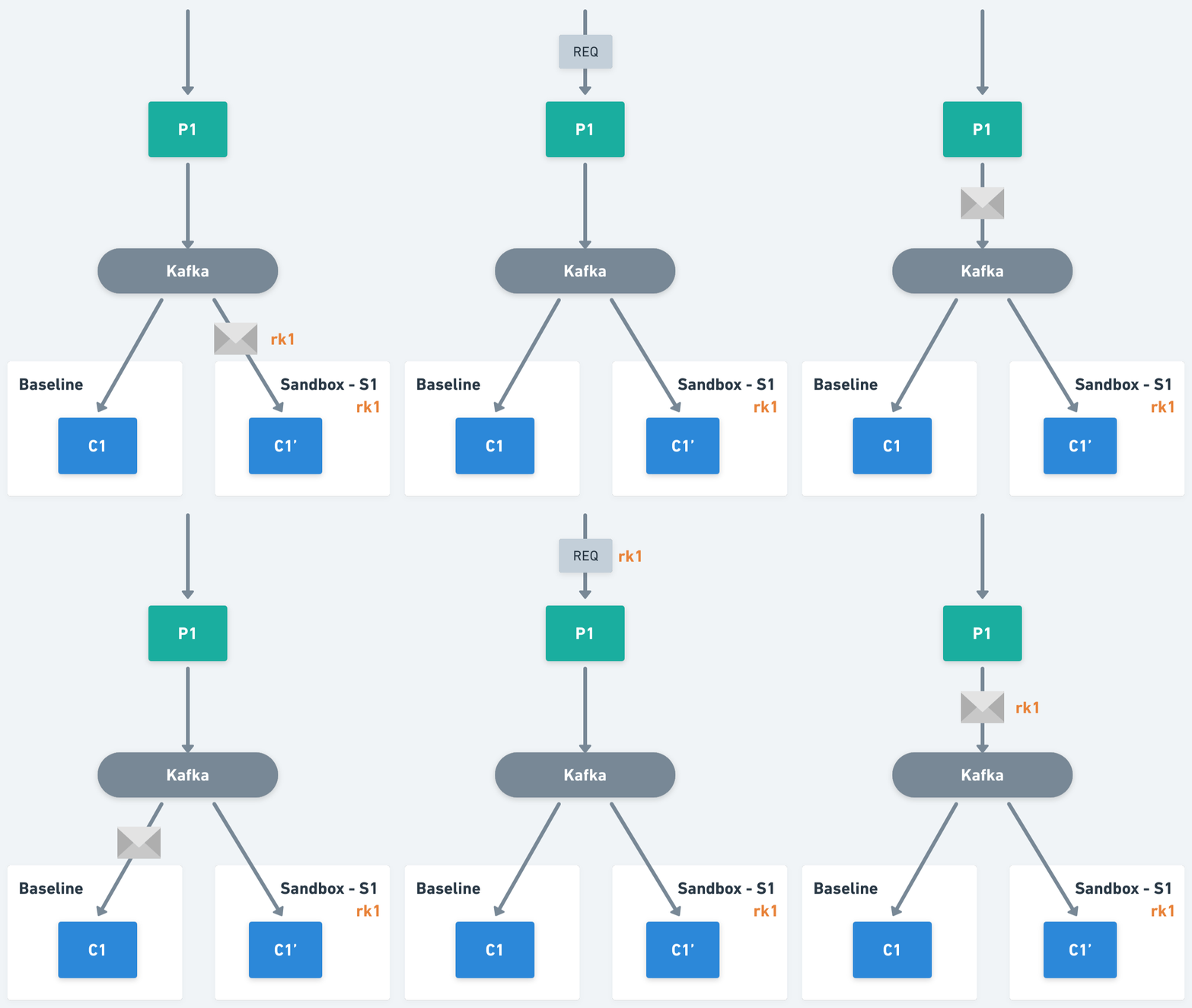
A sandboxed consumer needs the message's routing key and the set of routing keys it is
responsible for: the key of the sandbox that created it, plus the keys of every route group
containing that sandbox. If the message's key is in that set, process it; otherwise skip it. For
example, if sandbox S1 has routing key rk1 and belongs to route group RG1 with key rk2, then
the sandboxed consumer C1' processes messages carrying rk1 or rk2.
The baseline consumer applies the inverse rule: it needs the set of routing keys claimed by any
sandbox forked from it, and it processes a message only if the message carries no routing key or a
key outside that set. If a second sandbox S2 (key rk3) also forks the consumer, creating C1",
then C1' handles rk1 and rk2, C1" handles rk3, and the baseline C1 handles everything
else, including unmatched keys.
The Signadot Operator exposes the mapping of routing keys to sandboxes inside the cluster through the Routes API, a set of gRPC and REST endpoints served by the route server. Consumers pull the current mapping, or stream updates in near real time, and cache it locally. Platform teams typically wrap this lookup and the selective consumption rules in a small Kafka client library, so product teams get message isolation without thinking about it. The Kafka isolation guide covers that library and its failure modes.
The hard patterns
Four situations need extra design attention, and they are where most homegrown implementations stumble.
Change data capture (CDC). With CDC pipelines such as Debezium, the "producer" is reading a database transaction log, not handling a request, so there is no incoming header to propagate. The routing information has to live in the source rows themselves, typically in a metadata column, which the CDC producer then copies into message headers. The same applies to any flow that does not start with a request: a cron job reading rows and publishing messages needs a plan for which tenant each row belongs to.
Batch processing. When messages are processed in batches, routing decisions must be made at the batch level. Messages with different routing contexts belong in separate batches, and the processor has to maintain the routing context across the batch lifecycle. This matters most in high-throughput systems where batching is a performance requirement.
Consumer group lifecycle and offsets. Sandboxed consumer groups should start from the latest offset, so a new sandbox tests new messages rather than replaying history. And when a sandbox is deleted, its consumer group should be cleaned up too, freeing broker resources. Tie the group's lifecycle to the sandbox's.
Cache coherency. Consumers cache the routing key mapping for performance, which means a freshly created sandbox is not instantly visible to every consumer. Keep the cache TTL short (the demo below polls every five seconds) or use the streaming API so consumers converge quickly.
Tutorial: test an end-to-end Kafka flow with sandboxes
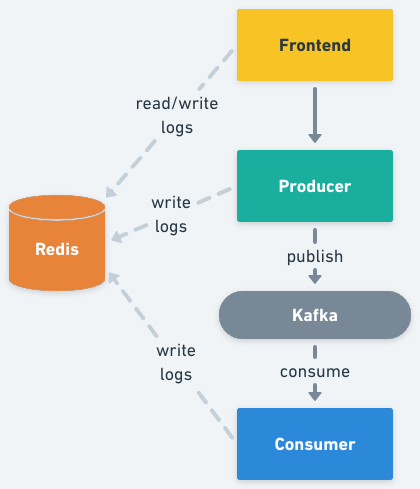
The rest of this page makes the model concrete with a small demo you can run on your own cluster. The demo is a Node.js system built around a shared Kafka cluster:
- a frontend for sending messages and watching the results,
- a producer that publishes each incoming request as a Kafka message on the
kafka-demotopic, - a consumer that processes those messages.
All three services log their activity to Redis, and the frontend polls those logs every two seconds, so you can see exactly which version of which service handled each message.
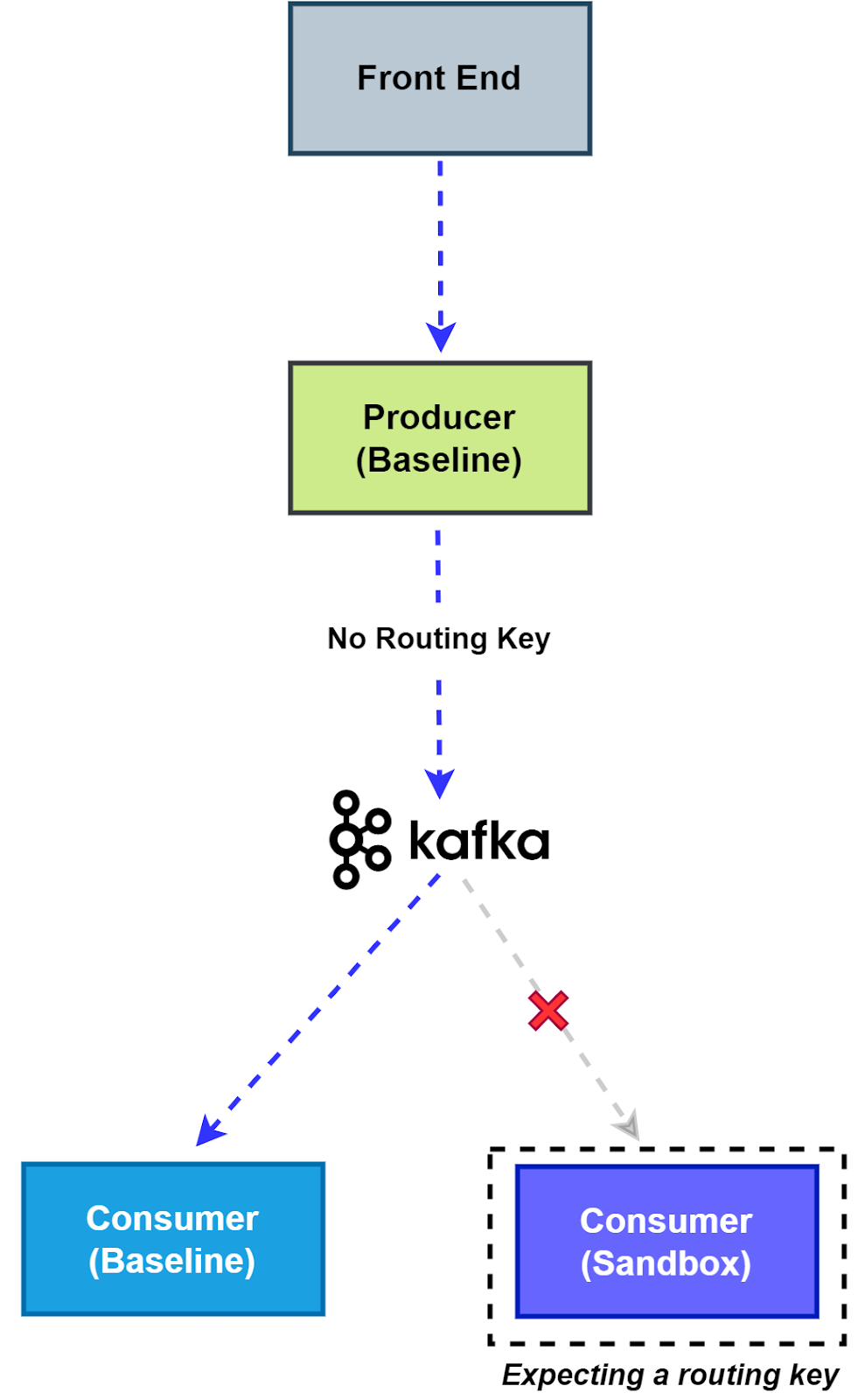
In demo terms, the routing key contract plays out in two flows:
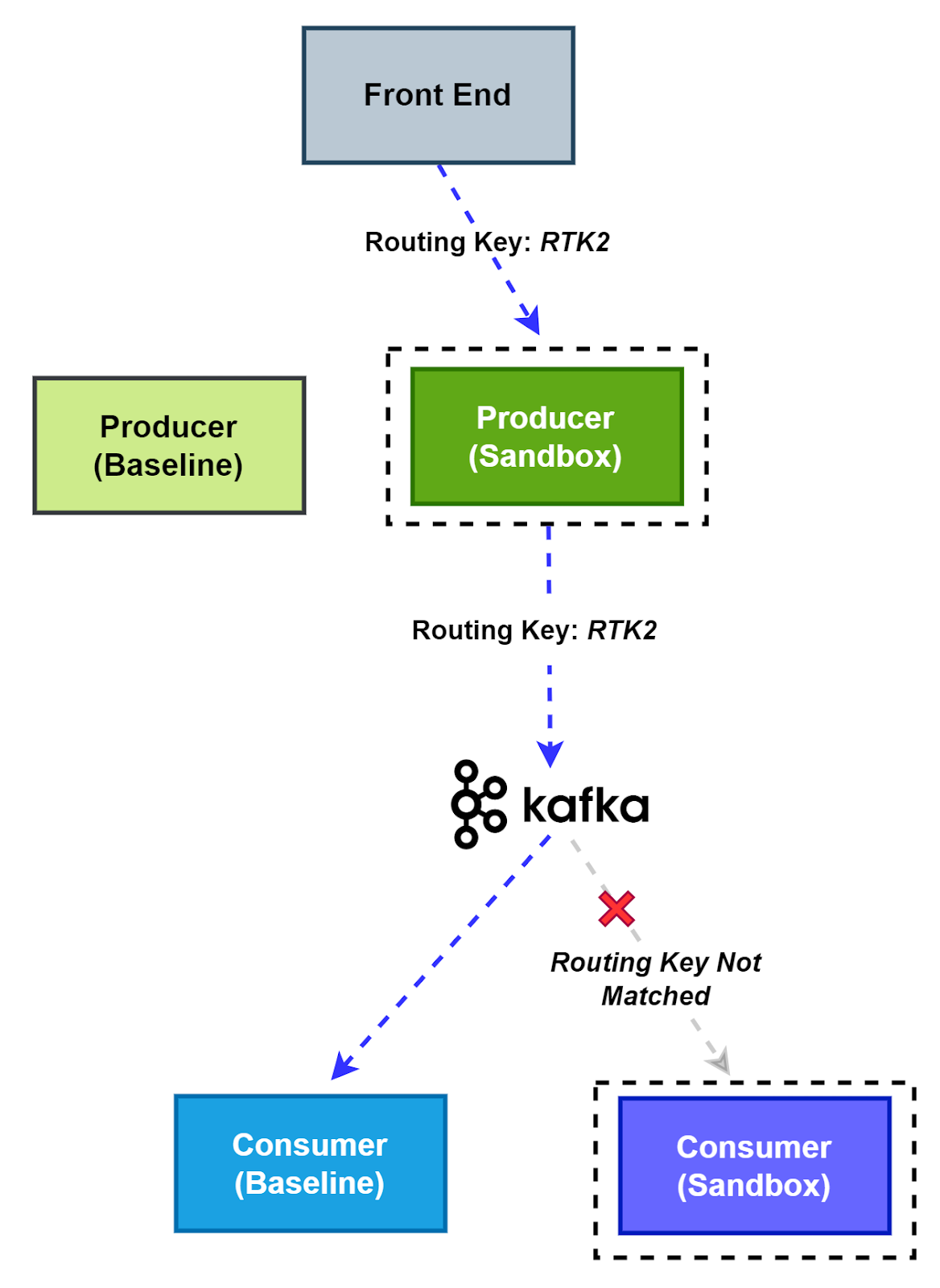
- No matching routing key. The producer publishes without a routing key, so the baseline consumer, in its own consumer group, processes the message and sandboxed consumers skip it.
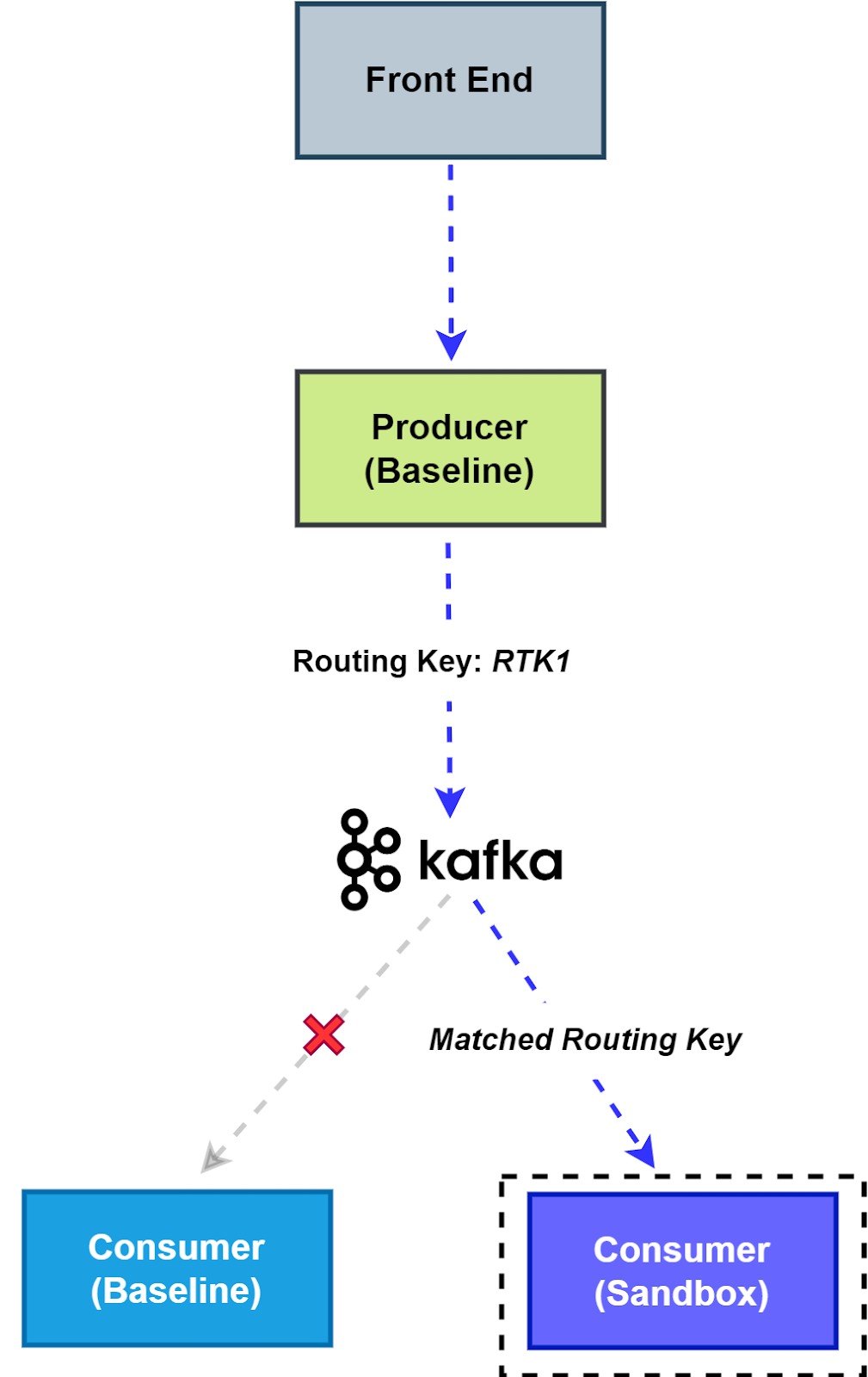
- Matching routing key. The producer copies the routing key from the incoming request into the message headers, the sandboxed consumer whose key matches processes the message, and the baseline consumer skips it.
Estimated time: 15 minutes.
Before you begin
You need:
- A Kubernetes cluster with the Signadot Operator v0.15.0 or later installed. The consumer uses the Operator's Routes API.
- The Signadot CLI, logged in with
signadot auth login. kubectlpointed at that cluster, andgit.- The Signadot Chrome extension, to choose which sandbox your browser's requests are routed to.
Step 1: Deploy the demo and check the baseline
Clone the demo
and deploy Kafka, Redis, the frontend, the producer and the consumer into a kafka-demo namespace:
git clone https://github.com/signadot/examples.git
cd examples/selective-consumption-with-kafka
kubectl create ns kafka-demo
kubectl -n kafka-demo apply -f k8s/pieces
kubectl -n kafka-demo wait --for=condition=available deployment --all --timeout=5m
Forward the frontend to your machine:
kubectl port-forward service/frontend -n kafka-demo 4000:4000
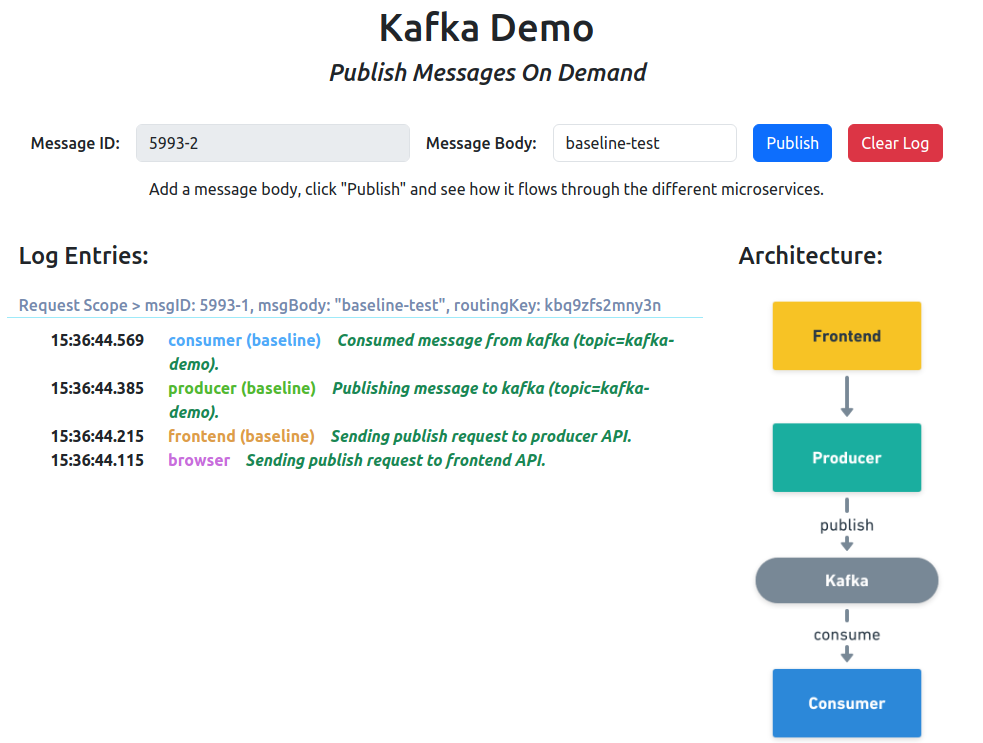
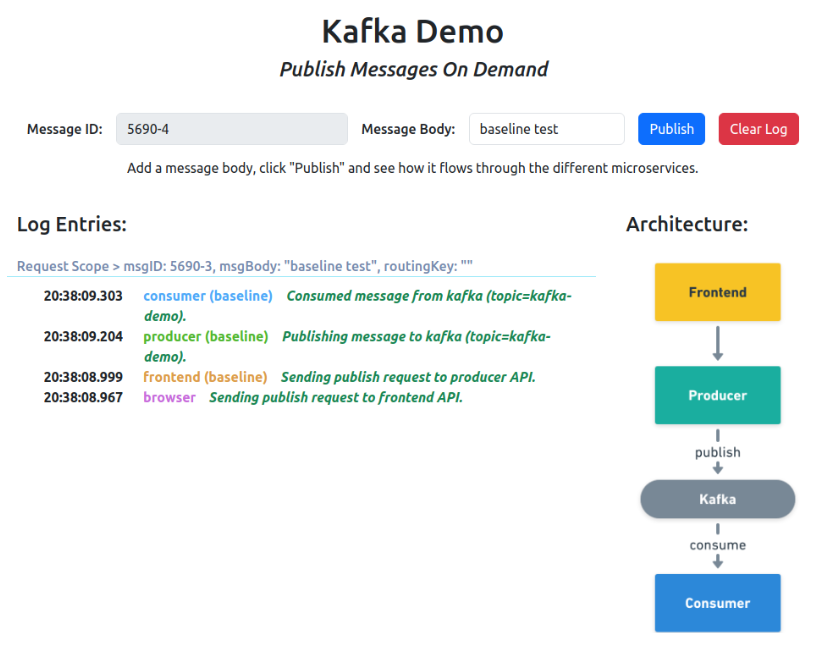
Open http://localhost:4000 and send a message. With no sandboxes created yet, the baseline consumer processes every message you send:
Step 2: How the producer propagates the routing key
The producer reads the routing key from the incoming request's baggage header and copies the
header into every Kafka message it publishes. In src/apps/producer/app.js, the publish handler
passes the request's baggage through as message headers:
publishMessage(kafkaTopic, msg, { baggage: req.get('baggage') })
and publishMessage in src/modules/kafka/kafka.js sends them with the message:
await producer.send({
    topic,
    messages: [
        {
            value: JSON.stringify(message),
            headers: headers || {}, // Include headers if provided, or an empty object
        },
    ],
});
In a real system you can get the same behavior with OpenTelemetry auto-instrumentation, without touching application code.
Step 3: How the consumer consumes selectively
The consumer implements the asynchronous pieces described earlier. The code is short enough to read in one sitting.
A consumer group per sandbox. The Signadot Operator injects a SIGNADOT_SANDBOX_NAME
environment variable into sandboxed pods. When it is set, src/modules/kafka/kafka.js joins a
different consumer group from the baseline's test-group. Separate groups mean separate offsets, so
sandboxed consumers never disturb the baseline's position in the topic. In your own client library,
append the sandbox name to the group ID, so that every sandbox gets a group of its own.
Fresh routing keys from the Routes API. Every five seconds,
src/modules/routesapi-mq-client/pullrouter.js asks the route server which routing keys apply to
this workload and caches them. A sandboxed consumer asks for the keys routed to its own sandbox; the
baseline asks for every key claimed by any sandbox that forks it:
var queryParams = {
    'baselineKind': baselineKind,
    'baselineNamespace': baselineNamespace,
    'baselineName': baselineName
}
if (sandboxName !== "") {
    queryParams.destinationSandboxName = sandboxName
}
var routeServerURL = url.format({
    protocol: 'http',
    host: routeServerAddr, // routeserver.signadot.svc:7778
    pathname: '/api/v1/workloads/routing-rules',
    query: queryParams,
});
A shouldProcess check on every message. The consumer reads the routing key from each
message's baggage header and applies the routing key contract:
function shouldProcess(routingKey) {
    const routingKeys = cache.get('routingKeys');
    if (sandboxName !== "") {
        // we are a sandboxed workload, only accept the received routing keys
        return routingKeys.has(routingKey)
    }
    // we are a baseline workload, ignore received routing keys (they belong
    // to sandboxed workloads)
    return !routingKeys?.has(routingKey)
}
In src/apps/consumer/app.js, every message that fails the check is skipped:
consumeMessages(kafkaTopic, (msg, headers) => {
    let baggage = "";
    if (headers['baggage'] !== undefined) {
        baggage = headers['baggage'].toString();
    }
    let routingKey = extractRoutingKey(baggage);
    if (!shouldProcess(routingKey)) {
        // skip this message
        return
    }
    // ... process the message
})
The demo's consumer subscribes with fromBeginning: true to keep the example simple. In your own
library, start sandboxed consumer groups at the latest offset, as described in
the hard patterns.
In production setups, platform teams typically wrap these pieces in a shared Kafka client library, so product teams get selective consumption without writing any of this themselves.
Step 4: Create the sandboxes
Create one sandbox that forks the producer, one that forks the consumer, and a route group that
combines them. These are ordinary sandbox specs; nothing Kafka-specific goes into the YAML. Here is
signadot/sandboxes/consumer.yaml:
name: consumer-sbx
spec:
  labels:
    demo: "kafka"
  cluster: "@{cluster}"
  forks:
  - forkOf:
      kind: Deployment
      name: consumer
      namespace: kafka-demo
  defaultRouteGroup:
    endpoints:
    - name: frontend
      target: http://frontend.kafka-demo.svc:4000
The producer sandbox, producer-sbx, is the same with producer in place of consumer. Both carry
the label demo: kafka, which the kafka-demo route group matches. Set CLUSTER to your cluster's
name from signadot cluster list, then create all three:
export CLUSTER=my-cluster
signadot sandbox apply -f signadot/sandboxes/producer.yaml --set cluster=$CLUSTER
signadot sandbox apply -f signadot/sandboxes/consumer.yaml --set cluster=$CLUSTER
signadot routegroup apply -f signadot/routegroups/demo.yaml --set cluster=$CLUSTER
The Operator assigns each sandbox and the route group a routing key, and injects the environment variables the consumer logic relies on into the forked pods.
Step 5: Send messages and watch the routing
With both sandboxes running, use the Signadot Chrome extension to choose which sandbox, if any, your browser's requests to http://localhost:4000 are routed to, then send messages from the frontend. Four scenarios cover the whole contract. You can also open the preview URLs printed by the commands above, which add the routing key for you.
Scenario 1: baseline producer, baseline consumer
With no sandbox selected, messages carry no routing key, so the baseline consumer processes them and both sandboxes stay silent.
Scenario 2: baseline producer, sandboxed consumer
Select the consumer-sbx sandbox in the extension and send another message.
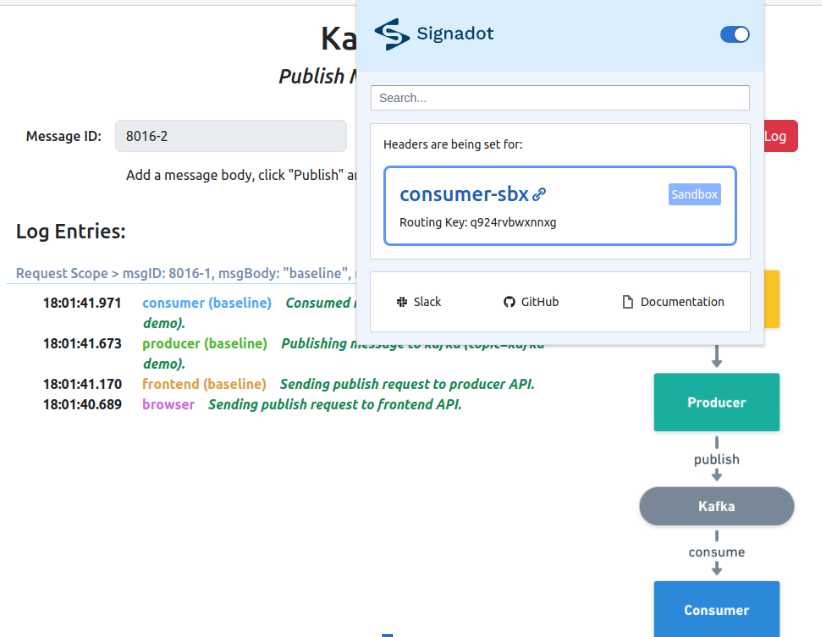
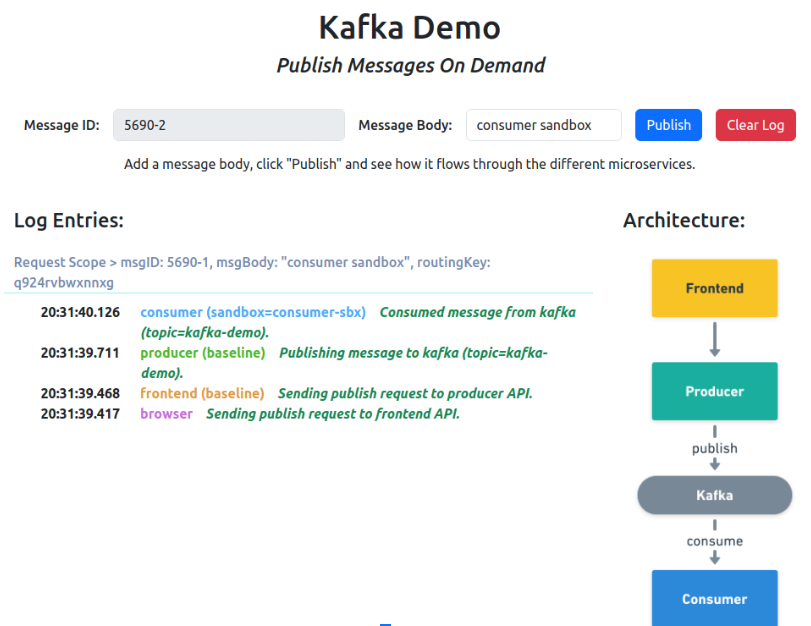
The routing key rides the request into the message headers, the sandboxed consumer's key matches, and it processes the message while the baseline consumer skips it.
Scenario 3: sandboxed producer, baseline consumer
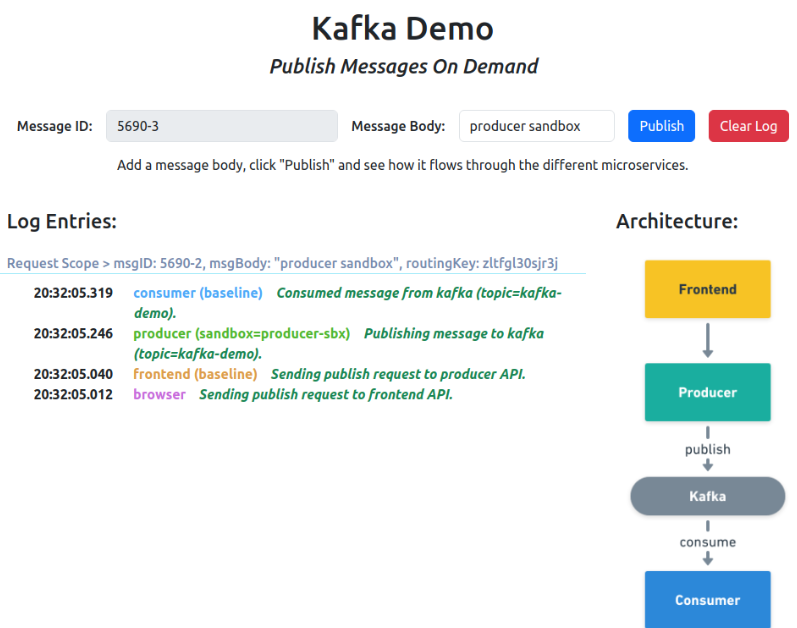
Now select the producer-sbx sandbox instead.
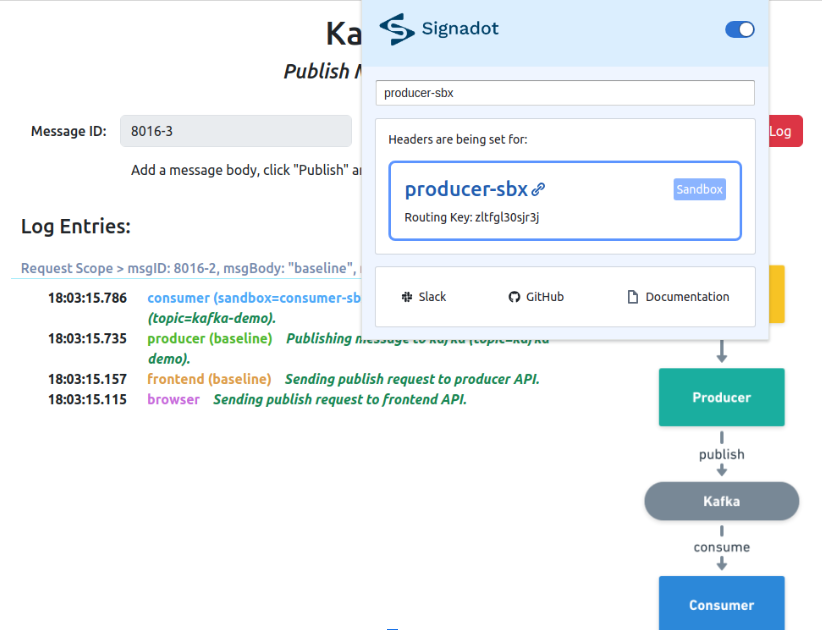
The forked producer publishes the message with its own routing key, but no consumer sandbox claims that key, so the baseline consumer treats it as general traffic and processes it. Unmatched keys falling through to the baseline is the contract working as designed.
Scenario 4: producer and consumer together in a route group
Real features often change more than one service at once. The kafka-demo route group combines
both sandboxes under a single routing key. Select it in the extension (or open the route group's
preview URL) and send a message. The request first hits the forked producer, and the resulting Kafka
message is consumed by the forked consumer, end to end, while the baseline and every other
developer's sandbox stay untouched.
Clean up
signadot routegroup delete kafka-demo
signadot sandbox delete producer-sbx
signadot sandbox delete consumer-sbx
kubectl -n kafka-demo delete -f k8s/pieces
kubectl delete ns kafka-demo
What this looks like day to day
From a developer's perspective, testing changes to asynchronous workflows becomes straightforward. Say a developer is modifying a service that consumes order events from Kafka and updates the shipping system. They create a sandbox for their modified service through their platform team's tooling; behind the scenes the platform deploys the service, sets up consumer groups, and configures routing. To test, they trigger a test order through the regular application interface with a header that routes traffic to their sandbox. The platform's instrumentation propagates that routing information through the entire system, from the initial request, through Kafka, to their modified service.
The developer observes how their changes process the test order, while other developers' tests and regular traffic continue flowing through the system undisturbed. The same flow runs in CI for every pull request, and a coding agent can run it to check its own change before it opens one. Brex runs this model to give hundreds of developers isolated testing on shared clusters.
Frequently asked questions
How do you test Kafka-based microservices?
There are three isolation strategies: give each test its own Kafka cluster (high fidelity, very expensive), give each test its own topics on a shared cluster (cheaper, but every producer and consumer must be duplicated and reconfigured), or isolate at the message level, where a shared baseline runs everything once and routing keys in message headers decide which consumer version processes each message. Message-level isolation is the most cost-efficient at scale and is the approach this tutorial covers in depth.
Do I need a separate Kafka cluster for testing?
Usually not. A dedicated cluster per test environment gives strong isolation but duplicates brokers, producers, and consumers for every tenant, and the copies drift out of date without constant automation. Most teams get the isolation they need by sharing one production-like Kafka cluster and isolating tests at the topic level or, more efficiently, at the message level with routing keys.
How does message-level isolation work in Kafka?
Producers propagate a routing key from the incoming request into the Kafka message headers, typically via OpenTelemetry context propagation. Each sandboxed consumer version joins its own consumer group, so every version sees every message, and a small piece of consumer logic decides whether to process or skip each message by matching its routing key against the sandbox keys. Baseline consumers process only messages that carry no routing key or one that no sandbox claims.
How do you automate Kafka testing in CI?
For each pull request, create a sandbox that forks the changed producer or consumer with the image built from the pull request, then run your end-to-end tests with the sandbox routing key in the baggage header. The key travels from the request into the Kafka message headers, so only the sandboxed consumer processes the test messages, while other pull requests and the baseline share the same brokers and topics undisturbed.
How is this different from Testcontainers or embedded Kafka?
Testcontainers and embedded brokers are excellent for unit and component tests: they give a single test suite a private, throwaway broker. They do not help with end-to-end flows across many real services, datastores, and topics. Message-level isolation on a shared staging environment covers that integration layer: real brokers, real consumers, real downstream services, with each change tested in its own sandbox.
Does this approach work for queues other than Kafka?
Yes. The pattern (propagate a routing key in message metadata, run sandboxed consumers in their own groups, and consume selectively) extends to RabbitMQ, Google Pub/Sub, AWS SQS, NATS, and other brokers. The mechanics of headers and consumer groups differ per system, but the model is the same.
See also
- Kafka isolation guide: message-level and topic-based isolation in depth, with failure modes
- Message queue isolation: the same pattern for RabbitMQ, Pub/Sub, SQS and NATS
- Google Pub/Sub tutorial: the same demo built on Google Cloud Pub/Sub
- RabbitMQ tutorial: a queue per consumer version on one broker, selected by routing key
- Amazon SQS tutorial: selective consumption on a shared SQS queue, releasing messages with a visibility timeout of 0
- Temporal worker tutorial: the routing-key gate applied to Temporal task queues
- Route groups: test changes that span several sandboxes together
- Testing event-driven architectures: how the pattern applies to event-driven systems more broadly
- The complete guide to microservices testing: where Kafka tests fit among the other test types