Plan-Based Validation with Agents
Overview
The hardest bugs in a microservice system are the integration ones: a change correct inside the service that ships it, silently breaking a consumer somewhere else. Unit tests don't catch them. Static analysis doesn't either. The signal only shows up when the change runs against real upstreams and downstreams.
This tutorial sets up a closed loop around exactly that class of bug, using two Signadot agent skills:
signadot-planlets a coding agent build a reusable validation plan once: a Playwright walk through the user-visible flow, runnable on demand against any sandbox.signadot-validateruns the loop on every code change: it spins up a sandbox with the change wired in, runs the plan, reads the failure if there is one, propagates the fix to whichever consumer needs it, and re-runs until the plan goes green.
By the end of this tutorial you'll have:
- A tagged Signadot plan that drives HotROD's ride-request flow with Playwright.
- A breaking contract change applied inside the
locationservice. - A sandbox where two workloads run locally and the loop closes against the same plan.
Throughout the tutorial we'll keep two lanes clearly separate:
- What you do: prompts you give to the agent, and a small number of verification commands you run in your terminal.
- What the skill does: the work the skill performs autonomously in response to each prompt. You don't run these commands yourself.
Prerequisites
- Signadot account (sign up here).
- Signadot CLI v1.6.0 or later (installation instructions).
- Your own Kubernetes cluster with the Signadot Operator v1.3.1 or later installed. Local clusters like Minikube or k3s are fine. Playground Clusters won't work for this tutorial since they don't support Plan Runner Groups.
- HotROD installed in the
hotrodnamespace. If you don't already have it:kubectl create ns hotrod || true
kubectl -n hotrod apply -k 'https://github.com/signadot/hotrod/k8s/overlays/prod/devmesh' - A Plan Runner Group enabled on your cluster (how to enable).
- A local clone of
signadot/hotrod. signadot local connectrunning in a separate terminal against your cluster.signadot-validateuses this tunnel to route cluster traffic to your local process; verify the tunnel is healthy withsignadot local statusbefore starting Step 3.- A coding agent that supports the Agent Skills format, with the
signadot-planandsignadot-validateskills installed:npx skills add signadot/agent-skills
Step 1: Author a reusable validation plan
You do
Open your agent (with both skills loaded) in the hotrod clone, and ask:
Create a Signadot plan tagged
hotrod-e2e-rideon cluster<your-cluster>that drives the HotROD frontend with Playwright: pick pickup + dropoff, click Request Ride, assert the itinerary shows both names. Take an optional routing key param so the same plan can validate against a sandbox, and make the plan fail when the test fails.
What the skill does
The signadot-plan skill drives the authoring loop autonomously: it inspects the org's action catalog, drafts an inline Playwright script that walks the ride-request flow and conditionally injects the routing-key headers (baggage and tracestate) when a routingKey param is supplied, so the same plan works against baseline (no key) and any sandbox (key set). It adds a check step that asserts the Playwright run exited 0 so the plan's overall result reflects the test result, pins the plan to your cluster, creates it, runs it once against baseline, and applies the tag.
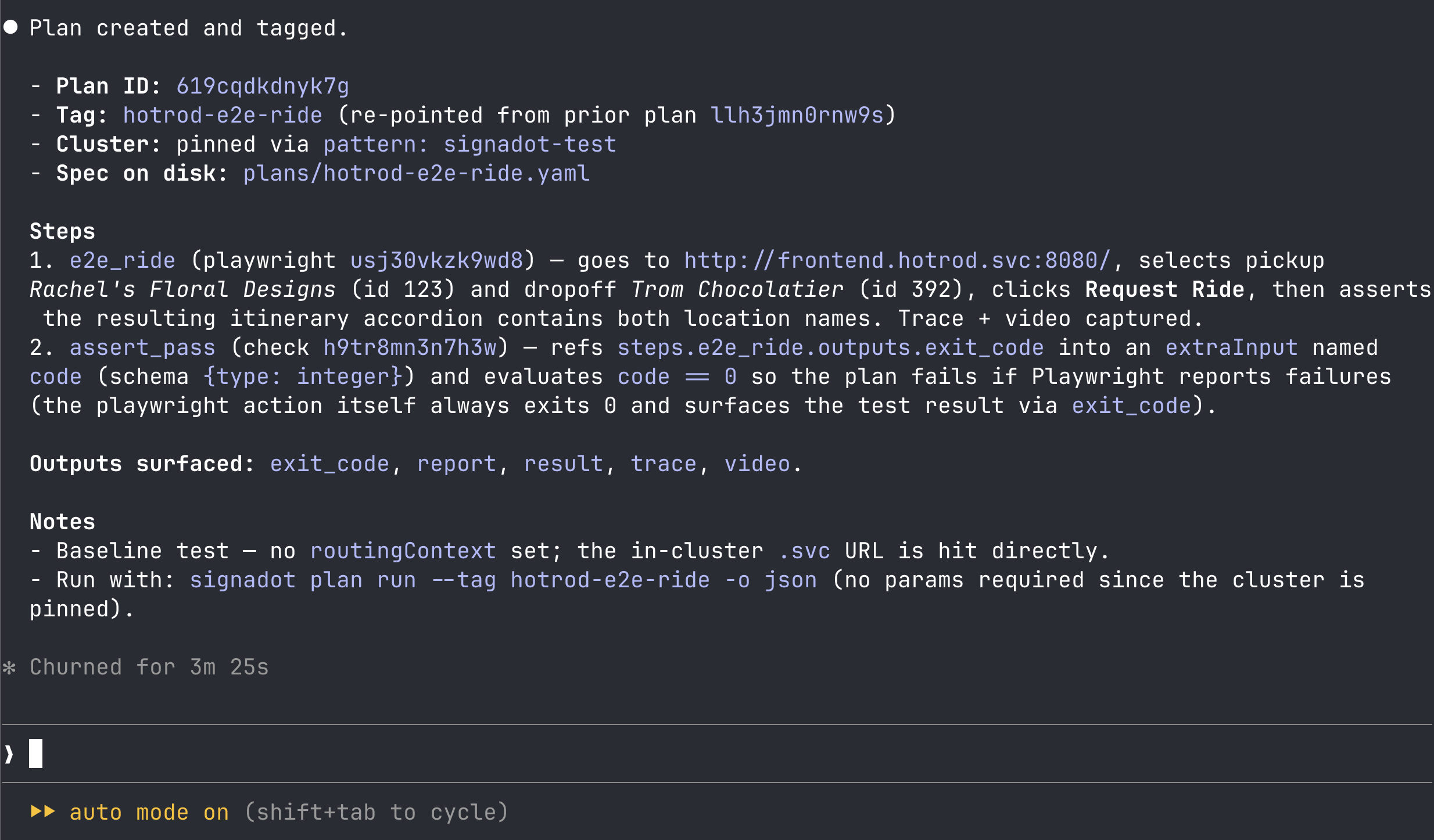
For reference, the plan the skill produces for HotROD looks like this:
Generated plan spec
spec:
  selectionHint: "End-to-end ride-request check for HotROD: pick pickup + dropoff in the React app, request a ride, assert the resulting itinerary shows both location names. Pass routingKey to validate against a sandbox; leave empty for baseline."
  cluster:
    pattern: <your-cluster>
  params:
  - name: routingKey
    required: false
    default: ""
  steps:
  - id: e2e_ride
    action:
      actionID: <playwright-action-id>
    routingContext:
      ref:
        routingKeyRef: params.routingKey
    args:
      values:
        base_url: http://frontend.hotrod.svc:8080
        capture_artifacts: "true"
        script: |
          import { test, expect } from '@playwright/test';

          const key = process.env.SIGNADOT_ROUTING_KEY ?? '';

          test.use({
            extraHTTPHeaders: key ? {
              baggage: `sd-routing-key=${key}`,
              tracestate: `sd-routing-key=${key}`,
            } : {},
            trace: 'on',
            video: 'on',
          });

          test('request ride itinerary shows pickup and dropoff', async ({ page }) => {
            if (key) {
              await page.route('**/*', async (route) => {
                await route.continue({
                  headers: {
                    ...route.request().headers(),
                    baggage: `sd-routing-key=${key}`,
                    tracestate: `sd-routing-key=${key}`,
                  },
                });
              });
            }

            await page.goto(process.env.BASE_URL + '/');
            await page.waitForLoadState();

            // Pickup: Rachel's Floral Designs (id=123), Dropoff: Trom Chocolatier (id=392).
            await page.getByRole('combobox').first().selectOption('123');
            await page.getByRole('combobox').nth(1).selectOption('392');
            await page.getByRole('button', { name: 'Request Ride' }).click();

            const itinerary = page.locator('.chakra-accordion__button').first();
            await expect(itinerary).toBeVisible({ timeout: 15000 });
            await expect(itinerary).toContainText("Rachel's Floral Designs");
            await expect(itinerary).toContainText('Trom Chocolatier');
          });
  - id: assert_pass
    action:
      actionID: <check-action-id>
    args:
      values:
        name: playwright e2e ride passed
        expression: code == 0
      refs:
        code: steps.e2e_ride.outputs.exit_code
    extraInputs:
    - name: code
      schema: { type: integer }
  output:
    exit_code: steps.e2e_ride.outputs.exit_code
    report: steps.e2e_ride.outputs.report
    result: steps.assert_pass.outputs.result
    trace: steps.e2e_ride.outputs.trace
    video: steps.e2e_ride.outputs.video
Verify
When the agent reports it's done, confirm the tag is in place:
signadot plan tag get hotrod-e2e-ride -o json | jq '{name, plan: .plan.id, selectionHint: .plan.spec.selectionHint}'
You should see the tag pointing at the plan it just created, with the selectionHint populated. Since the plan pins its cluster, you can replay it any time with:
signadot plan run --tag hotrod-e2e-ride
Playwright is one of several action types you can stand a validation plan on. The same org-wide catalog typically ships request-http for API-level contract checks and k6 for load and performance probes. Browse the full catalog at signadot/actions, or list what's enabled on your cluster:
signadot plan action list
Pick whichever shape best fits the integration you want to validate.
Step 2: Make a contract change
The point of the next two steps is to feel the failure mode that ordinarily costs a team hours: a refactor that's correct in isolation but breaks a consumer. We'll make the break deliberately.
You do
In your hotrod clone, ask your agent:
In
services/location/interface.go, renameNameon theLocationstruct toLocationName. Update the json tag to match and make sure the build is clean.
What the agent does
A clean rename: the Go struct field becomes LocationName, the JSON tag becomes locationName, and the agent fixes the resulting build errors in services/location/database.go (the seed-data struct literals and the c.Name / location.Name field reads). The build comes back clean.
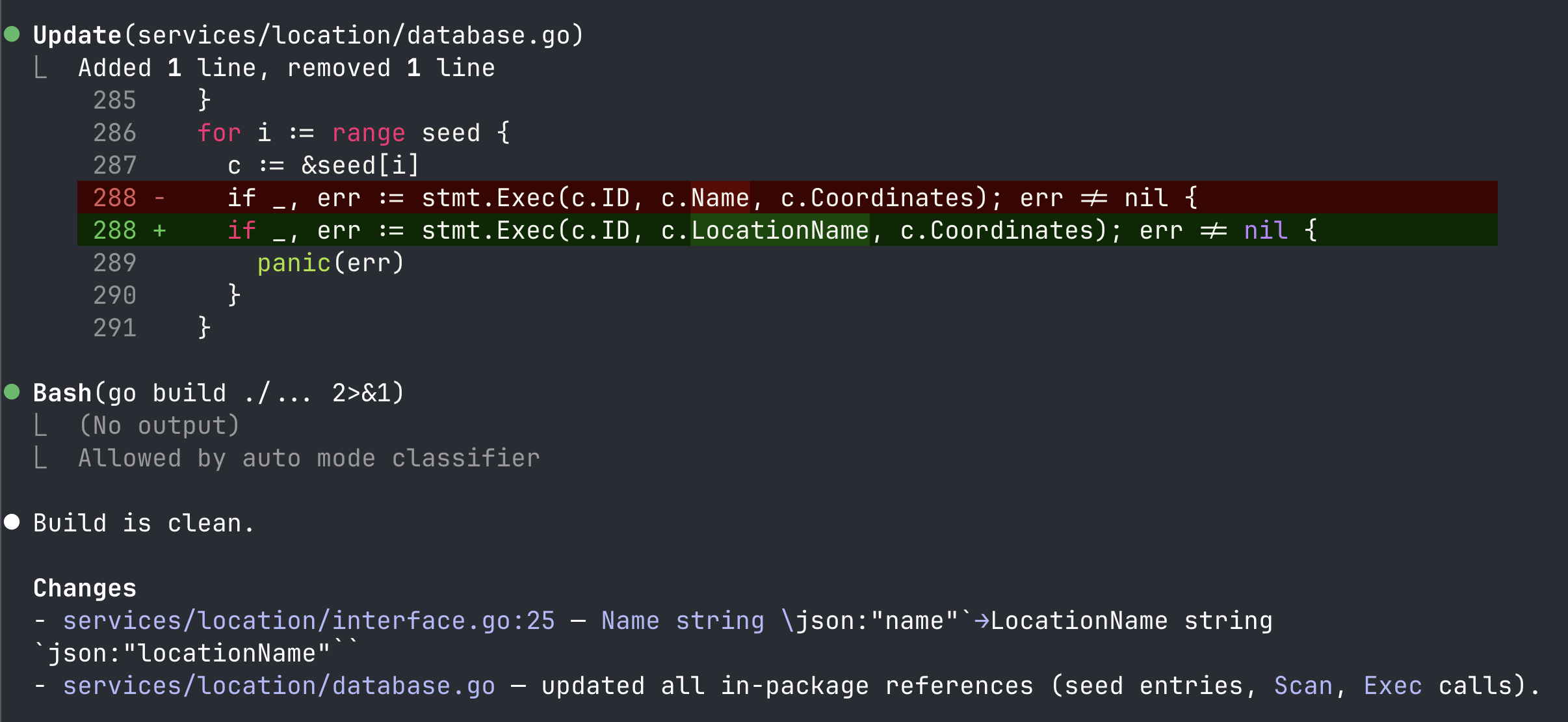
From inside the location package everything looks fine: the build is clean, unit tests in the location service still pass, linters are happy. The frontend still reads loc.name though, so the pickup-location text won't render. Nothing in the change set says so, and nothing the agent did would catch it.
Step 3: Validate the change with the skill
You do
Switch back to your agent with the two Signadot skills loaded and ask:
Validate this location-service change against the
hotrod-e2e-rideplan on cluster<your-cluster>.
That's the only prompt you give for this step. The rest is the skill working autonomously to validate, fix, and re-run until the plan goes green.
What the skill does
In the agent's chat, you'll see it work through these phases. None of this is something you run yourself.
Set up the sandbox. The skill picks up your local connect session and creates a sandbox (named something like validate-location-rename) that local-maps the location workload. It builds the hotrod binary from your changed source, exports the env it pulled from the sandbox, and starts hotrod location on localhost:8081.
Run the plan against the sandbox. It runs hotrod-e2e-ride with the sandbox's routing key, so the Playwright step in the cluster sends keyed traffic that the mesh routes to your local process. The plan fails: Playwright drives the ride-request flow, but the itinerary accordion never appears, and the expect(...).toBeVisible() assertion times out at 15s.
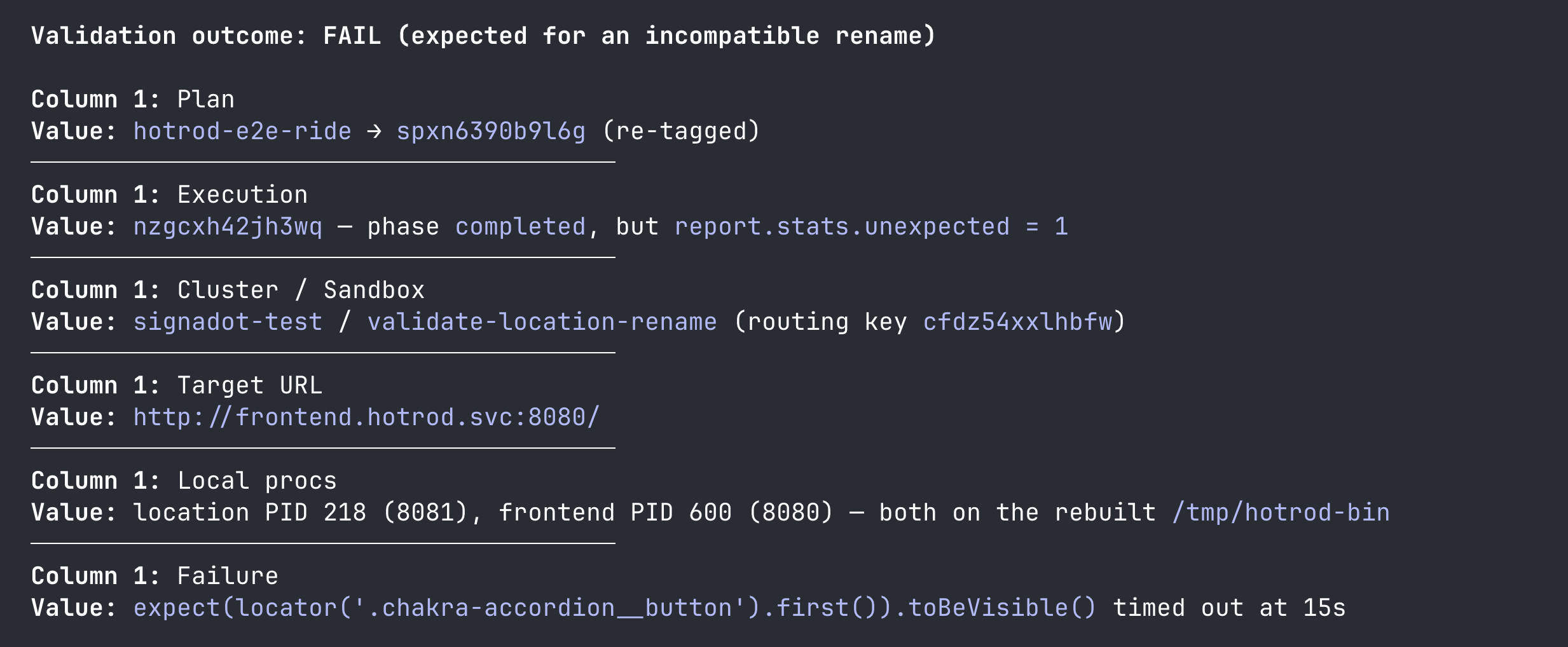
Trace the failure and propagate the fix. The skill knows the change set was scoped to services/location/, so it looks at how the consumer reads location data. It finds four sites in the React app under services/frontend/react_app/src/ reading the old name field, updates each to read locationName, rebuilds the React bundle and the hotrod binary, and adds frontend to the sandbox as a second local-mapped workload.
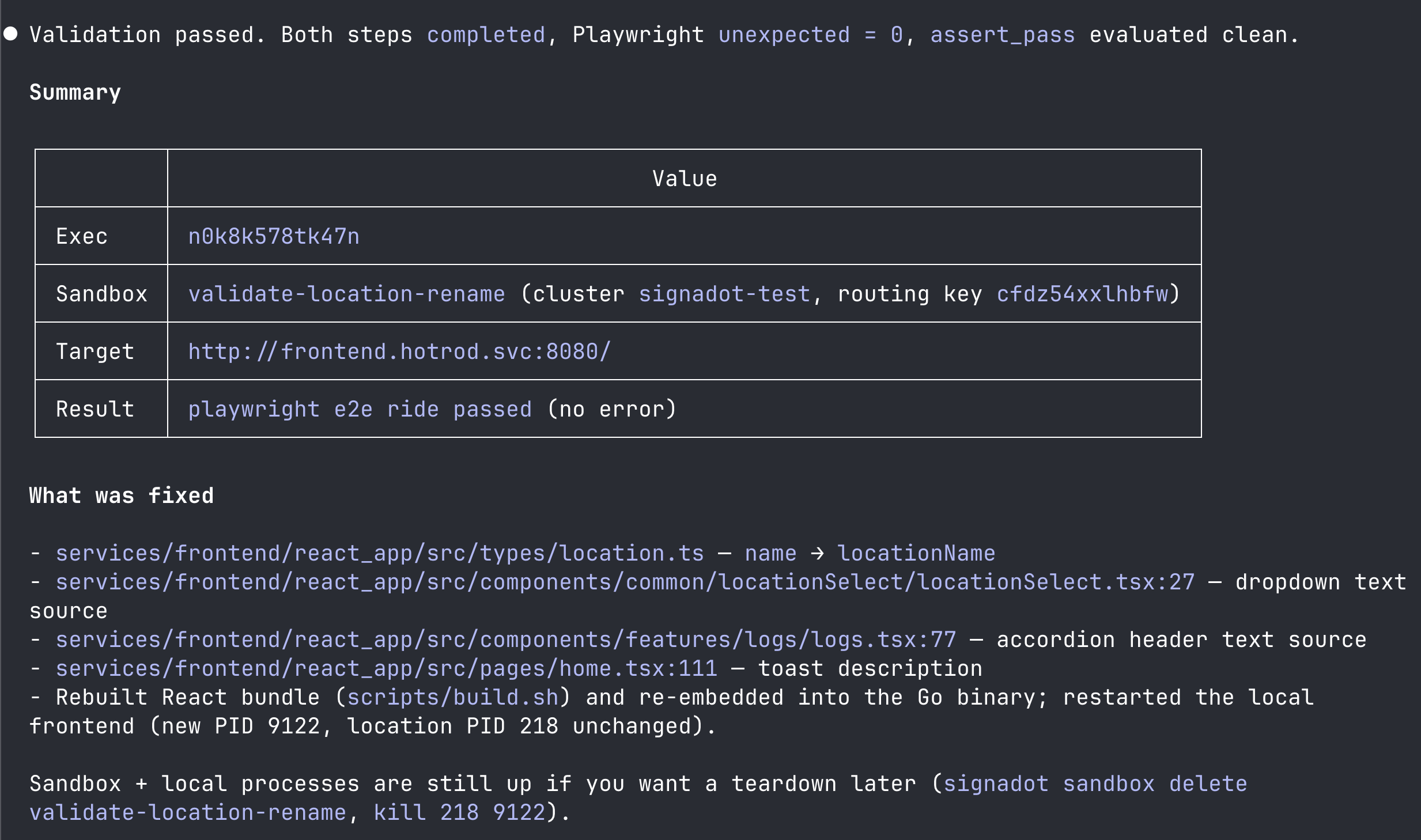
Re-run the plan. Playwright now resolves the itinerary header to "Request ID: #1 from Rachel's Floral Designs to Trom Chocolatier". The step exits 0.
Final report. The skill ends with a summary in the chat: the sandbox name and routing key, the files it touched across the two services, the local processes it left running, and the cleanup commands. It does not run cleanup itself.
If you want to see the failure interactively, open the sandbox URL the skill printed and walk through the ride-request flow yourself.
Step 4: Tear down
The validate skill leaves the sandbox and local processes up so you can inspect them. When you're done:
# Stop the local processes the skill started
pkill -f '/tmp/hotrod-bin'

# Tear down the sandbox
signadot sandbox delete validate-location-rename
If you want to disconnect the local tunnel as well:
signadot local disconnect
What just happened
You set up a validation workflow that catches integration issues no single-service check can.
signadot-plancaptured what the integrated behavior should look like as a durable, reusable artifact. Authoring it took one prompt.signadot-validatedid the work of finding the integration break by running the plan. The change was correct insidelocation, but the plan's end-to-end traffic exposed the consumer infrontendthat also had to change. The skill propagated the edit, brought a second workload into the sandbox, and re-ran the plan to confirm the loop closed.
The plan is reusable. The next time anyone changes anything in the ride-request path, the same validate invocation pulls the loop together again with no further authoring.
Further reading
- Letting Signadot pick the right plan automatically. Each plan's
selectionHintis a one-line, agent-readable description of when to use the plan. As you accumulate validation plans for different user flows (ride request, payment, search, signup), Signadot can match the change set to the most relevant plan(s) by reading the hints, so the inner loop only runs what's essential to validate the change at hand. That's how the loop stays fast as the system grows. - Other action types.
request-httpis the right action for API-shape and contract checks;k6covers load and performance probes. A single plan can chain steps across action types when the validation surface mixes UI and API checks. - Skill internals. Read the Agent Skills page for the full description of
signadot-planandsignadot-validate, including what's autonomous, what's gated, and how the skills compose.