Mobile Frontend Preview: Test Backend Changes from an iOS App with Sandboxes
To preview a backend change from a mobile app without deploying it to production, run the changed
service in a Signadot sandbox next to your shared baseline environment,
and have the app send the sandbox's routing key in a baggage header. Requests with the key reach
the sandboxed service; requests without it, including everyone else's, use the baseline. This
tutorial does it with the HotROD ride-sharing demo on Kubernetes and a SwiftUI iOS app whose
developer menu switches between the baseline and any sandbox by routing key.
The app is in the example repository.
How it works
A browser can get the routing key from the Signadot Chrome extension or a preview URL. A mobile app has neither, so the app adds the header itself. Signadot routes on the header, not on the hostname, so the app keeps calling the same backend address it always does.
In this tutorial, two backend changes run in sandboxes: the route service returns ETAs in seconds
instead of minutes, and the driver service adds an SD- prefix to license plates. The diagram
shows a ride request from the app with the routing key of a sandbox that forks both:
The frontend is unchanged, so the baseline handles it. HotROD's services propagate OpenTelemetry baggage, so the key travels from the app's request into the Kafka message the frontend publishes and into the driver's gRPC calls. At each hop, the request goes to the sandboxed version of the service if the key's sandbox forks it. The driver reads Kafka messages and processes only those meant for it, the selective consumption pattern.
What the app sends
The app keeps the selected routing key in its AppState, and turns it into two headers that
Signadot's routing reads by default:
var routingHeaders: [String: String] {
    guard let routingKey = selectedEnvironment.routingKey else {
        return [:]
    }

    // Use OpenTelemetry standard headers for Signadot routing
    return [
        "baggage": "sd-routing-key=\(routingKey)",
        "tracestate": "sd-routing-key=\(routingKey)"
    ]
}
HotRODAPIService puts those headers on every request it sends, both as session defaults and on
each URLRequest:
init(baseURL: String, routingHeaders: [String: String] = [:]) {
    // ...
    let config = URLSessionConfiguration.default
    config.httpAdditionalHeaders = routingHeaders
    self.session = URLSession(configuration: config)
}

func bookRide(_ request: RideRequest) async throws -> RideResponse {
    // ...
    for (key, value) in routingHeaders {
        urlRequest.setValue(value, forHTTPHeaderField: key)
    }
    // ...
}
With the baseline selected, routingHeaders is empty and the app talks to the baseline like any
other client.
Any mobile client works the same way
Nothing here is specific to iOS. The contract is one HTTP header, so an Android app adds it in an OkHttp interceptor:
val client = OkHttpClient.Builder()
    .addInterceptor { chain ->
        chain.proceed(
            chain.request().newBuilder()
                .header("baggage", "sd-routing-key=$routingKey")
                .build()
        )
    }
    .build()
React Native and Flutter apps set the same header as a default on their HTTP client. If the app
already sends OpenTelemetry baggage, add sd-routing-key=<key> as a member of the existing
baggage header rather than replacing it. Keep the routing key input in debug and internal builds
only.
Before you begin
You need:
- macOS with Xcode 15 or later and an iOS 17 simulator.
- A Kubernetes cluster with the Signadot Operator
installed.
kubectl get pods -n signadotshould list theagent,routeserver,tunnel-proxyandsignadot-controller-managerpods asRunning. - The Signadot CLI, logged in with
signadot auth login. kubectlpointed at that cluster, plusgitandjq.
Step 1: Deploy HotROD
Deploy HotROD into the hotrod namespace. The iOS app calls frontend.hotrod and
location.hotrod, so it expects that namespace.
kubectl create namespace hotrod
kubectl -n hotrod apply -k 'https://github.com/signadot/hotrod/k8s/overlays/prod/devmesh'
kubectl -n hotrod wait --for=condition=available deployment --all --timeout=5m
kubectl -n hotrod get pods
NAME                        READY   STATUS    RESTARTS   AGE
driver-7c7d9d8594-prn5w     2/2     Running   0          3m
frontend-795f945f8f-tsnhg   2/2     Running   0          3m
kafka-0                     1/1     Running   0          3m
location-6949dd6694-cx9cd   2/2     Running   0          3m
mysql-0                     1/1     Running   0          3m
redis-79f97d7dc8-m952z      1/1     Running   0          3m
route-55f4c8f576-p88gc      2/2     Running   0          3m
The four application services show 2/2: the second container is the
DevMesh sidecar that routes requests by routing key. The
app talks to frontend on port 8080 and location on port 8081.
Step 2: Create the sandboxes
Each sandbox forks the services a change touches and shares everything else with the baseline.
HotROD already has settings for both changes, so the sandboxes need no image build: FAST_ROUTE
makes the route service return a one-second ETA, and DRIVER_ID_PREFIX adds a prefix to every
driver's license plate.
Create a signadot-config directory with two files. route-fast-eta.yaml forks only route:
name: route-fast-eta
spec:
  cluster: "@{cluster}"
  description: route service with ETAs in seconds
  forks:
    - forkOf:
        kind: Deployment
        namespace: hotrod
        name: route
      customizations:
        env:
          - name: FAST_ROUTE
            value: "1"
combined-features.yaml forks both route and driver:
name: combined-features
spec:
  cluster: "@{cluster}"
  description: route with ETAs in seconds, driver with SD- license plates
  forks:
    - forkOf:
        kind: Deployment
        namespace: hotrod
        name: route
      customizations:
        env:
          - name: FAST_ROUTE
            value: "1"
    - forkOf:
        kind: Deployment
        namespace: hotrod
        name: driver
      customizations:
        env:
          - name: DRIVER_ID_PREFIX
            value: "SD-"
Create both, then look up a routing key:
export CLUSTER=<your-cluster>
signadot sandbox apply -f signadot-config/route-fast-eta.yaml --set cluster=$CLUSTER
signadot sandbox apply -f signadot-config/combined-features.yaml --set cluster=$CLUSTER
signadot sandbox get route-fast-eta
signadot sandbox get prints a Routing Key: line; you will paste that key into the app.
With a real code change, the sandbox runs the image your CI built for the pull request instead of setting a variable:
      customizations:
        images:
          - image: <your-registry>/hotrod:<pull-request-tag>
Step 3: Connect your Mac to the cluster
signadot local connect makes in-cluster service names such as frontend.hotrod resolve on your
Mac and routes that traffic into the cluster. It asks for your password because it edits
/etc/hosts and configures networking.
signadot local connect --cluster=$CLUSTER
signadot local connect has been started ✓
* runtime config: cluster my-cluster, running with root-daemon
✓ Local connection healthy!
    * operator version 1.0.0
    * port-forward listening at ":62594"
    * localnet has been configured
    * 20 hosts accessible via /etc/hosts
    * sandboxes watcher is running
* Connected Sandboxes:
    - No active sandbox
The iOS Simulator uses the Mac's network and hosts file, so the app can now reach
frontend.hotrod:8080 and location.hotrod:8081 as if it ran in the cluster. See
signadot local for the details.
Step 4: Check the sandboxes from the command line
The app adds a header and nothing else, so curl with the same header shows what the app's
requests will do. Book a ride for session 7 with the route-fast-eta key, then read the progress
notifications HotROD stores for that session. Run the second command within 30 seconds; HotROD
expires a session's notifications after that.
KEY=$(signadot sandbox get route-fast-eta -o json | jq -r .routingKey)

curl -s -X POST http://frontend.hotrod:8080/dispatch \
  -H 'Content-Type: application/json' \
  -H "baggage: sd-routing-key=$KEY" \
  -d '{"SessionID": 7, "RequestID": 1, "PickupLocationID": 1, "DropoffLocationID": 731}'

sleep 3
curl -s "http://frontend.hotrod:8080/notifications?sessionID=7&cursor=-1" \
  | jq -r '.notifications[] | "\(.context.sandboxName | if . == "" then "baseline" else . end): \(.body)"'
Each line names the sandbox whose service handled that step. Only the route lookup ran in the sandbox, and the ETA is now in seconds:
baseline: Processing dispatch driver request
baseline: Resolving locations
baseline: Finding an available driver
route-fast-eta: Resolving routes
baseline: Driver T751316C arriving in 1s
Repeat with the combined-features key and "SessionID": 8 (a new session, so the notifications
start empty). The driver now runs in the sandbox too, and the plate has the prefix:
baseline: Processing dispatch driver request
baseline: Resolving locations
combined-features: Finding an available driver
combined-features: Resolving routes
combined-features: Driver SD-T748291C arriving in 1s
Without the header, every line says baseline and the ETA is in minutes, such as
Driver T748291C arriving in 6m48s. Driver numbers are random.
Step 5: Run the iOS app
Clone the examples repository and open the project in Xcode:
git clone https://github.com/signadot/examples.git
open examples/hotrod-ios-app/HotRodApp.xcodeproj
Before you build, check baseURL in HotRodApp/Models.swift. The example sets it to
https://frontend.hotrod:8080, but HotROD's frontend serves plain HTTP, so change it to
http://frontend.hotrod:8080. The app's Info.plist already allows plain-HTTP requests. Then
build and run the app on an iPhone simulator.
Step 6: Switch the app between baseline and sandbox
Point the app at a sandbox from its developer menu:
- Tap the wrench icon to open Developer Mode.
- Open the Test Environment menu and choose Custom Sandbox....
- Paste the routing key from Step 2 and tap Connect.
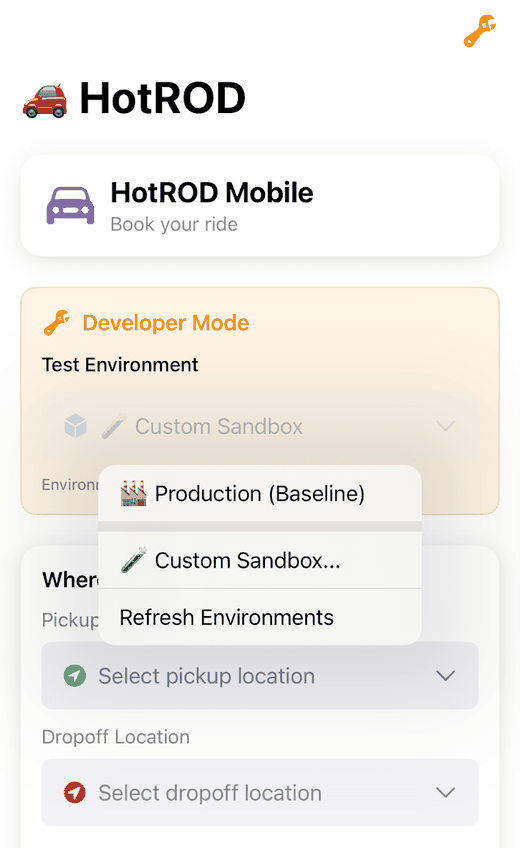
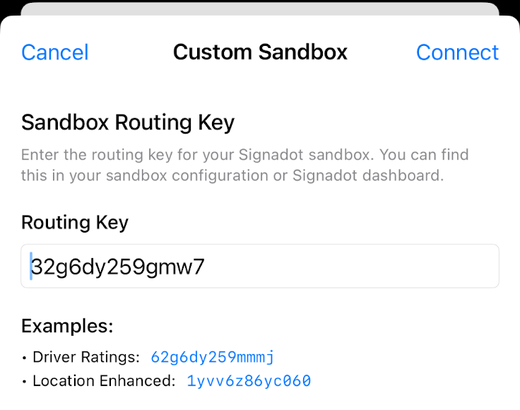
Switching environments reloads the location list, so the next request already carries the key. To
see the headers, set a breakpoint in getLocations() in APIService.swift after the header loop,
switch environments, and print the request in the Xcode debugger:
(lldb) po request.allHTTPHeaderFields
▿ Optional<Dictionary<String, String>>
  ▿ some : 2 elements
    ▿ 0 : 2 elements
      - key : "tracestate"
      - value : "sd-routing-key=32g6dy259gmw7"
    ▿ 1 : 2 elements
      - key : "baggage"
      - value : "sd-routing-key=32g6dy259gmw7"
Now pick a pickup and a dropoff location, enter a name, choose a driver and book the ride. The booking request carries the key to the backend, which routes it as in Step 4. To confirm that the sandbox handled it, read the forked route pod's logs; the pod name starts with the sandbox name:
kubectl -n hotrod get pods | grep route-fast-eta
kubectl -n hotrod logs <route-fast-eta-pod> -c hotrod | grep "Finding route"
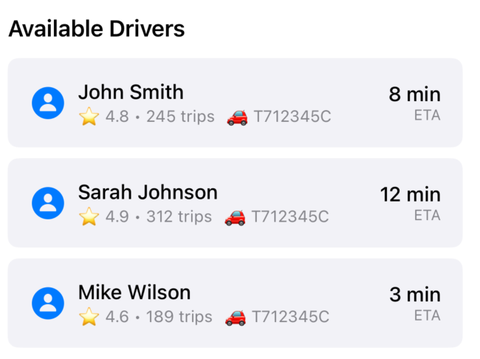
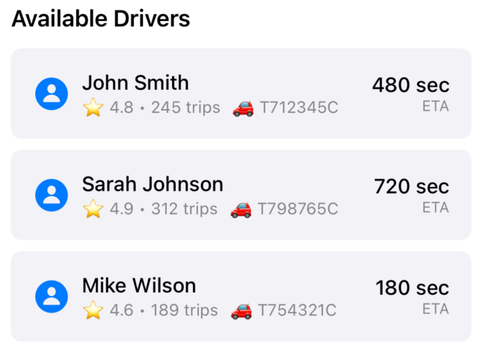
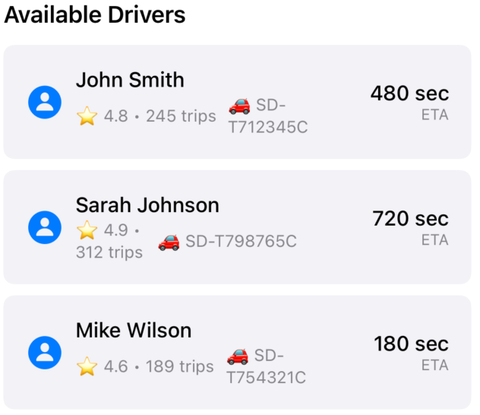
The driver list is where a rider sees the change. The example app is a UI prototype: it sends
real, header-tagged requests to HotROD but fills in the driver rows itself, so treat these screens
as the intended result and the Step 4 notifications and pod logs as the real check. In your own
app, the screen renders whatever the sandboxed backend returns. From left to right: the baseline,
the route-fast-eta sandbox, and the combined-features sandbox.
Use it with real pull requests
The steps above create sandboxes by hand. In day-to-day use:
- CI creates the sandboxes. Each backend pull request gets a sandbox running its image, as in pull request sandboxes. The Signadot GitHub App posts the sandbox's routing key on the pull request, so a mobile developer or tester copies it into the app.
- Features that span pull requests use a route group. Paste the route group's routing key instead; multi-PR feature testing shows how to build one.
- Physical devices and TestFlight builds call your staging entry point.
signadot local connectserves the simulator on your Mac. A device should call the ingress or API gateway it normally uses for staging, with the same header. Preview URLs require Signadot authentication, so they suit browsers and test scripts better than apps.
Clean up
signadot sandbox delete route-fast-eta
signadot sandbox delete combined-features
signadot local disconnect
kubectl delete namespace hotrod
Frequently asked questions
How do I preview backend changes without deploying to production?
Run the changed service in a sandbox next to a shared baseline environment, such as staging, and send requests that carry the sandbox routing key. Requests with the key reach the changed service and every other service comes from the baseline, so you test against real dependencies without deploying the change anywhere shared. Requests without the key, including everyone else, keep using the baseline.
How does a mobile app reach a sandbox instead of the baseline?
The app adds the sandbox routing key to its API requests as a baggage header, for example baggage: sd-routing-key=<key>, and keeps calling the same backend address. Routing happens inside the cluster: the backend services propagate the header, and at each hop a request with the key goes to the sandboxed version of that service if one exists. The example iOS app sets the header from a routing key typed into a developer menu.
Does this work for Android, React Native or Flutter apps?
Yes. The contract is one HTTP header, so any client that can set a request header can target a sandbox. On Android, add the header in an OkHttp interceptor; in React Native or Flutter, set it as a default header on the HTTP client. If the app already sends OpenTelemetry baggage, add sd-routing-key as a member of that header instead of replacing it.
Can I test on a physical device instead of the simulator?
Yes, as long as the device can reach your backend. The simulator reaches in-cluster services through signadot local connect on the Mac; a physical device or a TestFlight build should call the same entry point it normally uses for staging, such as an ingress or API gateway, with the routing key header added. The routing decision is made in the cluster, not on the device.
How do I test backend changes from several pull requests in the app?
Combine their sandboxes with a route group, which has its own routing key. Enter the route group key in the app instead of a sandbox key, and requests reach the forked service from every matched sandbox. Alternatively, one sandbox can fork several services, as the combined-features sandbox in this tutorial does.
See also
- Developer access to sandboxes: routing headers, the Chrome extension and preview URLs
- Context propagation: which headers carry the routing key between services
signadot local: connect your machine to the cluster- Multi-PR feature testing: join sandboxes from several pull requests with a route group
- Vercel preview environments: the same idea for a web frontend deployed on Vercel
- Preview URLs: hosted endpoints that add the routing key for you
- Pull request sandboxes: create a sandbox for every backend pull request