How to Test a Feature That Spans Multiple Pull Requests
A feature that changes several microservices usually arrives as several pull requests, and testing each pull request on its own never runs the feature end to end. The fix is a preview environment per feature: each pull request gets a sandbox that runs only its changed service, and a route group joins the sandboxes under one routing key, so one preview URL sends requests through all of them while every other service comes from the shared baseline. This tutorial builds that for a "dynamic surcharge" feature that spans two HotROD services, first by hand and then with GitHub Actions that create a sandbox per pull request and link pull requests into one preview from a PR comment.
The files are in the example repository.
Why testing each pull request separately misses the bug
The surcharge feature needs two changes. The route service gains a GetSurcharge gRPC method,
and the frontend calls it and shows the amount to the rider. Each change ships in its own pull
request, which gives four combinations of old and new versions:
| Frontend | Route | What the combination tells you |
|---|---|---|
| Baseline | Baseline | The current system still works. |
| Baseline | Route PR | The new route service does not break existing callers. |
| Frontend PR | Baseline | Whether the new frontend fails gracefully while the API it needs is missing. |
| Frontend PR | Route PR | Whether the feature works. |
A preview per pull request covers only the middle two rows, and both pass: the old frontend never
calls GetSurcharge, and the new frontend hides the surcharge when the call fails. Neither shows a
surcharge, so nobody has seen the feature work. Worse, a mismatch between the two pull requests,
such as a renamed RPC or a field the frontend expects but the route service never sends, passes
both checks and breaks only after merge. The last row is the one that matters, and it needs both
pull requests in the request path at once.
How it works: one preview environment across multiple microservices
Every sandbox has a routing key. A request that carries the key in its baggage header reaches the
sandbox's forked workloads, and a request without it reaches the baseline. The services propagate
the header from hop to hop with
OpenTelemetry context propagation, so the routing
decision is made again at every service the request reaches.
A route group is a routing key shared by several sandboxes. It selects sandboxes by
label, and a request that carries its key goes to
the forked version of any service that one of the matched sandboxes forks. Here both pull request
sandboxes carry the label epic: EPIC-42, and the route group matches it. This is the path of a
ride request sent through the route group's preview URL:
Only the two forked services run as new pods; location, driver, Kafka, Redis and MySQL are the
baseline's, shared with everyone else. Matching is by label, so a pull request can join a feature
preview at any time. A route group cannot match two sandboxes that fork the same workload; Signadot
rejects that combination as ambiguous. The keys help before anything merges, too: the frontend
developer can build against the route sandbox's routing key while the route pull request is still
in review.
Before you begin
You need:
- A Kubernetes cluster with the Signadot Operator
installed. HotROD's
devmeshoverlay uses DevMesh sidecars for routing. - The Signadot CLI, logged in with
signadot auth login. kubectlpointed at that cluster,git, Docker, and a container registry the cluster can pull from.- To build HotROD: Go, Node.js with npm, and
protocwith theprotoc-gen-goandprotoc-gen-go-grpcplugins. - Optionally, the Signadot Chrome extension, to pick which sandbox or route group your browser's requests use.
Step 1: Deploy HotROD and check the baseline
Deploy HotROD into the hotrod namespace, which the files in this tutorial assume:
kubectl create namespace hotrod
kubectl -n hotrod apply -k 'https://github.com/signadot/hotrod/k8s/overlays/prod/devmesh'
kubectl -n hotrod wait --for=condition=available deployment --all --timeout=5m
Connect your machine to the cluster, so that in-cluster service names resolve locally:
signadot local connect --cluster=<your-cluster>
Open http://frontend.hotrod.svc:8080, pick a pickup and a dropoff location, and request a ride. A car appears on the map. This is the baseline: no surcharge yet.
Step 2: Make the two changes
Clone HotROD and create a branch for the feature:
git clone https://github.com/signadot/hotrod.git
cd hotrod
git checkout -b epic-42-surcharge
In a real team the two changes would be two branches and two pull requests. HotROD compiles every service into one binary and one image, so here one branch carries both changes, and each sandbox runs only its own service from that image. The example README has the complete diff; these are the parts that define the feature.
The route pull request adds the RPC to services/route/route.proto:
message SurchargeRequest {
    string pickup = 1;
    string dropoff = 2;
}

message SurchargeResponse {
  double amount = 1;
}

service RoutesService {
  rpc FindRoute(FindRouteRequest) returns (FindRouteResponse);
  rpc GetSurcharge(SurchargeRequest) returns (SurchargeResponse);
}
It implements the method in the route server, returning a fixed amount, and adds a matching
GetSurcharge method to the route client in services/route/client.go:
func (s *Server) GetSurcharge(ctx context.Context, req *SurchargeRequest) (*SurchargeResponse, error) {
    s.logger.For(ctx).Info("Calculating surcharge", zap.String("pickup", req.Pickup), zap.String("dropoff", req.Dropoff))
    // In a real application, you would have logic to determine the surcharge.
    // For this tutorial, we'll return a fixed amount.
    return &SurchargeResponse{
        Amount: 1.25,
    }, nil
}
The frontend pull request gives the frontend server a route client and a /surcharge handler
that calls it. The handler passes the incoming request's context to the gRPC call, which is what
carries the routing key from the frontend to the route service:
func (s *Server) surcharge(w http.ResponseWriter, r *http.Request) {
    ctx := r.Context()
    pickup := r.URL.Query().Get("pickup")
    dropoff := r.URL.Query().Get("dropoff")
    // ... reject requests without pickup or dropoff

    surchargeRes, err := s.routeClient.GetSurcharge(ctx, pickup, dropoff)
    if err != nil {
        s.logger.For(ctx).Error("Failed to get surcharge", zap.Error(err))
        http.Error(w, "Failed to get surcharge", http.StatusInternalServerError)
        return
    }

    s.writeResponse(map[string]interface{}{
        "surcharge": surchargeRes.Amount,
    }, w, r)
}
The React page calls the handler when the rider requests a ride, and shows a "Dynamic Surcharge
Applied" banner only when the call succeeds. That response.ok check is why the frontend pull
request, paired with the baseline route service, quietly shows nothing:
const getSurcharge = async (pickupId: string, dropoffId: string) => {
    try {
        const response = await fetch(`/surcharge?pickup=${pickupId}&dropoff=${dropoffId}`);
        if (response.ok) {
            const data = await response.json();
            setSurcharge(data.surcharge);
        }
    } catch (error) {
        console.error('Failed to get surcharge:', error);
    }
};
Regenerate the gRPC code, then build and push the image. make build-docker builds the React app
first and tags the image signadot/hotrod:<RELEASE_TAG>-<GOOS>-<GOARCH>:
make generate-proto
make build-docker RELEASE_TAG=epic-42 GOOS=linux GOARCH=amd64
docker tag signadot/hotrod:epic-42-linux-amd64 <your-registry>/hotrod:epic-42
docker push <your-registry>/hotrod:epic-42
Use GOARCH=arm64 if your cluster's nodes are ARM.
<your-registry> is a placeholder. When you build images of your own services this way, push them to a
private repository and give the cluster pull access to it, for example with an
image pull secret.
Step 3: Create a sandbox for each pull request
Each pull request gets its own sandbox, which forks only the service that pull request changes.
Both carry the epic: EPIC-42 label that the route group will match. Save the route pull request's
sandbox as route-surcharge-sandbox.yaml:
name: route-surcharge-feature
spec:
  cluster: "@{cluster}"
  labels:
    epic: EPIC-42
  forks:
    - forkOf:
        kind: Deployment
        namespace: hotrod
        name: route
      customizations:
        images:
          - image: "@{image}"
frontend-surcharge-sandbox.yaml is the same with frontend-surcharge-feature as the name and
frontend in place of route. Create both:
export CLUSTER=<your-cluster>
export IMAGE=<your-registry>/hotrod:epic-42
signadot sandbox apply -f route-surcharge-sandbox.yaml --set cluster=$CLUSTER --set image=$IMAGE
signadot sandbox apply -f frontend-surcharge-sandbox.yaml --set cluster=$CLUSTER --set image=$IMAGE
Each command prints the sandbox's routing key. The cluster now runs two versions of route and
frontend: the baseline and the fork.
Step 4: Join the sandboxes with a route group
The route group matches every sandbox labeled epic: EPIC-42 and exposes an endpoint for the
frontend. Save it as epic-routegroup.yaml:
name: epic-42-preview
spec:
  cluster: "@{cluster}"
  match:
    any:
      - label:
          key: epic
          value: EPIC-42
  endpoints:
    - name: hotrod-frontend
      target: http://frontend.hotrod.svc:8080
The endpoint targets the baseline frontend service. The preview URL adds the route group's
routing key to each request, and routing sends it on to the forked frontend. Apply it:
signadot routegroup apply -f epic-routegroup.yaml --set cluster=$CLUSTER
The command waits until both sandboxes are ready, then prints the route group's routing key and its
preview URL, https://hotrod-frontend--epic-42-preview.preview.signadot.com.
Step 5: Test the feature end to end
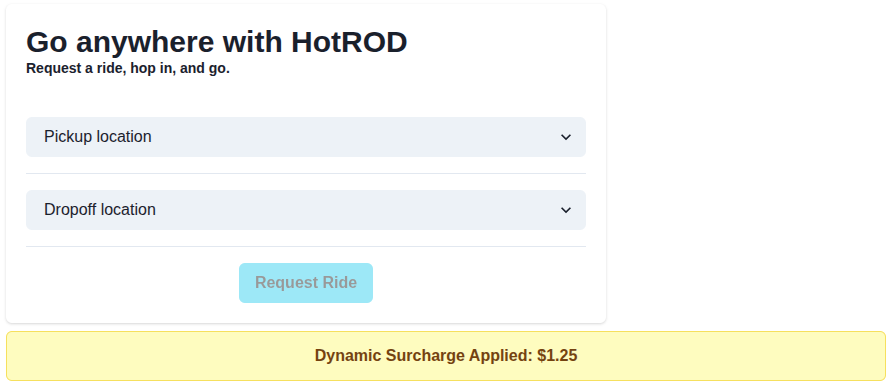
Open the preview URL in a browser where you are signed in to app.signadot.com, and request a ride. With both pull requests in the request path, the frontend shows the surcharge:
You can run every row of the table the same way: with signadot local connect running, open
http://frontend.hotrod.svc:8080 and pick a routing context in the Chrome extension. With no
selection or route-surcharge-feature, the ride works and no banner appears, because nothing calls
the new method. With frontend-surcharge-feature, the ride still works and the banner stays hidden,
while the frontend logs Failed to get surcharge because the baseline route service has no
GetSurcharge method. Only epic-42-preview shows $1.25.
Automate it with GitHub Actions
By hand, the flow is three files and three commands. In CI it becomes two workflows: one creates a
sandbox for every pull request, and one adds a pull request to a feature preview when someone
comments /epic EPIC-42 on it. Both are adapted from the example's .github/workflows directory.
Each service repository runs its own copy with SERVICE set to the service it builds; in a
monorepo like HotROD, detect the changed service instead.
Add these repository secrets:
| Secret | Value |
|---|---|
SIGNADOT_API_KEY | An API key from a service account |
SIGNADOT_ORG | Your Signadot organization name |
SIGNADOT_CLUSTER | The cluster name registered with Signadot |
DOCKER_USERNAME, DOCKER_PASSWORD | Credentials for your container registry |
Workflow 1: a sandbox for every pull request
On every push to a pull request, this workflow builds the image, then creates or updates a sandbox named after the service and the pull request:
name: Create PR Sandbox
on:
  pull_request:
    types: [opened, synchronize]

jobs:
  create-sandbox:
    runs-on: ubuntu-latest
    env:
      PR_NUMBER: ${{ github.event.pull_request.number }}
      SERVICE: frontend # the service this repository builds
    steps:
      - name: Checkout code
        uses: actions/checkout@v4

      - name: Set up Go
        uses: actions/setup-go@v5
        with:
          go-version-file: go.mod

      - name: Login to Docker Hub
        uses: docker/login-action@v3
        with:
          username: ${{ secrets.DOCKER_USERNAME }}
          password: ${{ secrets.DOCKER_PASSWORD }}

      - name: Build and push Docker image
        run: |
          make build-docker RELEASE_TAG=pr-${PR_NUMBER}
          docker tag signadot/hotrod:pr-${PR_NUMBER}-linux-amd64 <your-dockerhub-username>/hotrod:pr-${PR_NUMBER}
          docker push <your-dockerhub-username>/hotrod:pr-${PR_NUMBER}

      - name: Install Signadot CLI
        run: curl -sSLf https://raw.githubusercontent.com/signadot/cli/main/scripts/install.sh | sh

      - name: Apply Sandbox
        env:
          SIGNADOT_API_KEY: ${{ secrets.SIGNADOT_API_KEY }}
          SIGNADOT_ORG: ${{ secrets.SIGNADOT_ORG }}
        run: |
          # Keep the epic label if /epic already linked this pull request
          EPIC_ID=$(signadot sandbox get "${SERVICE}-pr-${PR_NUMBER}" -o json 2>/dev/null | jq -r '.spec.labels.epic // ""' || true)
          cat > sandbox.yaml << EOF
          name: "${SERVICE}-pr-${PR_NUMBER}"
          spec:
            cluster: "${{ secrets.SIGNADOT_CLUSTER }}"
            labels:
              signadot/github-pull-request: "${PR_NUMBER}"
              signadot/github-repo: "${{ github.repository }}"
              epic: "${EPIC_ID}"
            forks:
              - forkOf:
                  kind: Deployment
                  namespace: hotrod
                  name: ${SERVICE}
                customizations:
                  images:
                    - image: "<your-dockerhub-username>/hotrod:pr-${PR_NUMBER}"
          EOF
          signadot sandbox apply -f sandbox.yaml
The signadot/github-pull-request and signadot/github-repo labels let the
Signadot GitHub App post the
sandbox's status on the pull request and delete the sandbox when the pull request closes. Every push
re-applies the whole spec, so the workflow reads the current epic label first and keeps it;
otherwise a new commit would drop the pull request out of its feature preview. The
Signadot Sandbox Action can
replace the last two steps; it also accepts labels.
Workflow 2: link a pull request to a feature with /epic
When someone comments /epic EPIC-42 on a pull request, this workflow labels the pull request's
sandbox, creates or updates the feature's route group, and replies with the preview URL:
name: Link Epic Preview
on:
  issue_comment:
    types: [created]

permissions:
  pull-requests: write

jobs:
  link-epic:
    if: >-
      github.event.issue.pull_request &&
      startsWith(github.event.comment.body, '/epic ') &&
      contains(fromJSON('["OWNER", "MEMBER", "COLLABORATOR"]'), github.event.comment.author_association)
    runs-on: ubuntu-latest
    env:
      PR_NUMBER: ${{ github.event.issue.number }}
      SERVICE: frontend # the service this repository builds
      SIGNADOT_API_KEY: ${{ secrets.SIGNADOT_API_KEY }}
      SIGNADOT_ORG: ${{ secrets.SIGNADOT_ORG }}
    steps:
      - name: Parse Epic ID from comment
        env:
          COMMENT: ${{ github.event.comment.body }}
        run: |
          EPIC_ID=$(echo "$COMMENT" | awk '{print $2}')
          [[ "$EPIC_ID" =~ ^[A-Za-z0-9-]+$ ]] || { echo "Invalid epic ID: $EPIC_ID"; exit 1; }
          echo "EPIC_ID=${EPIC_ID}" >> $GITHUB_ENV

      - name: Install Signadot CLI
        run: curl -sSLf https://raw.githubusercontent.com/signadot/cli/main/scripts/install.sh | sh

      - name: Update Sandbox with Epic Label
        run: |
          cat > sandbox.yaml << EOF
          name: "${SERVICE}-pr-${PR_NUMBER}"
          spec:
            cluster: "${{ secrets.SIGNADOT_CLUSTER }}"
            labels:
              signadot/github-pull-request: "${PR_NUMBER}"
              signadot/github-repo: "${{ github.repository }}"
              epic: "${EPIC_ID}"
            forks:
              - forkOf:
                  kind: Deployment
                  namespace: hotrod
                  name: ${SERVICE}
                customizations:
                  images:
                    - image: "<your-dockerhub-username>/hotrod:pr-${PR_NUMBER}"
          EOF
          signadot sandbox apply -f sandbox.yaml

      - name: Create or Update Epic RouteGroup
        id: routegroup
        run: |
          RG_NAME="$(echo "$EPIC_ID" | tr '[:upper:]' '[:lower:]')-preview"
          cat > routegroup.yaml << EOF
          name: "${RG_NAME}"
          spec:
            cluster: "${{ secrets.SIGNADOT_CLUSTER }}"
            match:
              label:
                key: epic
                value: "${EPIC_ID}"
            endpoints:
              - name: hotrod-frontend
                target: http://frontend.hotrod.svc:8080
            ttl:
              duration: 1d # counted from when the last matched sandbox is deleted
          EOF
          signadot routegroup apply -f routegroup.yaml
          PREVIEW_URL=$(signadot routegroup get "${RG_NAME}" -o json | jq -r '.endpoints[0].url')
          echo "preview_url=${PREVIEW_URL}" >> $GITHUB_OUTPUT

      - name: Post Preview URL back to PR
        uses: peter-evans/create-or-update-comment@v4
        with:
          issue-number: ${{ github.event.issue.number }}
          body: |
            Unified preview for **${{ env.EPIC_ID }}** is ready!
            Preview URL: **${{ steps.routegroup.outputs.preview_url }}**
The comment body reaches the shell through an environment variable and must match a pattern, so a
crafted comment cannot inject commands, and only owners, members and collaborators can trigger the
workflow. The route group matches on the epic label alone, so every pull request with the same
epic joins the same group, and its name is the lowercased epic ID plus -preview, the same
epic-42-preview as the manual steps. The reply on the pull request looks like this:
Unified preview for EPIC-42 is ready!
Preview URL: https://hotrod-frontend--epic-42-preview.preview.signadot.com
Comment /epic EPIC-42 on the route pull request too, and its sandbox joins the same group: the
URL now runs both pull requests together, and stays current as either one gets new commits.
Clean up
Delete the route group and both sandboxes, then HotROD:
signadot routegroup delete epic-42-preview
signadot sandbox delete route-surcharge-feature
signadot sandbox delete frontend-surcharge-feature
signadot local disconnect
kubectl delete namespace hotrod
In CI, the GitHub App deletes each sandbox when its pull request closes, and the route group's ttl
removes the group a day after its last sandbox is gone.
Frequently asked questions
What should I use to preview microservices per pull request?
Use a sandbox per pull request. A sandbox runs only the services the pull request changes and routes requests that carry its routing key to them, while every other service comes from a shared baseline environment. CI creates or updates the sandbox on each push, and the Signadot GitHub App deletes it when the pull request closes. When a feature spans several pull requests, a route group combines their sandboxes into one preview.
How do you test a feature that spans multiple pull requests?
Create a sandbox for each pull request, give the sandboxes a shared label such as epic: EPIC-42, and create a route group that matches that label. The route group has its own routing key and preview URL, and requests sent with it reach the forked service from every matched pull request. The feature then runs end to end before any of the pull requests merges.
Why is testing each pull request separately not enough?
Each pull request's preview pairs its change with the baseline version of every other service, so the new frontend talks to the old backend and the old frontend talks to the new backend. Those checks show that each change is backward compatible, but neither one runs the feature. A contract mismatch between the pull requests, such as a renamed RPC or a missing field, passes both checks and fails only after merge.
Can two pull requests in the same route group change the same service?
No. If two sandboxes matched by one route group fork the same workload, Signadot cannot tell which one should receive a request, so it rejects the change with an ambiguous fork error. Put both changes in one sandbox, or keep the pull requests in separate route groups.
Do I need a full environment for each multi-service feature?
No. A route group adds no infrastructure: the only new pods are the services forked by each pull request sandbox, and every other service, database and queue comes from the shared baseline. A feature that changes two services runs two extra pods, however many services the application has.
See also
- Route group specification: label matching, endpoints and TTL
- Route group usage: lifecycle and routing conflicts
- Set up pull request sandboxes: templates for a sandbox per pull request
- GitHub Actions integration: the Sandbox Action, the CLI and the GitHub App labels
- Vercel preview environments: connect each Vercel preview to a backend sandbox from the same pull request
- Mobile app previews: send a sandbox or route group routing key from an iOS app
- Preview URLs: how hosted endpoints add the routing key for you