Using Sandboxes with Apollo GraphQL to Test Federated Schema Changes
A schema change to one subgraph of an Apollo Federation supergraph is hard to test on a shared cluster: the Apollo Router serves one supergraph to everyone, so publishing the new schema changes the graph for every developer at once. This tutorial gives each pull request its own GraphOS variant, and runs an Apollo Router pointed at that variant plus the changed subgraph in a Signadot sandbox. Requests that carry the sandbox's routing key see the new fields end to end, while every other request keeps using the baseline graph.
If you run WunderGraph Cosmo instead, one shared router can serve the change through a feature flag, with no router fork; the WunderGraph tutorial covers that approach.
How it works
A schema change is only testable when two things change together: the router must serve the new supergraph, and the subgraph must run the new code. One sandbox forks both, so one routing key selects both.
- A GraphOS variant per pull request. The pull request's subgraph schema is published to a
variant such as
pr-1234, cloned from the baseline variant. GraphOS composes a supergraph for it. The routing URLs stay the same as the baseline's: the variant still sendsuserstraffic tohttp://users.apollographql-demo.svc:4000/graphql. - A forked router. The sandbox forks the
routerDeployment and overrides one environment variable,APOLLO_GRAPH_VARIANT, so the fork loads the pull request's supergraph. - A forked subgraph. The sandbox also forks
userswith the image built from the pull request. - Routing by key. A request with the routing key reaches the
routerService, and the DevMesh sidecar in the baseline router pod hands it to the forked router. The fork plans the query against the new supergraph and calls each subgraph at its usual URL, forwarding thebaggageheader. The DevMesh sidecar in theuserspod sees the routing key and hands that call to the forkedusers. Theproductsandinventorysubgraphs are unchanged, so the baseline serves them.
This diagram shows the path of a request that carries the sandbox's routing key; dashed boxes are the sandbox's forks.
A request without the routing key never reaches either fork, so the baseline graph and other developers' sandboxes are unaffected.
The router needs one setting for this to work: it must forward the routing key to subgraphs. The
example's router configuration, k8s/router-config.yaml, propagates the baggage header (where
the routing key travels) and traceparent on every subgraph request:
headers:
  all:
    request:
      - propagate:
          named: "baggage"
      - propagate:
          named: "traceparent"
See context propagation for how the routing key travels between services.
Before you begin
The example is in
apollographql-tutorial
in the Signadot examples repo. It builds on Apollo's
supergraph demo. You need:
- A Kubernetes cluster with the Signadot Operator
installed. The manifests use
imagePullPolicy: Neverwith images you build locally, so the steps below use minikube. - The Signadot CLI, logged in.
kubectl,minikube,dockerandgit.- An Apollo GraphOS account and the Rover CLI, authenticated.
jqand Bash 4 or later, whichclone-variant.shneeds (it usesmapfile, which the Bash 3.2 that ships with macOS lacks).- The Signadot Chrome extension, to route browser requests to a sandbox.
Step 1: Build the images
The baseline subgraphs come from Apollo's supergraph demo, and the changed users subgraph comes
from the example repo. The scripts expect both repos at fixed paths under ~/git:
mkdir -p ~/git/signadot ~/git/third-party/apollographql
git clone https://github.com/signadot/examples.git ~/git/signadot/examples
git clone https://github.com/apollographql/supergraph-demo.git ~/git/third-party/apollographql/supergraph-demo

cd ~/git/signadot/examples/apollographql-tutorial
eval $(minikube docker-env)
./build.sh
build.sh builds the products, inventory and users images from the supergraph demo, and
signadot/apollographql-demo-users-fg:latest from the example's subgraphs/users, the version of
users you will test.
Step 2: Register the baseline graph in GraphOS
The router fetches its supergraph from GraphOS, so the baseline subgraphs must be published there first. Create a graph in GraphOS Studio, then export its API key, graph ID and variant:
export APOLLO_KEY=<generated-key>
export APOLLO_GRAPH_NAME=<graph-name>
export APOLLO_BASELINE_VARIANT=<graph-variant>
Publish the three subgraphs to the baseline variant:
./setup-apollo.sh
setup-apollo.sh runs rover subgraph publish for products, inventory and users, with
routing URLs that point at their in-cluster Services, such as
http://products.apollographql-demo.svc:4000/graphql.
Step 3: Deploy the baseline
Create the namespace, store the GraphOS credentials in a Secret, and deploy the three subgraphs and the router:
kubectl create ns apollographql-demo
kubectl -n apollographql-demo create secret generic router \
  --from-literal=APOLLO_KEY=${APOLLO_KEY} \
  --from-literal=APOLLO_GRAPH_NAME=${APOLLO_GRAPH_NAME} \
  --from-literal=APOLLO_BASELINE_VARIANT=${APOLLO_BASELINE_VARIANT}

kubectl apply -n apollographql-demo -f ./k8s
Every Deployment carries the sidecar.signadot.com/inject: "true" annotation, which adds the
DevMesh sidecar that hands matching requests to forks. The router builds its graph reference from
the Secret, and this is the value the sandbox will change:
- name: APOLLO_GRAPH_VARIANT
  valueFrom:
    secretKeyRef:
      name: router
      key: APOLLO_BASELINE_VARIANT
- name: APOLLO_GRAPH_REF
  value: "$(APOLLO_GRAPH_NAME)@$(APOLLO_GRAPH_VARIANT)"
Check the baseline. GraphOS Studio should list the three subgraphs in your graph. Then connect your machine to the cluster so in-cluster DNS names resolve:
signadot local connect
Open the router at http://router.apollographql-demo.svc:4000/. The router config enables Apollo Sandbox, Apollo's GraphQL IDE, as its landing page. Run this query:
query {
  allProducts {
    id
    createdBy {
      name
      email
    }
  }
}
It returns each product with the name and email of the user who created it, resolved across the
products and users subgraphs.
Step 4: Create the pull request variant
The forked router needs a variant whose supergraph includes the change. In CI this runs for every pull request; here you play the pipeline for pull request #1234.
The pull request's version of users adds a phoneNumber field and two queries:
type User @key(fields:"email") {
    email:ID!
    name: String
    phoneNumber: String
    totalProductsCreated: Int
}

extend type Query {
  allUsers: [User]
  user(email: ID!): User
}
Clone the baseline variant into a pull request variant, then publish the new users schema on top
of it:
export PR_GRAPH_VARIANT="pr-1234"
cd ~/git/signadot/examples/apollographql-tutorial

# Create the PR variant based on the baseline
./clone-variant.sh ${APOLLO_GRAPH_NAME} ${APOLLO_BASELINE_VARIANT} ${PR_GRAPH_VARIANT}

# Apply the schema changes introduced in the PR
rover subgraph publish "${APOLLO_GRAPH_NAME}@${PR_GRAPH_VARIANT}" \
  --schema ./subgraphs/users/users.graphql \
  --name users \
  --routing-url http://users.apollographql-demo.svc:4000/graphql
clone-variant.sh lists the subgraphs in the source variant with rover subgraph list, then copies
each one's schema and routing URL into the destination:
rover subgraph fetch "$GRAPH@$SRC" --name "$name" \
  | rover subgraph publish "$GRAPH@$DST" \
      --name "$name" \
      --routing-url "$url" \
      --schema -
The users routing URL in the pull request variant is still the baseline Service. That is
deliberate: the routing key, not the URL, decides which users pod answers. Publishing also makes
GraphOS compose the new supergraph, so composition errors in the pull request surface here.
Step 5: Create the sandbox
The sandbox forks the router, pointing it at the pull request variant, and forks users with the
new image. Set CLUSTER to your cluster's name in Signadot, then apply the spec:
export CLUSTER=<cluster-name>

signadot sandbox apply -f - <<EOF
name: apollographql-users
spec:
  cluster: ${CLUSTER}
  forks:
    # Fork the router pointing it to the PR variant
    - forkOf:
        kind: Deployment
        namespace: apollographql-demo
        name: router
      customizations:
        env:
          - name: APOLLO_GRAPH_VARIANT
            value: "${PR_GRAPH_VARIANT}"

    # Fork the users workload pointing it to the new version of the service
    - forkOf:
        kind: Deployment
        namespace: apollographql-demo
        name: users
      customizations:
        images:
          - image: signadot/apollographql-demo-users-fg:latest
EOF
The CLI prints the sandbox's routing key when the sandbox is ready. Both forks share it, so a
single key selects the new supergraph and the new users code together.
Step 6: Query the change through the sandbox
Now compare the two graphs side by side. In the Signadot Chrome extension, select the
apollographql-users sandbox. The extension adds the sandbox's routing key to every browser
request in a baggage header (see developer access
for the headers and other ways to set them).
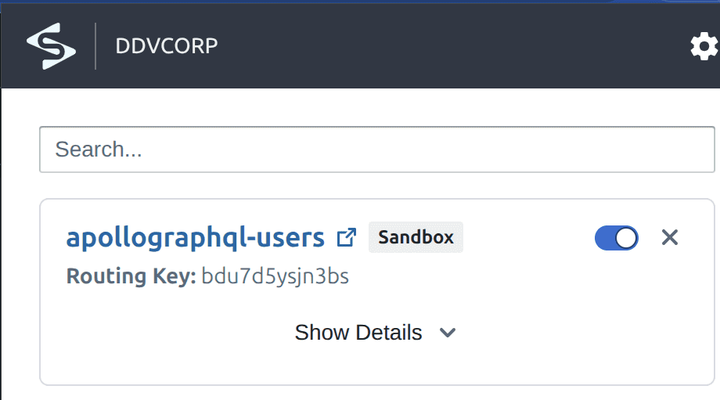
Reload the router page: the schema now lists the allUsers and user queries. Run this query:
query {
  allProducts {
    id
    createdBy {
      name
      email
      phoneNumber
    }
  }
  allUsers {
    email
    name
    phoneNumber
  }
}
The forked router resolves phoneNumber and allUsers through the forked users subgraph
(response shortened):
{
  "data": {
    "allProducts": [
      {
        "id": "apollo-studio",
        "createdBy": {
          "name": "Apollo Studio Support",
          "email": "support@apollographql.com",
          "phoneNumber": "(555) 010-1234"
        }
      }
    ],
    "allUsers": [
      { "email": "support@apollographql.com", "name": "Apollo Studio Support", "phoneNumber": "(555) 010-1234" },
      { "email": "support@signadot.com", "name": "Signadot Support", "phoneNumber": "(555) 030-5678" }
    ]
  }
}
Turn the extension off and run the same query again. The baseline router has never heard of the new field or query, so it rejects the operation with HTTP 400:
{
  "errors": [
    {
      "message": "Cannot query field \"phoneNumber\" on type \"User\".",
      "locations": [{ "line": 7, "column": 7 }],
      "extensions": { "code": "GRAPHQL_VALIDATION_FAILED" }
    },
    {
      "message": "Cannot query field \"allUsers\" on type \"Query\".",
      "locations": [{ "line": 10, "column": 3 }],
      "extensions": { "code": "GRAPHQL_VALIDATION_FAILED" }
    }
  ]
}
The same check works from a terminal or a test, with signadot local connect running. Send the
routing key in the baggage header:
ROUTING_KEY=$(signadot sandbox get apollographql-users -o json | jq -r .routingKey)

curl -s http://router.apollographql-demo.svc:4000/ \
  -H "content-type: application/json" \
  -H "baggage: sd-routing-key=${ROUTING_KEY}" \
  -d '{"query":"{ allUsers { email name phoneNumber } }"}'
Clean up
Delete the sandbox, the pull request variant and the demo namespace:
signadot sandbox delete apollographql-users
rover graph delete "${APOLLO_GRAPH_NAME}@${PR_GRAPH_VARIANT}" --confirm
kubectl delete ns apollographql-demo
Run it in CI
In a real pipeline, the steps above run on every pull request that changes a subgraph:
- Build the changed subgraph's image and push it to a registry your cluster can pull from.
- Run
clone-variant.shto create apr-<number>variant from the baseline variant. - Run
rover subgraph publishfor each changed subgraph against the pull request variant. - Apply a sandbox that forks the router with
APOLLO_GRAPH_VARIANTset to the pull request variant, and forks each changed subgraph with its new image. - Read the routing key with
signadot sandbox get <name> -o json | jq -r .routingKeyand run your tests with it in thebaggageheader, as the Playwright tutorial does for end-to-end tests. - When the pull request closes, delete the sandbox and the variant.
The pull request sandboxes guide covers the sandbox side of this pipeline, and the GitHub Actions guide shows the wiring.
Going further
The setup above is deliberately simple. Two improvements matter once many pull requests run at once.
Single router mode
Each Apollo Router instance points at one graph variant, so every sandbox with a schema change runs its own router fork. That is simple to operate but costs a router per sandbox. A single router could instead resolve, load and cache variants per request, trading memory for fewer running routers. A native Rust plugin in the Apollo Router can do this: it loads and caches several supergraphs and dispatches each request to the right one at runtime. It takes custom development, so it pays off mainly when many short-lived sandboxes run at once.
Variant reconciler
A pull request variant is cloned once, in CI, and then stays fixed, so it drifts as the baseline
moves. Say you open pull request #1234 and its variant is created; then pull request #1233 merges a
change to products. The baseline now has the new products schema, but the pr-1234 variant
does not. A variant reconciler fixes this: a process that detects changes to the baseline variant
and republishes them to every open pull request variant. Running it at the cluster level keeps all
active sandboxes consistent without manual steps.
Frequently asked questions
How do you test GraphQL schema changes before merging?
Publish the pull request's subgraph schema to its own GraphOS variant, then run the changed subgraph and an Apollo Router pointed at that variant in a Signadot sandbox. Requests that carry the sandbox's routing key get the new supergraph and reach the new subgraph code, while every other request keeps using the baseline graph. You can then run queries, end-to-end tests or a browser session against the change on a shared cluster before you merge.
Is Apollo Sandbox the same as a Signadot sandbox?
No. Apollo Sandbox is Apollo's browser-based GraphQL IDE, which the Apollo Router in this tutorial serves as its playground. A Signadot sandbox is a set of forked Kubernetes workloads, here the router and the users subgraph, that receive only the requests carrying its routing key. You send queries from Apollo Sandbox and use the Signadot browser extension to route them into the Signadot sandbox.
Why does each pull request need its own GraphOS variant?
An Apollo Router loads one supergraph, and that supergraph comes from one graph variant. Publishing the changed subgraph to a pull request variant lets GraphOS compose a supergraph that includes the change without touching the baseline variant everyone else uses. The example's clone-variant.sh script copies every subgraph from the baseline variant first, so the pull request variant differs only by the subgraphs the pull request changes.
Why does the sandbox fork the Apollo Router?
Each Apollo Router instance points at a single graph variant, set by its APOLLO_GRAPH_REF, so serving a pull request's supergraph takes a router configured with the pull request variant. The sandbox forks the router and overrides only APOLLO_GRAPH_VARIANT. A native Rust plugin that loads several variants into one router and picks one per request would avoid a router per sandbox, at the cost of custom development.
How do pull request variants stay in sync with the baseline graph?
Not on their own: a pull request variant is cloned when the pipeline runs and does not change when other pull requests merge subgraph changes into the baseline. A variant reconciler, a process that watches the baseline variant and republishes its changes to every open pull request variant, keeps them aligned. Running it at the cluster level keeps every active sandbox consistent without manual steps.
How does this relate to supergraph schema validation and schema checks?
Schema checks validate a proposed subgraph schema against the registered graph and catch composition errors and breaking changes before anything runs. Publishing to a pull request variant composes a real supergraph for the change, and the sandbox runs that supergraph against the new subgraph code. The two are complementary: checks validate the schema statically, and the sandbox shows that the resolvers behind it work with real requests.
See also
- Testing WunderGraph federated GraphQL schemas: the same pattern with one shared Cosmo router and feature flags
- Running Playwright tests on pull requests: run end-to-end tests against a sandbox for every pull request
- Sandboxes: how forks and routing keys work
- Set up developer access: the Chrome extension, routing headers and preview URLs
- Context propagation: how the routing key travels from the router to subgraphs
- Set up pull request sandboxes: create a sandbox from CI for every pull request
- The complete guide to contract testing: where GraphQL schema checks fit among contract tests