Federated GraphQL Schema Testing in CI/CD with WunderGraph and Sandboxes
Testing a change to one subgraph of a federated GraphQL API is hard when the router is shared:
publish the new schema and every client sees it. With WunderGraph Cosmo, you can register a pull
request's subgraph schema as a feature flag named after a Signadot sandbox's routing key, and run
the changed subgraph in that sandbox. A small Envoy proxy in the router pod copies the routing key
into Cosmo's X-Feature-Flag header, so one shared router serves the new schema only to requests
that carry the key, and those requests reach the sandboxed subgraph.
If you use Apollo GraphOS instead, the Apollo GraphQL tutorial does the same with a graph variant and a forked Apollo Router for each pull request.
How it works
Three pieces line up behind one routing key: a Cosmo feature flag that changes the schema, a sandbox that runs the new code, and a proxy that tells the router which flag a request wants.
Cosmo feature flags. In WunderGraph Cosmo, a feature flag
is a named, toggleable set of feature subgraphs. Each feature subgraph replaces one base subgraph
and has its own schema and routing URL. Cosmo composes a graph with the replacements swapped in, and
the router serves that graph to any request that names the flag in the
X-Feature-Flag header
(or a feature_flag cookie). An unknown flag name falls back to the default graph. Because the
router chooses per request, one router serves the baseline and every pull request.
A sandbox for the changed subgraph. The sandbox forks the products subgraph with the image
built from the pull request. The feature subgraph's routing URL is the baseline products Service,
not a sandbox address: the DevMesh sidecar in the products pod sees the routing key on the
router's request and hands it to the fork.
A proxy that turns the routing key into a flag. The Signadot browser extension and
OpenTelemetry carry the routing key in the W3C
baggage header as sd-routing-key, not in X-Feature-Flag.
The feature flag is named after the routing key, so all the proxy has to do is copy the value from
one header to the other.
This diagram shows the path of a request that carries the routing key. Envoy, on port 3002, adds
X-Feature-Flag and forwards to the router on port 13002. The router plans the query against the
flag's schema and calls products at its usual Service, forwarding baggage, and the DevMesh
sidecar there hands the call to the fork (the dashed box).
A request without a routing key gets no X-Feature-Flag header, so it sees the baseline schema and
the baseline products.
The Envoy proxy
The proxy runs as a second container in the router Deployment. Envoy listens on port 3002, the port
the router Service exposes, and the Cosmo router listens only on 127.0.0.1:13002 inside the pod,
so every request passes through Envoy first:
containers:
  - name: router
    image: ghcr.io/wundergraph/cosmo/router:latest
    env:
      - name: LISTEN_ADDR
        value: 127.0.0.1:13002
      # ...
  - name: envoy
    image: envoyproxy/envoy:v1.31.0
    args: ["-c", "/etc/envoy/envoy.yaml", "--disable-hot-restart"]
    ports:
    - containerPort: 3002
      name: graphql
A Lua filter in k8s/envoy-config.yaml does the translation. Its extract_rk helper splits the
baggage header on commas, finds the sd-routing-key member, strips optional quotes and
URL-decodes the value. The request hook then sets the header:
function envoy_on_request(handle)
  local baggage = handle:headers():get("baggage")
  if baggage then
    local rk = extract_rk(baggage)
    if rk and rk ~= "" then
      -- replace to avoid duplicates
      handle:headers():replace("X-Feature-Flag", rk)
    end
  end
end
So a request that arrives with this header:
Baggage: aaa=bbb, sd-routing-key=<routing-key>, xxx=yyy
reaches the router with both:
Baggage: aaa=bbb, sd-routing-key=<routing-key>, xxx=yyy
X-Feature-Flag: <routing-key>
The original baggage header stays intact because the router must pass it on to subgraphs. The
router config, k8s/router-config.yaml, propagates it on every subgraph request:
headers:
  all:
    request:
      - op: "propagate"
        named: "Baggage"
The router Deployment has no Signadot sidecar annotation because it is never forked. Every subgraph
Deployment has sidecar.signadot.com/inject: "true", which adds the DevMesh sidecar that hands
matching requests to forks.
Before you begin
The example is in
wundergraph-tutorial in the
Signadot examples repo. It adapts the
Cosmo Cloud onboarding
demo to Kubernetes. You need:
- A Kubernetes cluster with the Signadot Operator
installed. The manifests use
imagePullPolicy: Neverwith images you build locally, so the steps below use minikube. - The Signadot CLI, logged in.
kubectl,minikube,docker,gitandjq.- A WunderGraph Cosmo account and the
wgcCLI, authenticated. - The Signadot Chrome extension, to route browser requests to a sandbox.
Step 1: Build the images
The subgraphs, including the changed products_fg version of products, come from the demo
directory of WunderGraph's Cosmo repo. The scripts expect both repos at fixed paths under ~/git:
mkdir -p ~/git/signadot ~/git/third-party/wundergraph
git clone https://github.com/signadot/examples.git ~/git/signadot/examples
git clone https://github.com/wundergraph/cosmo.git ~/git/third-party/wundergraph/cosmo

cd ~/git/signadot/examples/wundergraph-tutorial
eval $(minikube docker-env)
./build.sh
build.sh builds images for the products, employees, mood and availability subgraphs, plus
signadot/wundergraph-demo-products_fg:latest, a version of products that adds a
productCount: Int! field to the Employee type. That field is the schema change you will test.
Step 2: Create the federated graph in Cosmo
The router pulls its configuration from Cosmo, so the graph and its subgraphs must exist there
first. setup-wg.sh creates a federated graph named demo in the development namespace, then
creates and publishes the four subgraphs with routing URLs that point at their in-cluster Services,
such as http://products.wundergraph-demo.svc:4004/graphql:
./setup-wg.sh
Create a token the router uses to fetch the graph's configuration:
wgc router token create myName \
    --graph-name demo \
    --namespace development
Step 3: Deploy the baseline
Store the router token in a Secret and deploy the subgraphs and the router. Replace
<router-token> with the token from the previous step:
kubectl create ns wundergraph-demo
kubectl -n wundergraph-demo create secret generic router-token \
  --from-literal=token=<router-token>

kubectl apply -n wundergraph-demo -f ./k8s
Check the baseline. The Cosmo console should show the demo
graph with its four subgraphs and a healthy router. Then connect your machine to the cluster so
in-cluster DNS names resolve:
signadot local connect
Open the router's GraphQL playground at http://router.wundergraph-demo.svc:3002/ and run:
query myEmployees {
  employees {
    id
    products
  }
}
It returns each employee's ID and the products they work on.
Step 4: Fork the products subgraph in a sandbox
The sandbox runs the pull request's version of products. Set CLUSTER to your cluster's name in
Signadot, then apply the spec:
export CLUSTER=<cluster-name>

signadot sandbox apply -f - <<EOF
name: wundergraph-products
spec:
  cluster: ${CLUSTER}
  forks:
    - forkOf:
        kind: Deployment
        namespace: wundergraph-demo
        name: products
      customizations:
        images:
          - image: signadot/wundergraph-demo-products_fg:latest
        env:
        - name: PORT
          value: "4004"
EOF
The PORT variable makes the fork listen on 4004, the same port as the baseline products
Service, so requests handed over from that Service land on it. Save the sandbox's routing key for
the next step:
export ROUTING_KEY=$(signadot sandbox get wundergraph-products -o json | jq -r .routingKey)
Step 5: Register the feature flag
Now tell Cosmo about the new schema, using the routing key as the flag name so the Envoy proxy's
header selects it. Run these from the Cosmo demo directory, where the products_fg schema lives:
cd ~/git/third-party/wundergraph/cosmo/demo

wgc feature-subgraph create products-${ROUTING_KEY} \
  --namespace development \
  --routing-url http://products.wundergraph-demo.svc:4004/graphql \
  --subgraph products

wgc subgraph publish products-${ROUTING_KEY} \
  --namespace development \
  --schema ./pkg/subgraphs/products_fg/subgraph/schema.graphqls

wgc feature-flag create ${ROUTING_KEY} \
  --namespace development \
  --feature-subgraphs products-${ROUTING_KEY} \
  --enabled
The three commands:
feature-subgraph createregistersproducts-<routing-key>as a replacement forproducts, with the baselineproductsrouting URL.subgraph publishuploads theproducts_fgschema for that feature subgraph.feature-flag createcreates an enabled flag, named after the routing key, that swaps in the feature subgraph.
Cosmo composes the flag's graph and the running router picks up the new configuration; no restart or router fork is needed.
Step 6: Query the change through the sandbox
In the Signadot Chrome extension, select the wundergraph-products sandbox. The extension adds
the routing key to every browser request in a baggage header (see
developer access for the headers and other
ways to set them). Add productCount to the query and run it:
query myEmployees {
  employees {
    id
    products
    productCount
  }
}
The router serves the feature flag's schema and resolves productCount from the forked products:
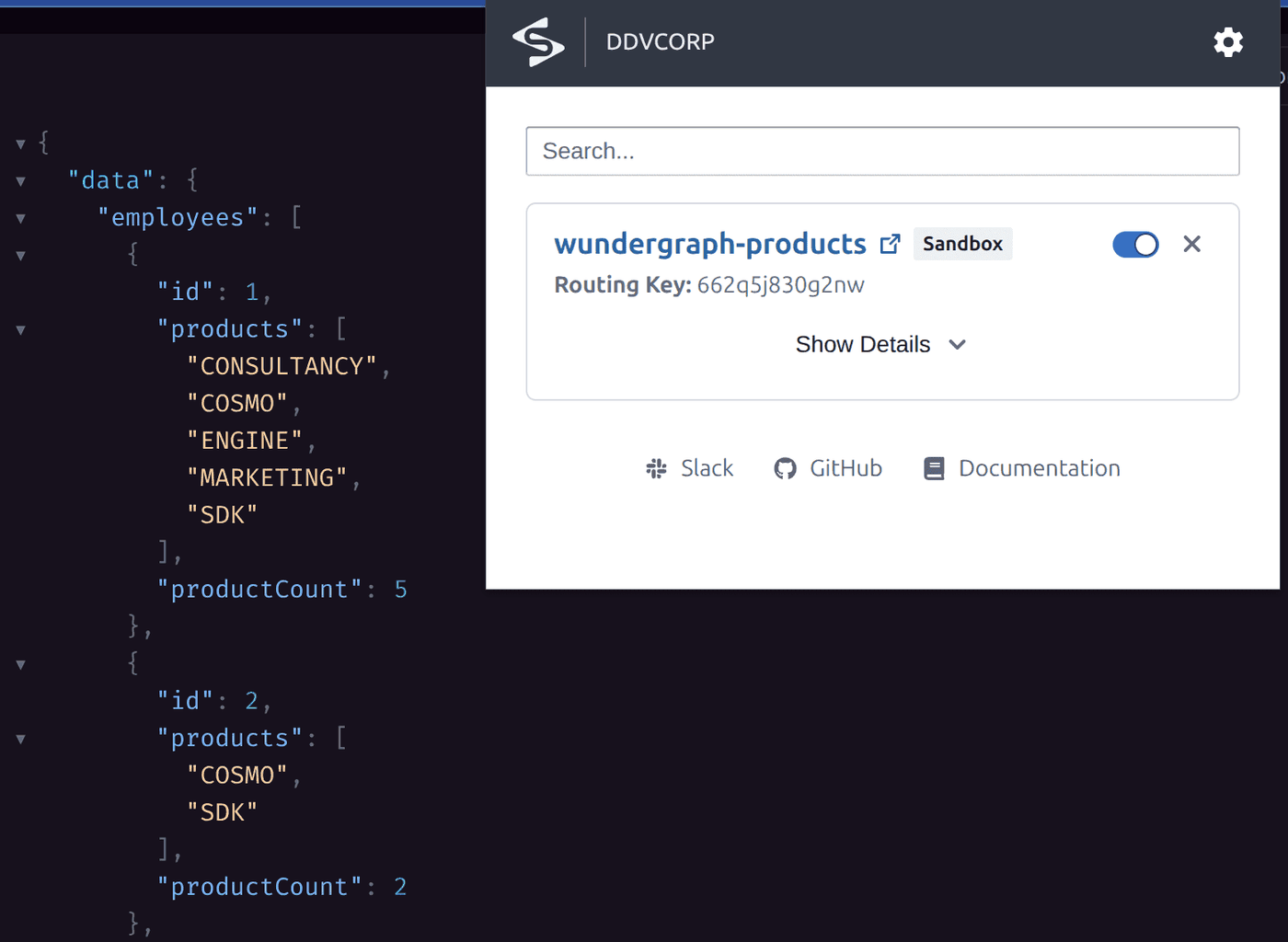
Turn the extension off and run the same query against the baseline. The field does not exist there, so the router returns an error, with HTTP status 200:
{
  "errors": [
    {
      "message": "Cannot query field \"productCount\" on type \"Employee\".",
      "path": ["query", "employees"]
    }
  ]
}
Because the status is 200, an automated test should assert on the errors array, not the status
code. From a terminal or a test, with signadot local connect running, send the routing key in the
baggage header and the router's /graphql endpoint does the rest:
curl -s http://router.wundergraph-demo.svc:3002/graphql \
  -H "content-type: application/json" \
  -H "baggage: sd-routing-key=${ROUTING_KEY}" \
  -d '{"query":"{ employees { id productCount } }"}'
Clean up
Deleting a feature flag does not delete its feature subgraphs, so remove both, then the sandbox and the demo namespace:
wgc feature-flag delete ${ROUTING_KEY} --namespace development
wgc subgraph delete products-${ROUTING_KEY} --namespace development
signadot sandbox delete wundergraph-products
kubectl delete ns wundergraph-demo
Run it in CI
In a pipeline, the sandbox and the feature flag are created together for each pull request: detect the subgraphs the pull request changes, create a sandbox that forks them, wait for it to be ready, then register one feature subgraph per changed service and a single feature flag named after the sandbox's routing key:
for service in $CHANGED_SERVICES; do
  # Create a feature subgraph for each updated service
  wgc feature-subgraph create ${service}-${ROUTING_KEY} \
    --namespace development \
    --routing-url <original-service-url> \
    --subgraph ${service}

  # Publish the updated schema for the service
  wgc subgraph publish ${service}-${ROUTING_KEY} \
    --namespace development \
    --schema <updated-service-schema>
done

# Finally, create a single feature flag referencing all feature subgraphs
wgc feature-flag create ${ROUTING_KEY} \
  --namespace development \
  --feature-subgraphs <service1>-${ROUTING_KEY} ... <serviceN>-${ROUTING_KEY} \
  --enabled
Then run your tests with the routing key in the baggage header, as the
Playwright tutorial does for end-to-end tests, and
delete the flag, the feature subgraphs and the sandbox when the pull request closes. The
pull request sandboxes guide covers the sandbox side of the
pipeline.
Alternatives to the proxy
The Envoy proxy exists only because the routing key and the feature flag travel in different headers. Two changes would remove it:
- Route on
X-Feature-Flagdirectly. Signadot can route on custom headers, set with the Operator'srouting.customHeadersHelm value. If your services propagatedX-Feature-Flag, you could make it a routing header, and one header would drive both the router and the sandbox routing. - Extend the router. The Cosmo router
is open source, so you can extend or fork it to read the feature flag from the
baggageheader and skip the translation step.
Frequently asked questions
How do feature flags work in GraphQL federation?
In WunderGraph Cosmo, a feature flag is a named, toggleable set of feature subgraphs, each of which replaces one base subgraph. Cosmo composes a graph with those replacements swapped in, and the router serves it to any request that names the flag in the X-Feature-Flag header or the feature_flag cookie. Requests without a valid flag name get the default federated graph.
How do you test federated GraphQL schema changes in CI/CD?
For each pull request, deploy the changed subgraphs in a Signadot sandbox, then register their new schemas in Cosmo as feature subgraphs under a feature flag named after the sandbox's routing key. Tests that send the routing key in the baggage header get the new schema from the shared router and reach the sandboxed subgraphs, while every other request keeps the baseline graph. When the pull request closes, delete the sandbox, the feature flag and the feature subgraphs.
Why does the Cosmo router need an Envoy proxy in this setup?
Signadot carries the routing key in the W3C baggage header as sd-routing-key, while the Cosmo router picks a feature flag from the X-Feature-Flag header. An Envoy proxy in the router pod copies the routing key into X-Feature-Flag and leaves baggage in place, so one key selects both the schema in the router and the sandboxed subgraph behind it. Propagating X-Feature-Flag through your services as a custom routing header, or extending the open-source router, would remove the proxy.
Do I need a separate WunderGraph router for each pull request?
No. One Cosmo router serves the baseline graph and every feature flag graph, choosing per request from the X-Feature-Flag header, so the sandbox forks only the changed subgraph. This is the main difference from Apollo GraphOS, where each Apollo Router instance loads a single graph variant and a pull request's schema needs its own router fork.
What happens to a request whose routing key has no feature flag?
Cosmo falls back to the default federated graph when the X-Feature-Flag header names a flag that does not exist. A sandbox for a service with no schema change, or one whose flag is not registered yet, therefore still gets a working router with the baseline schema, and its forked services still receive its requests as usual.
Does this approach work with WunderGraph alternatives such as Apollo GraphOS?
Yes. The pattern is the same for any federated GraphQL router: run the changed subgraph in a sandbox, make the router serve the pull request's schema, and let one routing key select both. With Apollo GraphOS you publish the schema to a graph variant per pull request and fork the Apollo Router to point at it, as the Signadot Apollo GraphQL tutorial shows.
See also
- Testing Apollo Federation schema changes: the same pattern with a GraphOS variant and a forked Apollo Router per pull request
- Running Playwright tests on pull requests: run end-to-end tests against a sandbox for every pull request
- Sandboxes: how forks and routing keys work
- Set up developer access: the Chrome extension, routing headers and preview URLs
- Context propagation: the
baggageheader and custom routing headers - Set up pull request sandboxes: create a sandbox from CI for every pull request