Test Temporal Workers in Kubernetes with Sandboxes
This tutorial deploys a small money-transfer app (web UI, Temporal server, Python, TypeScript, Go, or Java worker) to your Kubernetes cluster and shows how a Sandbox tests a changed worker version against the language's shared Temporal task queue, with no duplicated servers, no per-environment queues, and no crosstalk between tests.
The example is implemented in Python, TypeScript, Go, and Java. Choose the worker language that matches your stack; the Python tab is selected by default.
Estimated time: 15 to 20 minutes for one language.
git clone https://github.com/signadot/examples.git
cd examples/temporal-tutorial
Full source: signadot/examples/temporal-tutorial
How Temporal changes the isolation problem
Sandboxes isolate synchronous microservices on Kubernetes through request routing: something in the path (sidecar, proxy) chooses a destination per request. Temporal is different: a workflow is submitted once to a task queue; workers poll that queue independently and pull tasks at their own pace. Deploy a changed worker version next to the baseline and both receive tasks, causing either split execution (share a queue, arbitrary partition of tasks) or duplication (separate queues, both versions process everything).
Selective task routing extends sandbox isolation across the async hop using interceptors:
- The client stamps a routing key onto the workflow submission via OpenTelemetry baggage in the task headers (
_tracer-data). - Each worker (baseline and sandboxed) polls the same task queue.
- A workflow interceptor reads the routing key from the task headers, consults the Signadot Routes API to learn which sandboxes are live, and rejects tasks that do not belong to this worker.
- When a worker rejects a task, Temporal retries it. Eventually the right worker (the one whose routing key set includes this task's key) pulls and processes it.
- Activity interceptors bridge the routing key from task headers into OpenTelemetry baggage for the duration of activity execution, so outbound HTTP calls made from activities automatically carry the key and route correctly downstream.
The result is an invariant: exactly one worker version processes each task. A task with no routing key belongs to the baseline. If a routing key is no longer claimed by a sandbox, the task also falls back to the baseline. A sandbox that still exists continues to claim its key even when its worker is unavailable, so those tasks wait or retry instead of falling back.
What you will deploy
The demo app deploys to the temporal namespace:
- py_client (FastAPI web UI, shared): starts workflows with OpenTelemetry context propagation, works with every worker via its
TASK_QUEUEsetting - Temporal server (one instance, all languages): Temporal with embedded Postgres and Elasticsearch
- One worker in your language:
temporal_worker(Python),ts_worker(TypeScript),go_worker(Go), orjava_worker(Java); the baseline and its sandboxed variants share that language's task queue - K8s manifests: the Temporal server stack plus baseline Deployments for the workers and client; Sandbox specs for all four languages live in
sandbox/
Deploy the demo
Prerequisites:
- A Minikube cluster with the Signadot Operator installed
- The
signadotCLI installed and authenticated kubectlpointing at the cluster- Docker and the
minikubeCLI installed
Build the shared web client image and load it into Minikube:
docker build -t temporal-py-client-ui:v1.0 py_client
minikube image load temporal-py-client-ui:v1.0
Deploy the Temporal server stack (server, Postgres, Elasticsearch, UI, admin tools) to the temporal namespace:
kubectl create namespace temporal
kubectl apply -n temporal -f k8s/temporal/
Then deploy the baseline worker and the web client:
- Python
- TypeScript
- Go
- Java
docker build -t temporal-money-transfer:v1.0 temporal_worker
minikube image load temporal-money-transfer:v1.0

kubectl apply -n temporal -f k8s/worker-deployment.yaml
kubectl apply -n temporal -f k8s/temporal-py-client-ui-deployment.yaml
The Python worker polls the money-transfer task queue.
docker build -t temporal-money-transfer-ts:v1.0 ts_worker
minikube image load temporal-money-transfer-ts:v1.0

kubectl apply -n temporal -f k8s/ts-worker-deployment.yaml
kubectl apply -n temporal -f k8s/temporal-py-client-ui-deployment.yaml
kubectl set env -n temporal deployment/temporal-py-client-ui TASK_QUEUE=money-transfer-ts
The TypeScript worker polls its own money-transfer-ts task queue. The final command sends client submissions to that queue.
docker build -t temporal-money-transfer-go:v1.0 go_worker
minikube image load temporal-money-transfer-go:v1.0

kubectl apply -n temporal -f k8s/go-worker-deployment.yaml
kubectl apply -n temporal -f k8s/temporal-py-client-ui-deployment.yaml
kubectl set env -n temporal deployment/temporal-py-client-ui TASK_QUEUE=money-transfer-go
The Go worker polls its own money-transfer-go task queue. The final command sends client submissions to that queue.
docker build -t temporal-money-transfer-java:v1.0 java_worker
minikube image load temporal-money-transfer-java:v1.0

kubectl apply -n temporal -f k8s/java-worker-deployment.yaml
kubectl apply -n temporal -f k8s/temporal-py-client-ui-deployment.yaml
kubectl set env -n temporal deployment/temporal-py-client-ui TASK_QUEUE=money-transfer-java
The Java worker polls its own money-transfer-java task queue. The final command sends client submissions to that queue.
Wait for all pods to be Ready:
kubectl get pods -n temporal -w
How the code works
The pattern is platform-owned isolation logic (interceptors, routeserver client) plus ordinary application code (workflows, activities) that never touches Signadot. The integration points:
1. The routing-key gate in workflow interceptors
When a worker receives a workflow task, the interceptor extracts the routing key from the task headers (stamped by the client's OpenTelemetry tracer), checks the Routes API to see if this task belongs to this worker, and rejects it if not.
- Python
- TypeScript
- Go
- Java
The workflow interceptor reads baggage directly because the SDK's TracingInterceptor has already attached it:
            async def execute_workflow(self, input: ExecuteWorkflowInput):
                # The TracingInterceptor (registered before this interceptor) has
                # already attached the OTel context from the workflow headers, so
                # baggage is readable directly here.
                routing_key = str(baggage.get_baggage(ROUTING_KEY) or "")
                workflow_name = getattr(input.run_fn, "__name__", str(input.run_fn))
                should_process = True

                if self.routes_client and not await self.routes_client.should_process(routing_key):
                    should_process = False

                if not should_process:
                    error_msg = f"Workflow/Worker cannot handle routing key: {routing_key} - Worker: {self.worker_ident}"
                    logger.info(error_msg)
                    raise Exception(error_msg)

                logger.info(f"[Worker:{self.worker_ident}] Workflow: {workflow_name}: Processing task with routing key '{routing_key}'")
                return await self.next.execute_workflow(input)
The TypeScript SDK runs workflow code in a deterministic V8 isolate with no I/O access. The interceptor reads the routing key via a deterministic string parse of the _tracer-data header, then invokes signadotShouldProcess as a local activity. Local activities execute on the Node.js side with full routeserver access, and their result is recorded in workflow history for replay determinism. Any non-TemporalFailure error fails only the workflow task, triggering a server retry.
  async execute(input: WorkflowExecuteInput, next: Next<WorkflowInboundCallsInterceptor, 'execute'>): Promise<unknown> {
    // Capture the OTel context header so the outbound interceptor can stamp it
    // onto activities/child workflows scheduled by this workflow.
    this.state.payload = input.headers[TRACE_HEADER];

    const routingKey = routingKeyFromHeaders(input.headers);
    let shouldProcess: boolean;
    try {
      shouldProcess = await this.signadotShouldProcess(routingKey);
    } catch (err) {
      // Never let a failed routing check fail the workflow itself: convert to
      // a plain Error so it only fails this workflow task and gets retried.
      throw new Error(`Signadot routing check failed for routing key '${routingKey}': ${err}`);
    }
    if (!shouldProcess) {
      throw new Error(
        `Workflow/Worker cannot handle routing key: '${routingKey}' - Workflow: ${workflowInfo().workflowType}`
      );
    }
    return next(input);
  }
The outbound interceptor copies the _tracer-data header verbatim onto every activity and child workflow the workflow schedules, instead of running the OpenTelemetry SDK's propagators inside the isolate. That is deliberate: the SDK reuses workflow isolates across runs (reuseV8Context), and the OpenTelemetry SDK holds mutable module state that would make runs and replays diverge. A plain payload copy stays deterministic.
The Go SDK requires deterministic workflow execution. Like TypeScript, the workflow interceptor reads the routing key deterministically, then delegates the cache check to a local activity via workflow.ExecuteLocalActivity. The result is recorded in history so replays remain deterministic.
// InterceptWorkflow wraps the workflow inbound interceptor.
func (i *SelectiveTaskInterceptor) InterceptWorkflow(
	ctx workflow.Context,
	next interceptor.WorkflowInboundInterceptor,
) interceptor.WorkflowInboundInterceptor {
	inbound := &selectiveWorkflowInboundInterceptor{parent: i}
	inbound.Next = next
	return inbound
}

// InterceptActivity wraps the activity inbound interceptor.
func (i *SelectiveTaskInterceptor) InterceptActivity(
	ctx context.Context,
	next interceptor.ActivityInboundInterceptor,
) interceptor.ActivityInboundInterceptor {
	inbound := &selectiveActivityInboundInterceptor{parent: i}
	inbound.Next = next
	return inbound
}

type selectiveWorkflowInboundInterceptor struct {
	interceptor.WorkflowInboundInterceptorBase
	parent *SelectiveTaskInterceptor
}

func (i *selectiveWorkflowInboundInterceptor) Init(outbound interceptor.WorkflowOutboundInterceptor) error {
	wrapped := &selectiveWorkflowOutboundInterceptor{}
	wrapped.Next = outbound
	return i.Next.Init(wrapped)
}

func (i *selectiveWorkflowInboundInterceptor) ExecuteWorkflow(
	ctx workflow.Context,
	in *interceptor.ExecuteWorkflowInput,
) (interface{}, error) {
	// Extract routing key from the _tracer-data header (deterministic parse, no I/O)
	tracePayload := interceptor.WorkflowHeader(ctx)[traceHeaderKey]
	routingKey := routingKeyFromHeaders(interceptor.WorkflowHeader(ctx))
	ctx = workflow.WithValue(ctx, tracePayloadContextKey{}, tracePayload)

	// Delegate routing decision to a local activity so it's recorded in history
	// and replays are deterministic: once a worker accepts the workflow, later
	// replays see the recorded decision and proceed.
	localCtx := workflow.WithLocalActivityOptions(ctx, workflow.LocalActivityOptions{
		ScheduleToCloseTimeout: 5 * time.Second,
	})
	var shouldProcess bool
	err := workflow.ExecuteLocalActivity(
		localCtx,
		"signadotShouldProcess",
		routingKey,
	).Get(localCtx, &shouldProcess)
	if err != nil {
		// Panic, don't return: in the Go SDK an error returned from workflow
		// code fails the workflow execution permanently, while a panic fails
		// only this workflow task, which the server retries. A transient
		// routing-check failure must never kill the workflow.
		panic(fmt.Sprintf("signadot routing check failed for routing key '%s': %v", routingKey, err))
	}

	if !shouldProcess {
		panic(fmt.Sprintf(
			"Workflow/Worker cannot handle routing key: '%s' - Worker: %s",
			routingKey, i.parent.workerIdent,
		))
	}

	workflow.GetLogger(ctx).Info(
		fmt.Sprintf(
			"[Worker:%s] Workflow: %s: Processing task with routing key '%s'",
			i.parent.workerIdent, workflow.GetInfo(ctx).WorkflowType.Name, routingKey,
		),
	)

	// Propagate _tracer-data header to activities via the outbound interceptor
	return i.Next.ExecuteWorkflow(ctx, in)
}

type selectiveWorkflowOutboundInterceptor struct {
	interceptor.WorkflowOutboundInterceptorBase
}

// propagateTracerHeader copies the _tracer-data header onto the outbound call.
// The SDK gives every outbound call a fresh empty header, so without this the
// routing key would be lost on anything the workflow schedules.
func propagateTracerHeader(ctx workflow.Context) {
	if tracePayload, ok := ctx.Value(tracePayloadContextKey{}).(*commonpb.Payload); ok && tracePayload != nil {
		interceptor.WorkflowHeader(ctx)[traceHeaderKey] = tracePayload
	}
}

func (i *selectiveWorkflowOutboundInterceptor) ExecuteActivity(
	ctx workflow.Context,
	activityType string,
	args ...interface{},
) workflow.Future {
	propagateTracerHeader(ctx)
	return i.Next.ExecuteActivity(ctx, activityType, args...)
}
The Java interceptor follows the same deterministic design as Go and TypeScript. It extracts the routing key in workflow code, then calls the platform-provided signadotShouldProcess local activity registered by SandboxAwareWorkerFactory. The recorded result keeps replays stable.
            @Override
            public WorkflowOutput execute(WorkflowInput input) {
                workflowHeader = input.getHeader();
                String routingKey = OTelHeaderParsing.extractRoutingKeyFromHeaders(
                    workflowHeader.getValues()
                );

                // Workflow code must not read mutable process state (the
                // routes cache changes between replays), so the routing
                // decision runs as a local activity: its result is recorded
                // in history and replays see the original decision. Same
                // pattern as the Go and TypeScript workers.
                ActivityStub routingStub = Workflow.newUntypedLocalActivityStub(
                    LocalActivityOptions.newBuilder()
                        .setScheduleToCloseTimeout(Duration.ofSeconds(5))
                        .build());
                boolean shouldProcess;
                try {
                    shouldProcess = routingStub.execute("signadotShouldProcess", Boolean.class, routingKey);
                } catch (RuntimeException e) {
                    // Wrap in a plain RuntimeException: an ActivityFailure is a
                    // TemporalFailure and would fail the workflow permanently,
                    // while a plain RuntimeException fails only this workflow
                    // task, which the server retries.
                    throw new RuntimeException(String.format(
                        "Signadot routing check failed for routing key '%s' - Worker: %s",
                        routingKey, workerIdent), e);
                }

                if (!shouldProcess) {
                    String errorMsg = String.format(
                        "Workflow/Worker cannot handle routing key: %s - Worker: %s",
                        routingKey, workerIdent);
                    logger.info(errorMsg);
                    // Plain RuntimeException => workflow task failure, retried
                    // by the server until the matching worker accepts it.
                    throw new RuntimeException(errorMsg);
                }

                WorkflowInfo workflowInfo = Workflow.getInfo();
                logger.info("[Worker:{}] Workflow: {}: Processing task with routing key '{}'",
                    workerIdent, workflowInfo.getWorkflowType(), routingKey);

                return super.execute(input);
            }
Note what is NOT here: no sandbox awareness in the application. Workflows contain pure domain logic (withdraw, deposit); the routing check is owned by the platform layer.
2. Learn which routing keys are claimed
Workers need to know which keys currently belong to live sandboxes. That state lives in the Signadot Routes API, served in-cluster:
curl "http://routeserver.signadot.svc:7778/api/v1/workloads/routing-rules?baselineKind=Deployment&baselineNamespace=temporal&baselineName=temporal-worker"
# {"routingRules": [{"routingKey": "k7", ...}]}
A sandboxed worker adds &destinationSandboxName=<its-sandbox> so it receives only the keys it should claim. The poll-and-cache client maintains a refreshed cache of routing keys:
- Python
- TypeScript
- Go
- Java
class RoutesAPIClient:
    """
    Client for fetching routing rules from the central platform routing API.
    Handles caching and refresh of routing keys for sandbox/baseline selection.
    """
    def __init__(self, sandbox_name: str):
        self.sandbox_name = sandbox_name
        self.route_server_addr_base = os.environ["ROUTES_API_ROUTE_SERVER_ADDR"]
        parsed_addr = urlparse(self.route_server_addr_base)
        self.route_server_scheme = parsed_addr.scheme or "http"
        self.route_server_netloc = parsed_addr.netloc
        self.baseline_kind = os.environ["ROUTES_API_BASELINE_KIND"]
        self.baseline_namespace = os.environ["ROUTES_API_BASELINE_NAMESPACE"]
        self.baseline_name = os.environ["ROUTES_API_BASELINE_NAME"]
        self.refresh_interval = int(os.environ["ROUTES_API_REFRESH_INTERVAL_SECONDS"])
        self._routing_keys_cache: Set[str] = set()
The TypeScript implementation polls every ROUTES_API_REFRESH_INTERVAL_SECONDS (default 120 seconds). An unknown, non-empty routing key triggers a rate-limited refresh so newly created sandbox keys can be discovered between polls. On network errors, the worker preserves the previous cache and makes the routing decision from that cached state.
  async shouldProcess(routingKey: string): Promise<boolean> {
    if (routingKey === '') {
      return this.sandboxName === '';
    }
    if (
      !this.routingKeysCache.has(routingKey) &&
      Date.now() - this.lastFetchAtMs >= MISS_REFRESH_MIN_INTERVAL_MS
    ) {
      try {
        await this.refresh();
      } catch (err) {
        logError(`Refresh on cache miss failed; falling back to cached routing keys: ${err}`);
      }
    }
    if (this.sandboxName) {
      return this.routingKeysCache.has(routingKey);
    }
    return !this.routingKeysCache.has(routingKey);
  }
The Go implementation maintains the same polling pattern with a background goroutine. Cache misses trigger a rate-limited synchronous refresh, while failures retain the previous routing rules.
func (c *RoutesAPIClient) ShouldProcess(routingKey string) bool {
	if routingKey == "" {
		return c.sandboxName == ""
	}

	if !c.hasKey(routingKey) {
		c.refreshOnMiss()
	}

	has := c.hasKey(routingKey)
	if c.sandboxName != "" {
		// Sandbox worker: only process keys routed to this sandbox
		return has
	}
	// Baseline worker: process everything except sandboxed keys
	return !has
}

func (c *RoutesAPIClient) hasKey(routingKey string) bool {
	c.mu.RLock()
	defer c.mu.RUnlock()
	return c.routingKeys[routingKey]
}

// refreshOnMiss refreshes the cache at most once per missRefreshMinInterval.
// Concurrent callers don't wait for an in-flight refresh; they proceed with
// the current cache. Errors are logged inside fetchAndUpdate and swallowed.
func (c *RoutesAPIClient) refreshOnMiss() {
	if !c.missMu.TryLock() {
		return
	}
	defer c.missMu.Unlock()

	c.mu.RLock()
	recent := time.Since(c.lastFetchAt) < missRefreshMinInterval
	c.mu.RUnlock()
	if recent {
		return
	}

	_ = c.fetchAndUpdate(context.Background())
}
The Java implementation uses an AtomicReference for its routing-key cache and a scheduled executor for periodic polling. Like the other workers, it refreshes on cache misses at most once per second and retains the previous cache when a refresh fails.
    public boolean shouldProcess(String routingKey) {
        if (routingKey == null || routingKey.isEmpty()) {
            return sandboxName.isEmpty();
        }

        if (!routingKeysCache.get().contains(routingKey)) {
            refreshOnMiss();
        }

        Set<String> currentCache = routingKeysCache.get();
        boolean inCache = currentCache.contains(routingKey);
        boolean should = sandboxName.isEmpty() ? !inCache : inCache;
        logger.debug("{} worker: routing_key={}, cache={}, should_process={}",
            sandboxName.isEmpty() ? "Baseline" : "Sandbox", routingKey, currentCache, should);
        return should;
    }

    /**
     * Refreshes the cache at most once per MISS_REFRESH_MIN_INTERVAL_MS.
     * Concurrent callers don't wait for an in-flight refresh; they proceed
     * with the current cache.
     */
    private void refreshOnMiss() {
        if (!missRefreshLock.tryLock()) {
            return;
        }
        try {
            if (System.currentTimeMillis() - lastFetchAtMs.get() < MISS_REFRESH_MIN_INTERVAL_MS) {
                return;
            }
            fetchAndUpdate();
        } finally {
            missRefreshLock.unlock();
        }
    }
3. Gate the activity before processing
When a worker receives an activity task, the interceptor applies the same routing check as workflows:
- Python
- TypeScript
- Go
- Java
            async def execute_activity(self, input: ExecuteActivityInput):
                # Unlike workflows, the SDK's TracingInterceptor only uses the
                # context from the headers to parent the activity span -- it does
                # NOT attach it, so baggage is not available via get_baggage()
                # here. Extract it from the headers explicitly instead.
                header_context = context_from_headers(input.headers)
                routing_key = routing_key_from_context(header_context)
                activity_name = getattr(input.fn, "__name__", str(input.fn))
                should_process = True

                if self.routes_client and not await self.routes_client.should_process(routing_key):
                    should_process = False

                if not should_process:
                    error_msg = f"Activity/Worker cannot handle routing key: {routing_key} - Worker: {self.worker_ident}"
                    logger.info(error_msg)
                    raise Exception(error_msg)

                logger.info(f"[Worker:{self.worker_ident}] Activity: {activity_name}: Processing task with routing key '{routing_key}'")

                # Bridge baggage from the task headers into the current OTel
                # context, scoped to this activity execution. Without this,
                # outbound HTTP calls made by the activity would carry the trace
                # context but NOT the sd-routing-key baggage, so downstream
                # services would not route sandbox traffic correctly.
                context = otel_context.get_current()
                if header_context is not None:
                    for key, value in baggage.get_all(header_context).items():
                        context = baggage.set_baggage(key, value, context=context)
                token = otel_context.attach(context)
                try:
                    logger.info(
                        f"[Worker:{self.worker_ident}] Activity: {activity_name}: outbound HTTP calls will carry: {outbound_http_headers()}"
                    )
                    return await self.next.execute_activity(input)
                finally:
                    otel_context.detach(token)
The activity interceptor runs on the Node.js side with no determinism constraints. It checks the routing key against the cache and uses a retryable ApplicationFailure with a 1-second next-retry delay when the task belongs to another worker. It then bridges the OTel context around activity execution so outbound HTTP calls carry the routing key downstream.
  async execute(input: ActivityExecuteInput, next: Next<ActivityInboundCallsInterceptor, 'execute'>): Promise<unknown> {
    // Local activities always execute on the worker that is processing the
    // workflow task, and that worker already passed the workflow-level routing
    // check -- this also covers the `signadotShouldProcess` check itself.
    const isLocal = this.ctx.info.isLocal;
    if (!isLocal) {
      const routingKey = routingKeyFromHeaders(input.headers);
      if (!(await this.routesClient.shouldProcess(routingKey))) {
        // Fails only this attempt. The explicit next-retry delay keeps
        // wrong-worker bounces at 1 second instead of following the app's
        // backoff curve.
        throw ApplicationFailure.create({
          message: `Activity/Worker cannot handle routing key: '${routingKey}' - Worker: ${this.workerIdent}`,
          type: 'RoutingKeyNotHandled',
          nextRetryDelay: 1_000,
        });
      }
      console.log(
        `[Worker:${this.workerIdent}] Activity: ${this.ctx.info.activityType}: Processing task with routing key '${routingKey}'`
      );
    }

    // Bridge the OTel context (trace context + baggage) from the task headers
    // around the activity execution.
    const headerContext = contextFromHeaders(input.headers);
    if (headerContext === undefined) {
      return next(input);
    }
    return otelContext.with(headerContext, () => {
      if (!isLocal) {
        console.log(
          `[Worker:${this.workerIdent}] Activity: ${this.ctx.info.activityType}: outbound HTTP calls will carry: ${JSON.stringify(outboundHttpHeaders())}`
        );
      }
      return next(input);
    });
  }
The Go interceptor skips the routing gate for local activities, checks regular activity tasks against the cache, and uses a retryable application error with a 1-second next-retry delay for wrong-worker bounces. It also restores OTel baggage around activity execution.
func (i *selectiveActivityInboundInterceptor) ExecuteActivity(
	ctx context.Context,
	in *interceptor.ExecuteActivityInput,
) (interface{}, error) {
	info := activity.GetInfo(ctx)
	activityType := info.ActivityType.Name

	// Decode the _tracer-data header once; both the routing check and the
	// baggage bridge read from it.
	carrier := carrierFromHeaders(interceptor.Header(ctx))

	// For non-local activities, check if we should process this routing key
	if !info.IsLocalActivity {
		routingKey := routingKeyFromCarrier(carrier)
		if !i.parent.routesClient.ShouldProcess(routingKey) {
			// Retryable by design: the server redelivers until the right
			// worker claims the task. NextRetryDelay keeps wrong-worker
			// bounces fast instead of following the app's backoff curve.
			return nil, temporal.NewApplicationErrorWithOptions(
				fmt.Sprintf(
					"Activity/Worker cannot handle routing key: '%s' - Worker: %s",
					routingKey, i.parent.workerIdent,
				),
				"RoutingKeyNotHandled",
				temporal.ApplicationErrorOptions{NextRetryDelay: time.Second},
			)
		}

		activity.GetLogger(ctx).Info(
			fmt.Sprintf(
				"[Worker:%s] Activity: %s: Processing task with routing key '%s'",
				i.parent.workerIdent, activityType, routingKey,
			),
		)
	}

	// Bridge OTel baggage from headers into the context so outbound HTTP calls
	// made with an OTel-instrumented client carry the sd-routing-key
	if bagStr := carrier["baggage"]; bagStr != "" {
		if b, err := baggage.Parse(bagStr); err != nil {
			// A malformed baggage header must not fail the activity: it would
			// be redelivered identically to every worker and never succeed.
			activity.GetLogger(ctx).Warn("Ignoring malformed OpenTelemetry baggage header", "err", err)
		} else {
			ctx = baggage.ContextWithBaggage(ctx, b)
			if !info.IsLocalActivity {
				activity.GetLogger(ctx).Info(
					fmt.Sprintf(
						"[Worker:%s] Activity: %s: outbound calls made with an OTel-instrumented HTTP client will carry baggage",
						i.parent.workerIdent, activityType,
					),
				)
			}
		}
	}

	return i.Next.ExecuteActivity(ctx, in)
}
The Java interceptor exempts local activities, rejects wrong-worker tasks with a retryable failure and a 1-second next-retry delay, and restores the full W3C trace and baggage context around application activity execution.
    @Override
    public ActivityOutput execute(ActivityInput input) {
        // Local activities always run on the worker that is executing the
        // workflow task and are retried on that same worker. A routing
        // rejection cannot migrate them elsewhere, so skip the check
        // (the Go and TypeScript workers do the same).
        boolean isLocal = activityContext != null && activityContext.getInfo().isLocal();

        Map<String, String> carrier = OTelHeaderParsing.extractCarrier(
            input.getHeader() != null ? input.getHeader().getValues() : null);
        String routingKey = OTelHeaderParsing.routingKeyFromCarrier(carrier);

        if (!isLocal) {
            if (!routesClient.shouldProcess(routingKey)) {
                String errorMsg = String.format(
                    "Activity/Worker cannot handle routing key: %s - Worker: %s",
                    routingKey, workerIdent);
                logger.info(errorMsg);
                // Retryable by design: the server redelivers until the right
                // worker claims the task. The 1s next-retry delay keeps
                // wrong-worker bounces fast instead of following the app's
                // backoff curve.
                throw ApplicationFailure.newFailureWithCauseAndDelay(
                    errorMsg, "RoutingKeyNotHandled", null, Duration.ofSeconds(1));
            }

            logger.info("[Worker:{}] Activity: Processing task with routing key '{}'",
                workerIdent, routingKey);
        }

        if (carrier == null) {
            return super.execute(input);
        }

        // Restore the full OTel context (trace context plus ALL baggage
        // members, not just the routing key) around the activity, so outbound
        // calls made with an OTel-instrumented HTTP client carry
        // `baggage: sd-routing-key=...` plus trace correlation downstream.
        Context otelContext = W3CBaggagePropagator.getInstance().extract(
            W3CTraceContextPropagator.getInstance().extract(Context.root(), carrier, CARRIER_GETTER),
            carrier, CARRIER_GETTER);
        try (Scope ignored = otelContext.makeCurrent()) {
            return super.execute(input);
        }
    }
This is the critical step: without bridging baggage into the OTel context, outbound HTTP calls made from activities would carry traceparent but no baggage: sd-routing-key=..., and downstream sandbox routing would silently break. The worker logs the effective outbound headers per activity so this is easy to verify.
4. Worker setup and the sandbox-aware wrapper
The entry point registers interceptors, polls the routeserver, and starts the worker. Application developers never touch this:
- Python
- TypeScript
- Go
- Java
async def main():
    # Get task queue from environment
    task_queue = os.environ["TASK_QUEUE"]

    # Create banking activities instance
    banking_activities = BankingActivities()

    # Create the SandboxAware worker
    worker = SandboxAwareWorker(
        task_queue=task_queue,
        workflows=[MoneyTransferWorkflow],
        activities=[
            banking_activities.withdraw,
            banking_activities.deposit,
        ]
    )

    # Start the worker
    await worker.start()
SandboxAwareWorker wires up the interceptors, starts the routeserver poller, and instruments aiohttp so outbound HTTP calls carry the routing key automatically.
  static async create(options: SandboxAwareWorkerOptions): Promise<SandboxAwareWorker> {
    setupOpenTelemetry();

    const sandboxName = process.env.SIGNADOT_SANDBOX_NAME ?? '';
    const temporalServerUrl = requireEnv('TEMPORAL_SERVER_URL');
    const refreshInterval = Number(process.env.ROUTES_API_REFRESH_INTERVAL_SECONDS ?? '120');
    const workerIdent = `sandbox=${sandboxName || 'baseline'} task_queue=${options.taskQueue}`;

    // Routes cache used by both the activity interceptor (Node.js side) and
    // the signadotShouldProcess local activity backing the workflow-level
    // routing check inside the V8 isolate.
    const routesClient = new RoutesAPIClient(sandboxName);
    await routesClient.startPolling(refreshInterval);

    const connection = await NativeConnection.connect({ address: temporalServerUrl });
    console.log(`Connected to Temporal server: ${temporalServerUrl}`);

    // Platform-provided local activity used by the workflow routing check.
    // Merged in last so applications cannot accidentally shadow it.
    const signadotShouldProcess = async (routingKey: string): Promise<boolean> => {
      const should = await routesClient.shouldProcess(routingKey);
      console.log(`[Worker:${workerIdent}] signadotShouldProcess('${routingKey}') -> ${should}`);
      return should;
    };

    const worker = await Worker.create({
      connection,
      taskQueue: options.taskQueue,
      workflowsPath: options.workflowsPath,
      activities: { ...options.activities, signadotShouldProcess },
      identity: `${workerIdent} pid=${process.pid}`,
      interceptors: {
        // Runs inside the workflow V8 isolate: routing check + deterministic
        // propagation of the `_tracer-data` header to scheduled activities
        workflowModules: [require.resolve('./workflow-interceptors')],
        // Runs on the Node.js side: routing check + OTel context bridging so
        // outbound HTTP calls from activities carry sd-routing-key baggage
        activity: [(ctx) => ({ inbound: new SignadotActivityInboundInterceptor(ctx, routesClient, workerIdent) })],
      },
    });

    console.log(`Worker created successfully: ${workerIdent}`);
    return new SandboxAwareWorker(worker, routesClient, workerIdent);
  }
SandboxAwareWorker handles all Signadot-specific wiring: workflow and activity interceptors, routeserver polling, and OTel baggage bridging.
func main() {
	ctx := context.Background()

	// Load configuration from environment
	cfg, err := signadot.LoadConfigFromEnv()
	if err != nil {
		slog.Error("Failed to load configuration", "err", err)
		os.Exit(1)
	}

	// Create sandbox-aware worker with application workflows and activities
	w, err := signadot.New(ctx, cfg, registerWorkflowsActivities)
	if err != nil {
		slog.Error("Failed to create worker", "err", err)
		os.Exit(1)
	}
	defer w.Stop()

	// Run the worker (blocks until interrupted)
	if err := w.Run(ctx); err != nil {
		slog.Error("Worker error", "err", err)
		os.Exit(1)
	}
}

// registerWorkflowsActivities registers the application workflows and activities
func registerWorkflowsActivities(r worker.Registry) error {
	// Register workflows
	moneyTransfer := &app.MoneyTransferWorkflow{}
	r.RegisterWorkflowWithOptions(moneyTransfer.Run, workflow.RegisterOptions{Name: "MoneyTransferWorkflow"})

	// Register activities
	activities := &app.BankingActivities{}
	r.RegisterActivity(activities.Withdraw)
	r.RegisterActivity(activities.Deposit)

	return nil
}
The SandboxAwareWorker wrapper (via signadot.New) handles routing setup, interceptor registration, and background polling.
            Worker worker = SandboxAwareWorkerFactory.createWorker(
                taskQueue,
                temporalServerUrl,
                MoneyTransferWorkflowImpl.class
            );

            worker.registerActivitiesImplementations(new BankingActivitiesImpl());

            Runtime.getRuntime().addShutdownHook(new Thread(() -> {
                logger.info("Shutdown signal received. Stopping worker...");
                SandboxAwareWorkerFactory.stopWorker(worker);
            }));

            SandboxAwareWorkerFactory.startWorker(worker);
SandboxAwareWorkerFactory.createWorker handles all Signadot-specific wiring: initializing the RoutesClient, starting background polling, and registering interceptors with the Temporal worker.
5. Sandbox spec
Each sandboxed worker is a fork of the baseline Deployment:
- Python
- TypeScript
- Go
- Java
# see https://www.signadot.com/docs/reference/sandboxes/spec
name: temporal-worker-sandbox
spec:
  labels:
    team: backend
  cluster: "@{cluster}"
  description: Testing temporal sandboxes
  defaultRouteGroup:
    endpoints:
    - name: web-client
      target: http://temporal-py-client-ui.temporal.svc:8080
  forks:
  - forkOf:
      kind: Deployment
      namespace: temporal
      name: temporal-worker
    customizations:
      images:
      - container: temporal-worker
        image: "@{image}"
# see https://www.signadot.com/docs/reference/sandboxes/spec
name: temporal-worker-ts-sandbox
spec:
  labels:
    team: backend
  cluster: "@{cluster}"
  description: Testing temporal sandboxes (TypeScript worker)
  defaultRouteGroup:
    endpoints:
    - name: web-client
      target: http://temporal-py-client-ui.temporal.svc:8080
  forks:
  - forkOf:
      kind: Deployment
      namespace: temporal
      name: temporal-worker-ts
    customizations:
      images:
      - container: temporal-worker-ts
        image: "@{image}"
name: temporal-worker-go-sandbox
spec:
  labels:
    team: backend
  cluster: "@{cluster}"
  description: Testing temporal Go worker sandboxes
  defaultRouteGroup:
    endpoints:
    - name: web-client
      target: http://temporal-py-client-ui.temporal.svc:8080
  forks:
  - forkOf:
      kind: Deployment
      namespace: temporal
      name: temporal-worker-go
    customizations:
      images:
      - container: temporal-worker-go
        image: "@{image}"
name: temporal-worker-java-sandbox
spec:
  labels:
    team: backend
  cluster: "@{cluster}"
  description: Testing temporal sandboxes
  defaultRouteGroup:
    endpoints:
    - name: web-client
      target: http://temporal-py-client-ui.temporal.svc:8080
  forks:
  - forkOf:
      kind: Deployment
      namespace: temporal
      name: temporal-worker-java
    customizations:
      images:
      - container: temporal-worker-java
        image: "@{image}"
Create sandboxes and test
Create a sandbox for the worker language you deployed above:
- Python
- TypeScript
- Go
- Java
Build the sandbox worker image and load it into Minikube:
docker build -t temporal-money-transfer:sandbox temporal_worker
minikube image load temporal-money-transfer:sandbox

signadot sandbox apply -f sandbox/worker-sandbox.yaml \
  --set cluster=<your-cluster-name> \
  --set image=temporal-money-transfer:sandbox
docker build -t temporal-money-transfer-ts:sandbox ts_worker
minikube image load temporal-money-transfer-ts:sandbox

signadot sandbox apply -f sandbox/ts-worker-sandbox.yaml \
  --set cluster=<your-cluster-name> \
  --set image=temporal-money-transfer-ts:sandbox
docker build -t temporal-money-transfer-go:sandbox go_worker
minikube image load temporal-money-transfer-go:sandbox

signadot sandbox apply -f sandbox/go-worker-sandbox.yaml \
  --set cluster=<your-cluster-name> \
  --set image=temporal-money-transfer-go:sandbox
docker build -t temporal-money-transfer-java:sandbox java_worker
minikube image load temporal-money-transfer-java:sandbox

signadot sandbox apply -f sandbox/java-worker-sandbox.yaml \
  --set cluster=<your-cluster-name> \
  --set image=temporal-money-transfer-java:sandbox
The command prints the sandbox's routing key and a preview URL for the web UI. Opening the preview URL tags your requests with that sandbox's routing key automatically.
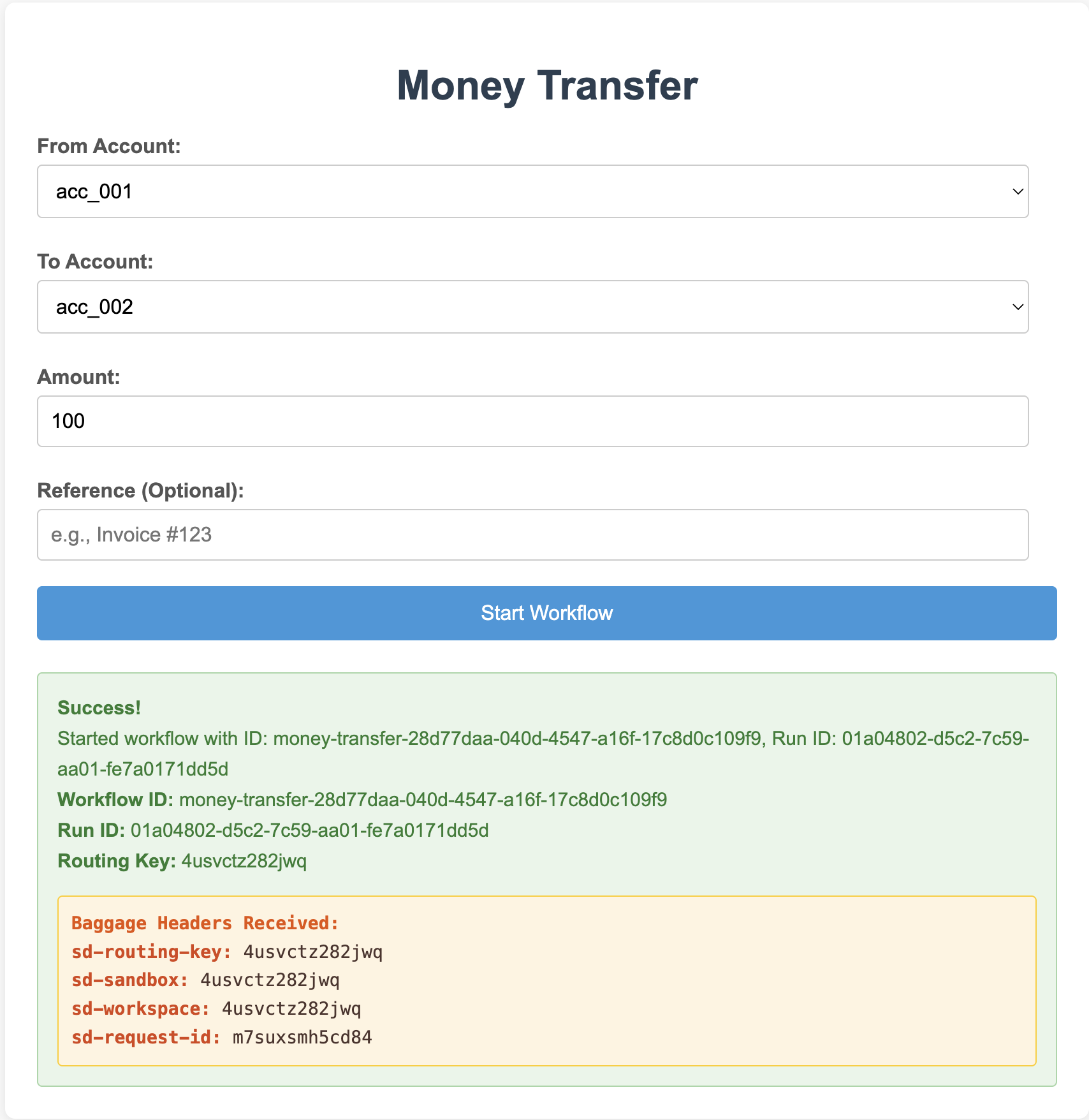
Open the preview URL, select two accounts, enter an amount, and start the workflow. The success panel shows the workflow ID and confirms that the web client received the sandbox routing key:
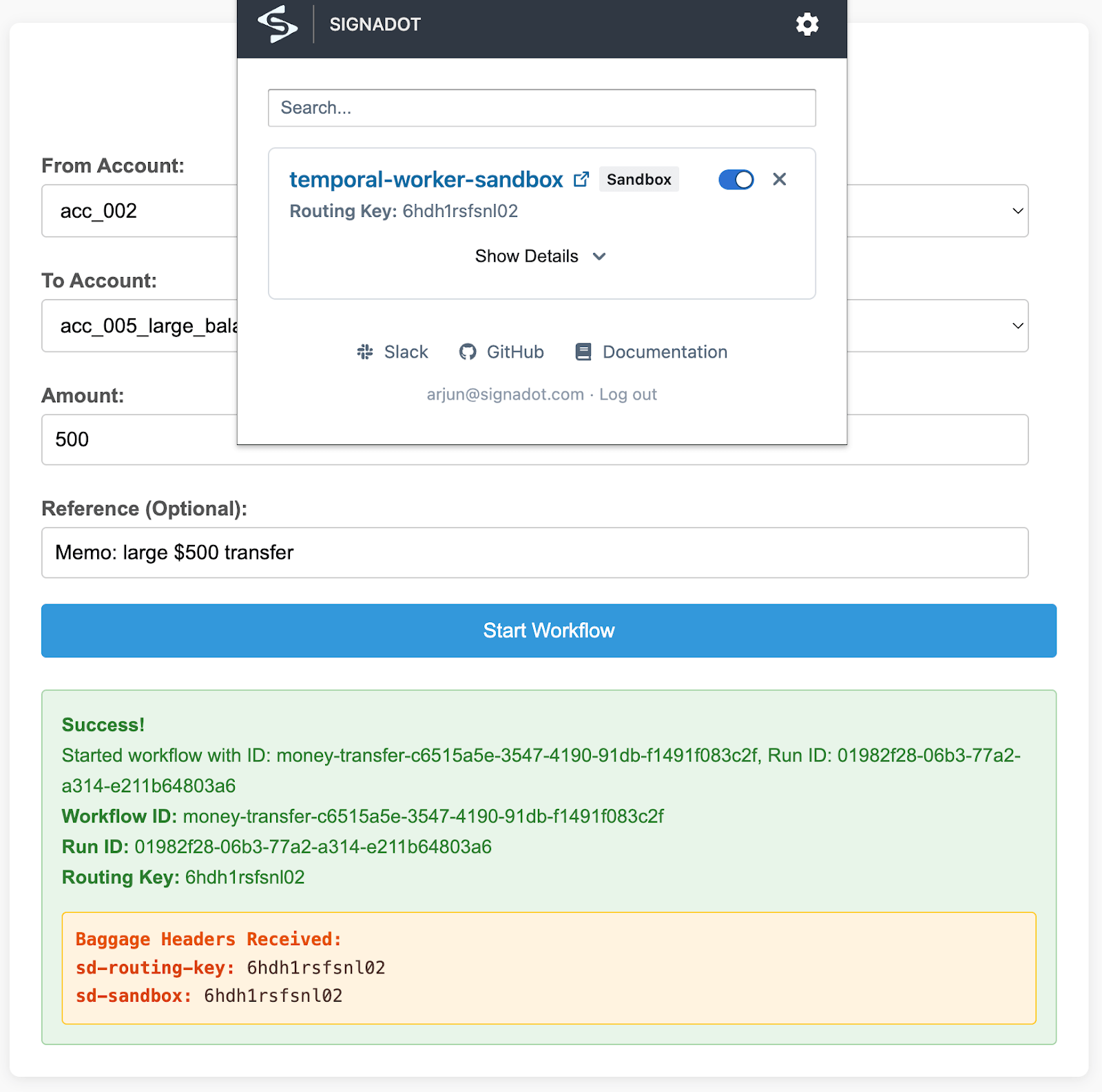
You can also route from the browser without the preview URL. Install the Signadot Chrome Extension, sign in, and pick the sandbox from its list. The extension adds the routing-key header to every request the web client makes, so the next transfer you submit runs on the sandboxed worker:
To drive the same test from the command line, select the values for your worker language:
- Python
- TypeScript
- Go
- Java
SANDBOX_NAME=temporal-worker-sandbox
BASELINE_DEPLOYMENT=temporal-worker
WORKER_CONTAINER=temporal-worker
SANDBOX_NAME=temporal-worker-ts-sandbox
BASELINE_DEPLOYMENT=temporal-worker-ts
WORKER_CONTAINER=temporal-worker-ts
SANDBOX_NAME=temporal-worker-go-sandbox
BASELINE_DEPLOYMENT=temporal-worker-go
WORKER_CONTAINER=temporal-worker-go
SANDBOX_NAME=temporal-worker-java-sandbox
BASELINE_DEPLOYMENT=temporal-worker-java
WORKER_CONTAINER=temporal-worker-java
Extract the routing key:
ROUTING_KEY=$(signadot sandbox get "$SANDBOX_NAME" -o json | jq -r '.routingKey')
In a separate terminal, forward the web client port:
kubectl port-forward service/temporal-py-client-ui -n temporal 8080:8080
Return to the first terminal. Submit one tagged workflow and one untagged workflow. The endpoint accepts form fields, not JSON:
curl -X POST http://localhost:8080/api/start-workflow \
  -H "baggage: sd-routing-key=$ROUTING_KEY" \
  -d "from_account=acc_001" -d "to_account=acc_002" -d "amount=100.00"

curl -X POST http://localhost:8080/api/start-workflow \
  -d "from_account=acc_001" -d "to_account=acc_002" -d "amount=100.00"
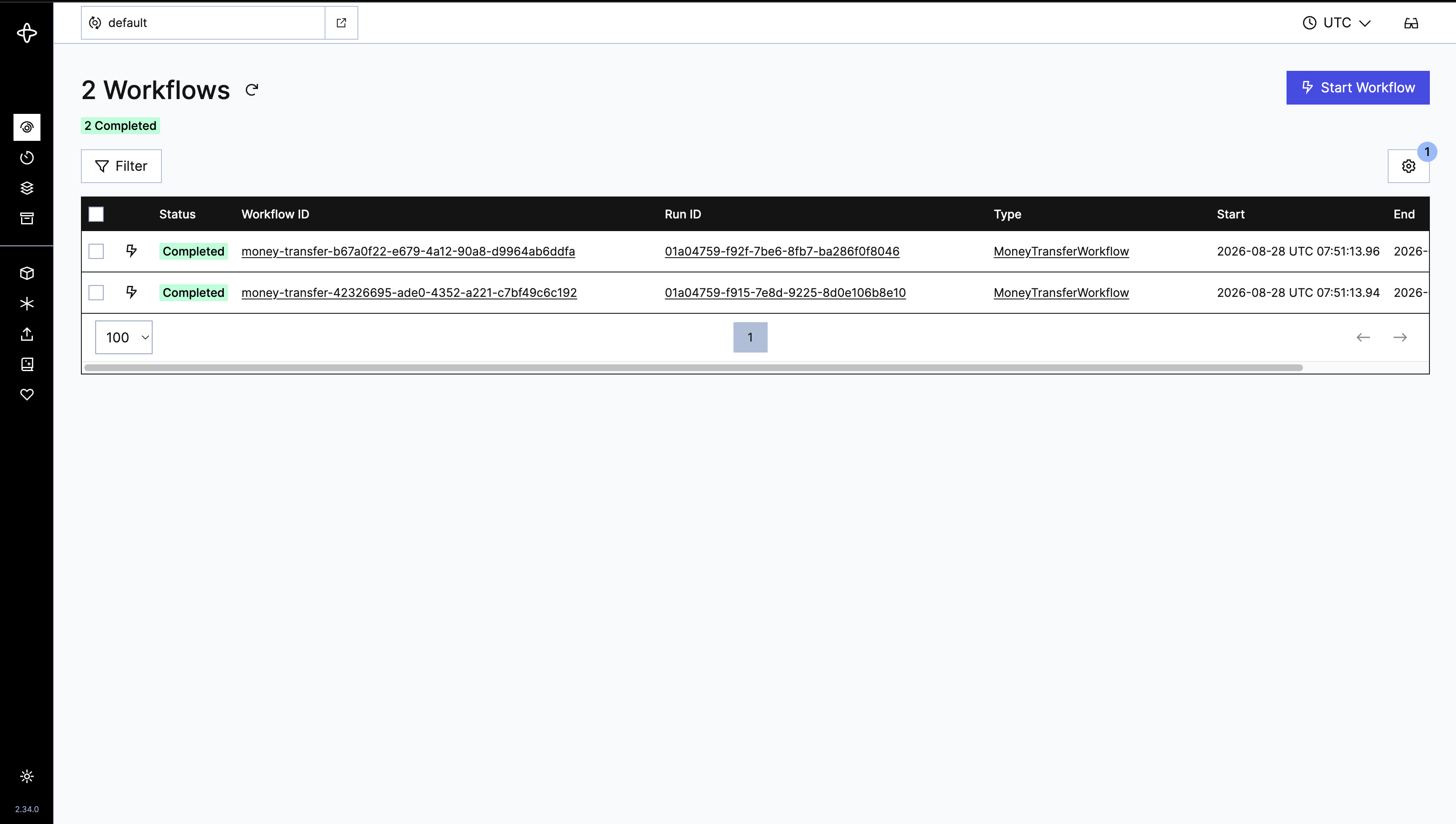
After submitting one tagged and one untagged workflow, both runs should complete:
Check the worker logs to see which version processed the task:
kubectl logs -n temporal "deployment/$BASELINE_DEPLOYMENT" \
  -c "$WORKER_CONTAINER" --since=10m | \
  grep "Processing task with routing key"

SANDBOX_DEPLOYMENT=$(kubectl get deployments -n temporal -o name | \
  grep "^deployment.apps/${SANDBOX_NAME}-dep-${BASELINE_DEPLOYMENT}-")

kubectl logs -n temporal "$SANDBOX_DEPLOYMENT" \
  -c "$WORKER_CONTAINER" --since=10m | \
  grep "Processing task with routing key"
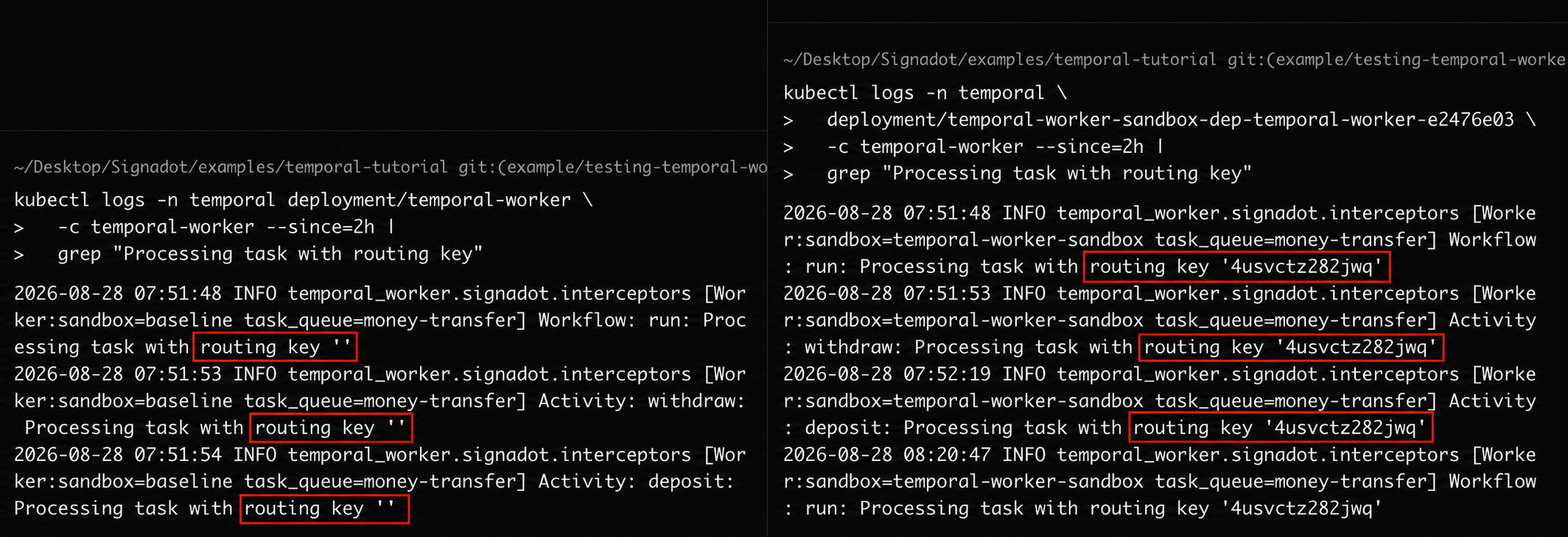
You should see the message:
Processing task with routing key '<ROUTING_KEY>'
The baseline worker processes tasks without a routing key, while the sandbox worker processes tasks carrying the sandbox routing key:
Three scenarios to verify:
| Routing context | Source worker | Processing worker | Why |
|---|---|---|---|
| none (baseline) | baseline | baseline | untagged workflows belong to the baseline |
| sandboxed | sandboxed | sandboxed | the routing key is claimed; the baseline skips it |
| unclaimed key | any client | baseline | the Routes API has no sandbox rule for this key, so fallback applies |
The third row is the fallback rule: if a workflow carries a key that is not claimed by any sandbox rule, the baseline processes it. A sandbox that still exists but has an unavailable worker continues to claim its key, so its tasks wait or retry rather than falling back.
Behavior and tradeoffs
-
Message-based isolation is recommended. Shared task queues with routing keys in task headers and per-task routing via the Routes API work well with Temporal's task distribution model. Per-sandbox task queues are NOT recommended: they push routing decisions onto every workflow starter, lose baseline fallback for unforked services, and do not compose with Route Groups.
-
No first-pickup guarantee. The pattern relies on wrong-worker rejections and server retries. A task may bounce between workers before the right one claims it. This is acceptable for integration testing because test tasks are short-lived and bounded.
-
Retry exhaustion. Wrong-worker rejections can burn bounded retry budgets. The workflow interceptor must use the SDK-specific failure mechanism that fails only the current workflow task, rather than failing the workflow execution. The activity interceptor should return a retryable failure with a short retry delay, about 1 second, so routing bounces skip exponential backoff. Keep activity attempts unbounded within a schedule-to-close timeout when the SDK and application policy allow it. If attempts must be bounded, size the limit for the expected number of wrong-worker bounces.
-
Coupled services and Route Groups. When a workflow spans services that must be tested together, create one sandbox with multiple forked workloads (they share a routing key). Route Groups also work, but only if workers consult the Routes API as the source of truth, not the
SIGNADOT_SANDBOX_NAMEenvironment variable. Env vars are immutable and never reflect Route Group keys. This example queries the Routes API directly, so Route Groups work transparently. -
Advanced alternative: producer-side queue routing. To avoid retries entirely, a producer-side interceptor can consult the Routes API at workflow-submit time and start the work on a task queue named
<queue>--<routing-key>. Sandboxed workers poll only that queue. Caveats: the baseline producer needs the interceptor too; inside workflows the lookup must run in a local activity or side effect for replay determinism; tasks already on<queue>--<rk>strand (until timeout) if the sandbox is deleted mid-flight instead of falling back to baseline. The reject-and-retry approach (this tutorial) is the more common choice because it is simpler and the baseline fallback is more robust.
Adapt this to your stack
The reference platform modules live in temporal_worker/signadot/ (Python), ts_worker/src/signadot/ (TypeScript), go_worker/signadot/ (Go), and java_worker/src/main/java/com/signadot/temporaldemo/signadot/ (Java). Use the implementation for your SDK as the starting point:
-
Add the platform layer to your shared code:
- workflow and activity interceptors: the routing gate and baggage bridge
- a Routes API client with a polling cache
- a worker wrapper or factory that wires the platform layer into the Temporal SDK
-
Instrument your HTTP clients. Use the matching OpenTelemetry instrumentation package for the HTTP client your activities call. The Python and TypeScript implementations also include helpers for injecting the current baggage into outbound headers when automatic instrumentation is unavailable.
-
Set environment variables on your worker Deployment:
TEMPORAL_SERVER_URL
TASK_QUEUE
ROUTES_API_ROUTE_SERVER_ADDR
ROUTES_API_BASELINE_KIND
ROUTES_API_BASELINE_NAMESPACE
ROUTES_API_BASELINE_NAME
ROUTES_API_REFRESH_INTERVAL_SECONDSSIGNADOT_SANDBOX_NAMEis injected automatically by the operator. -
Adjust retry policies. Size
maximum_attemptsto account for routing bounces (default is unbounded; recommend keeping it unbounded for sandboxed work). -
Register your workflows and activities through the language's sandbox-aware worker wrapper or factory. Your application workflows and activities remain separate from the routing implementation.
Cleanup
Delete the sandbox for the worker language you tested:
- Python
- TypeScript
- Go
- Java
signadot sandbox delete temporal-worker-sandbox
signadot sandbox delete temporal-worker-ts-sandbox
signadot sandbox delete temporal-worker-go-sandbox
signadot sandbox delete temporal-worker-java-sandbox
Then delete the demo namespace:
kubectl delete namespace temporal
Frequently asked questions
How do you test Temporal workflows against real dependencies?
Temporal's SDK test environments cover unit-level workflow logic, but integration behavior needs the real Temporal service, real workers, and the real services your activities call. Running a sandboxed version of the changed worker on a shared Kubernetes cluster gives you that: the workflow executes against the actual stack while a routing key keeps your test traffic isolated from the baseline.
Can I test a new Temporal worker version without redeploying the whole stack?
Yes. Deploy only the changed worker as a sandboxed workload next to the baseline worker. Both poll the same task queue, and the routing key carried in the workflow task headers decides which worker version processes your test workflow, so nothing else in the stack changes.
How does routing work between baseline and sandboxed Temporal workers?
A routing key travels with the workflow as OpenTelemetry baggage in the _tracer-data task header and is copied onto the activities the workflow schedules. Each worker checks the key against the Signadot Routes API before executing a task: the sandboxed worker handles only workflows carrying a key it claims, and the baseline handles everything else, including keys that no sandbox claims any more.
Which Temporal SDKs does this pattern support?
The example ships workers in Python, TypeScript, Go, and Java. All four SDKs store the OpenTelemetry context under the same _tracer-data header, so a workflow started by the Python client is routed correctly by any of them. The workflow-side check runs in a local activity in the SDKs that require deterministic workflow code (TypeScript, Go, and Java) and directly in the interceptor in Python.
Do I need a separate Temporal task queue per sandbox?
No, and it is not recommended. Per-sandbox queues push the routing decision onto every workflow starter, lose the baseline fallback for services you did not fork, and do not compose with Route Groups. A shared queue with a routing key in the task headers keeps all three properties, and it is what this tutorial uses.
See also
- Getting Started: Install Signadot
- Signadot CLI Reference
- Message Queue Isolation: the concept-level view of async isolation
- Test a Microservice with RabbitMQ: parallel example using a different broker
- Testing Kafka-Based Microservices in Kubernetes: the same selective-consumption pattern applied to Kafka consumers