Cut the Cost of Kubernetes Preview Environments with Signadot
Preview environments do not have to cost a full environment copy per pull request. This tutorial shows how to cut preview costs in Kubernetes by forking only the microservices a change touches into a lightweight sandbox and sharing the rest of the cluster, with a step-by-step setup using Signadot and the HotROD demo app.
Featured image by Gustavo Quepón on Unsplash.
Introduction
How can development teams ensure efficient testing in a microservices world without incurring high resource costs? Preview environments are crucial for catching bugs early, but setting them up can be complex and expensive. Signadot tackles these challenges by providing a Kubernetes-native solution that creates scalable, lightweight sandboxes. Now developers can fork only the necessary microservices instead of replicating the whole tech stack. The result is optimized resources with high-quality testing in a real-world environment. Let’s dive into how Signadot simplifies the microservices testing workflow followed by a step-by-step guide to create a preview sandbox for microservices testing.
Signadot’s Approach and Its Benefits
Unlike traditional testing methods that require replicating the entire cluster, Signadot’s approach isolates only the relevant microservices for testing. The diagram below illustrates how this isolation is achieved by routing requests through the main environment to the sandboxed microservices.
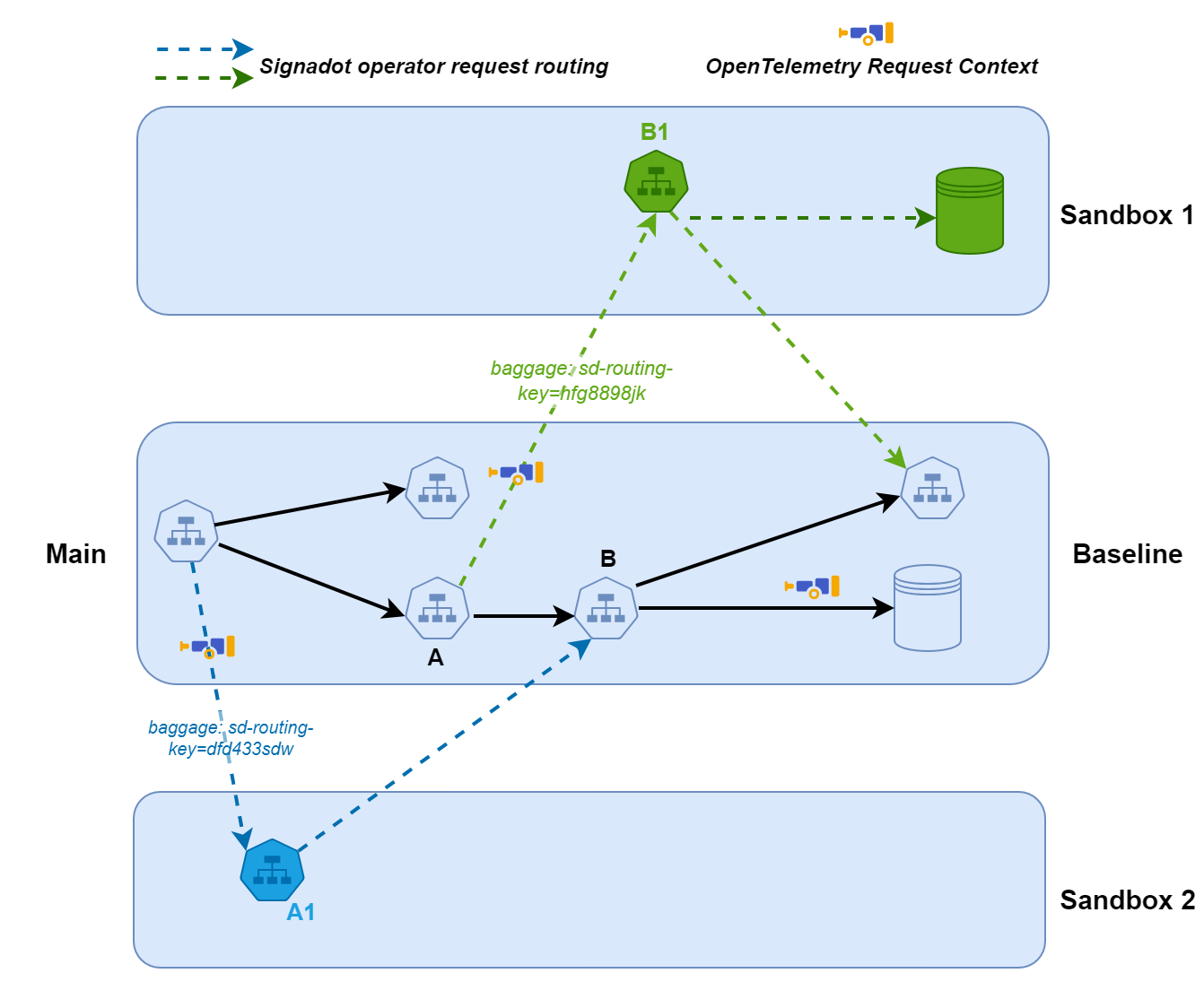
This lightweight approach provides several key benefits, some of which are outlined below:
Key Features and Benefits
Lightweight Sandboxes:
- Forking only necessary microservices: Signadot allows you to create sandboxes by forking only the specific microservices that need to be tested. This not only reduces resource usage but improves performance as well.
- Connection to shared baseline: Sandboxes connect to a shared baseline environment to provide access to common infrastructure and dependencies without duplicating them.
Improved Developer Experience:
- Rapid environment creation: As developers can spin up new environments in seconds, your development and testing cycles are accelerated.
- Simplified workflows: Reproducing bugs and testing in isolation is simplified with Signadot. Using its browser extension, developers can set headers and reuse existing URLs to streamline testing and reduce overhead.
Cost-Efficiency and Scalability:
- Reduced resource consumption: Signadot utilizes a shared baseline environment that minimizes the resources required for each preview. By forking only the necessary microservices, it avoids the overhead of creating and maintaining multiple full-stack environments.
- Supports large teams and complex architectures: The platform efficiently manages multiple concurrent previews without performance degradation and can handle the demands of large development teams and complex microservices architectures.
Early Issue Detection:
- Thorough code testing: Signadot enables developers to test code changes thoroughly in isolated environments before merging them into the main codebase.
- Decreased likelihood of production bugs: By identifying and addressing issues early in the development process, Signadot helps reduce the risk of production bugs.
Step-by-Step Guide to Setting Up Preview Environments with Signadot
Step 1 - Prerequisites and Setup
Pre-requisites
- A Kubernetes cluster provisioned through minikube, K3, MicroK8s, etc. For this example, it will be a local minikube cluster.
- Kubectl needs to be installed.
- Helm should be installed too.
Setup
- Create an account on signadot.com. You should have access to your Signadot dashboard from where you can create API keys, create cluster, manage sandboxes, and many more.
- Create a cluster through the Signadot dashboard and create a cluster token. The Signadot cluster (from the dashboard) is a logical representation in the Signadot platform that allows it to connect and manage your local cluster (Minikube) using the cluster token.
- Install Signadot cluster operator. This Kubernetes operator will be installed on your local Minikube cluster. It will enable management and coordination between your Minikube cluster and the Signadot platform. Upon successful installation of the operator, you will see the below message on your terminal.
On the Signadot dashboard, you will see the status of your Signadot cluster as ready, see the below screenshot for reference:
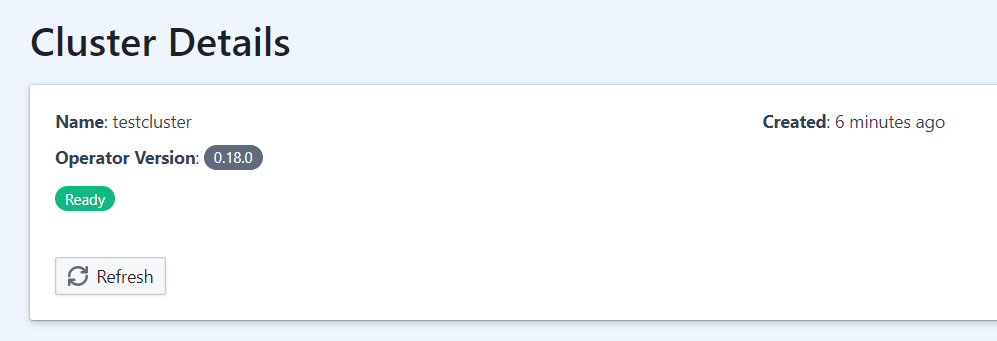
This shows that the Signadot Operator on your local cluster has successfully authenticated with the Signadot platform using the cluster token.
Step 2: Deploying the Baseline Environment
Deploy a baseline environment in your cluster. For this article, we will use the Hotrod application https://github.com/signadot/hotrod as the baseline. See below commands to install the application.
The above commands deploy the Hotrod demo application into the Hotrod namespace in your local Minikube cluster. After running the above commands, you will see the output below:
Signadot spins up isolated sandboxes on the Kubernetes cluster you already run, so every change is validated against real services before it merges. The free tier is open to every developer.
Step 3: Installing and Configuring Signadot CLI
-
Install and configure the Signadot CLI. It will be used to establish a connection with the local cluster so that you can access the Hotrod frontend application from your local machine. The Signadot CLI config is located at $HOME/.signadot/config.yaml. Make sure to configure it with the appropriate values. Below is a sample config file for the ongoing example:
-
Let’s use the Signadot CLI to connect to your local cluster, as well as start testing local changes using Sandboxes. See the below command “signadot local connect” and its result.
The above command provided direct access to services running on the local Minikube cluster by configuring /etc/hosts and routing traffic. As a result, you can access the services (API, front end, etc.) accessible via localhost on your machine. In the next step, we will test the front end of the Hotrod application.
- You should be able to access the front end using the URL http://frontend.hotrod.svc:8080. If you can see the Hotrod application, then everything worked fine so far and we are one step away from creating our first sandbox (preview environment).
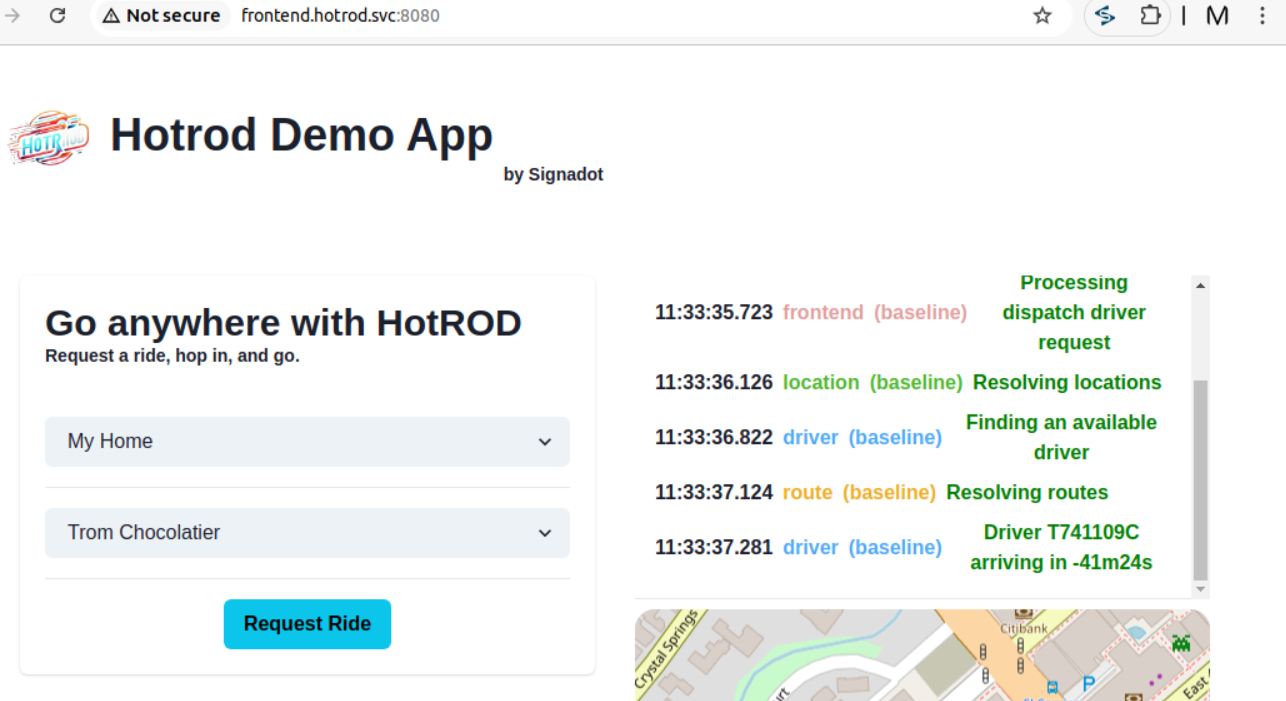
Notice the ETA value coming as negative, which is a bug intentionally introduced in this baseline environment. We will discuss this in next section where we will create a sandbox to test its fix.
Step 4: Creating and Testing a Signadot Sandbox
The Hotrod application consists of 4 services: frontend, location, driver, and route. We already noticed a bug in the “route” service that we want to fix and test through sandbox. We will deploy the docker image of that fix in a docker registry (in this case, Dockerhub) and reference this image in the sandbox configuration file. We can either create the sandbox through the Signadot dashboard or CLI. In both cases, the sandbox configuration file will be the key. Here are the details of the configuration file.
Example Configuration for Forking a Deployment
We will continue with the example of Hotrod application and create a sandbox negative-eta-fix as an example. In the baseline environment, when you book a ride, the ETA shows negative, which is a bug. We have tagged its fix as signadot/hotrod:quickstart-v3-fix. Below is the sandbox configuration for negative-eta-fix sandbox_._
You can just place this configuration in the Signadot dashboard when creating a sandbox and apply it. The sandbox containing the fix will be deployed immediately. See the below screenshot for reference.
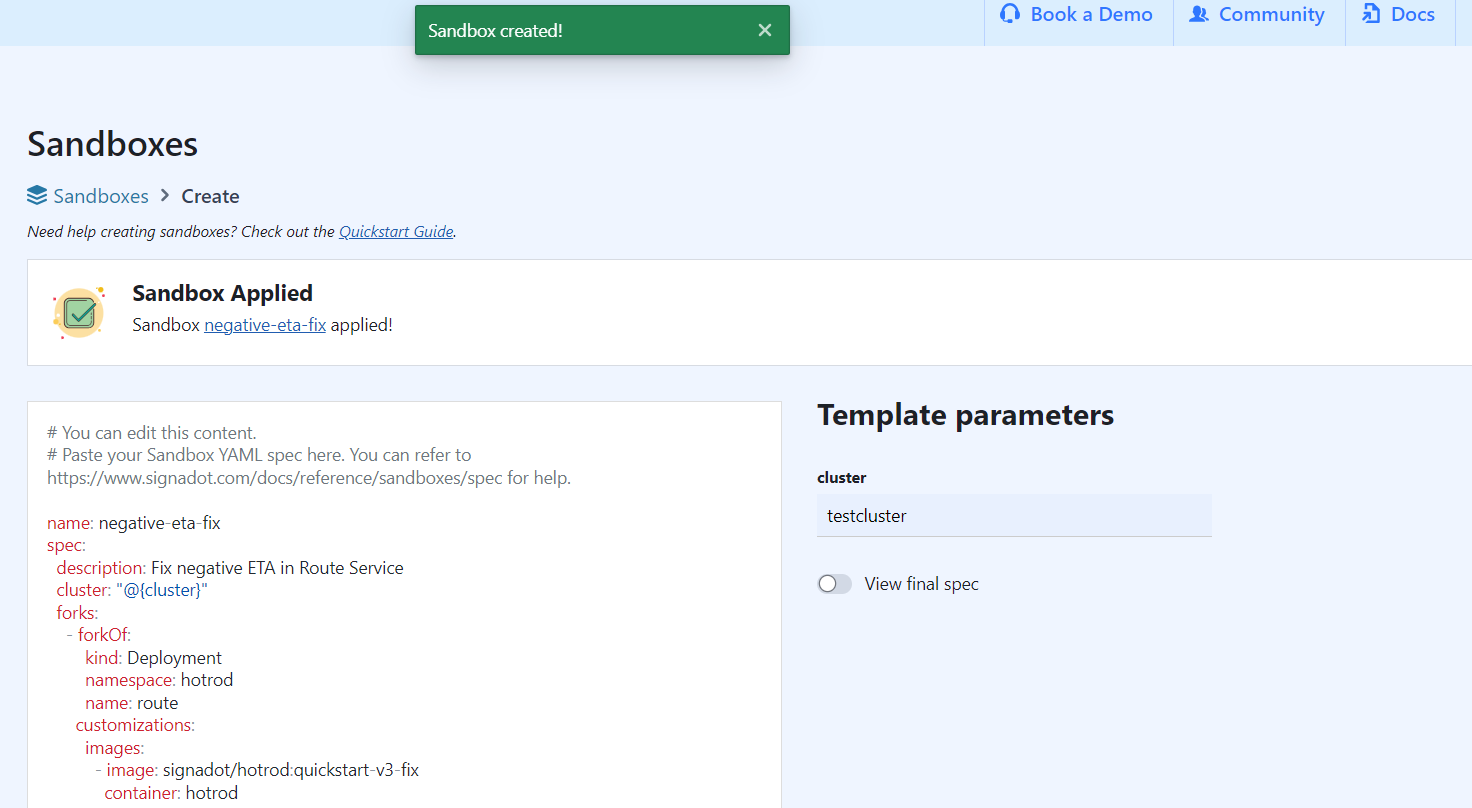
You can achieve the same through CLI. Just run the below command providing the path to the sandbox configuration file and specifying the Signadot cluster name.
The terminal will display the status of sandbox creation as below:
You will see the status of the sandbox as “Ready” in the Signadot dashboard as well. At this stage, we have two versions of the “route” service. The buggy one in the baseline environment, and the fixed one in the sandbox. So how to divert traffic to the sandbox one? The answer lies in the last step which is about routing the request.
Step 5: Routing to the Sandbox
The Signadot operator is responsible for routing the request to the sandbox instead of the baseline version of “route” service but it needs the routing key for this purpose. To implement this, pass the header baggage: sd-routing-key=
You will see a list of all the sandboxes that are created. We will select the negative-eta-fix sandbox here.
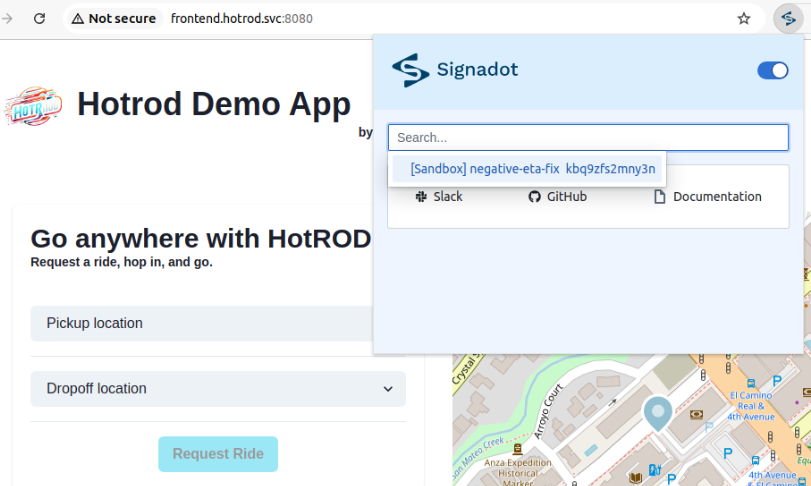
Now that the routing is set, we will reload the Hotrod application on same URL and we can see the ETA is now positive.
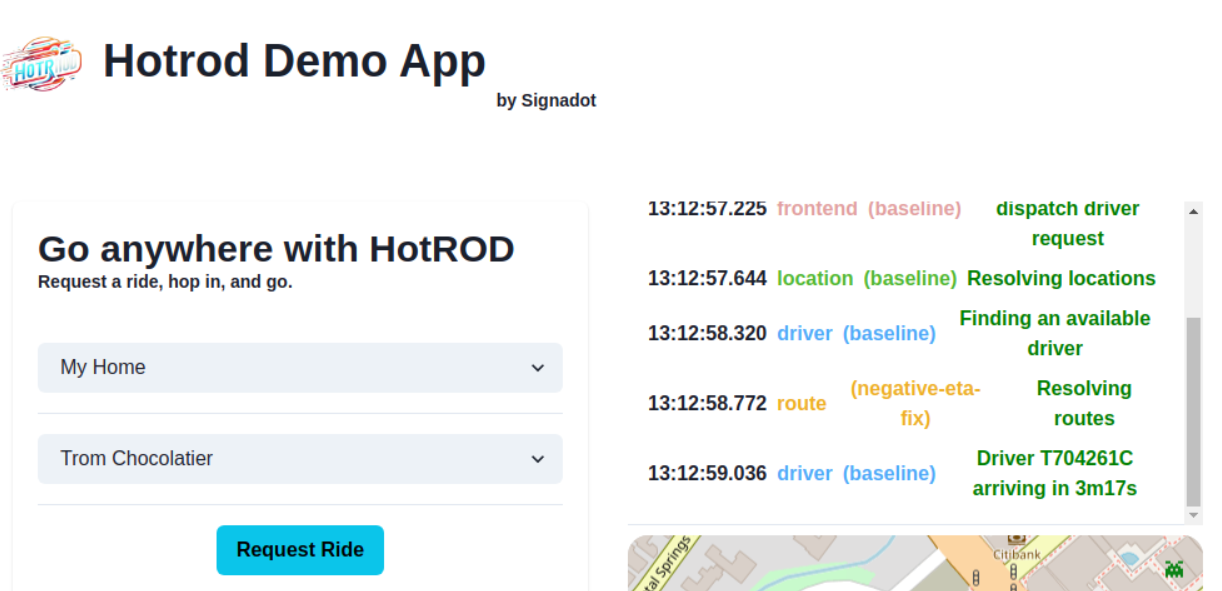
After completion of sandbox testing, you can either delete it from Signadot dashboard or through the below command:
Conclusion
With Signadot, creating efficient and scalable preview environments in Kubernetes has never been easier. Its ability to isolate specific microservices in lightweight sandboxes reduces resource usage, increases productivity, and improves code quality. By incorporating Signadot into your development workflow, you can accelerate testing and release cycles while minimizing costs at the same time. Why not try Signadot and transform the way your team builds and tests microservices? Explore how companies like Brex and DoorDash have scaled their testing and improved productivity with Signadot.